
 By Asep Darmawan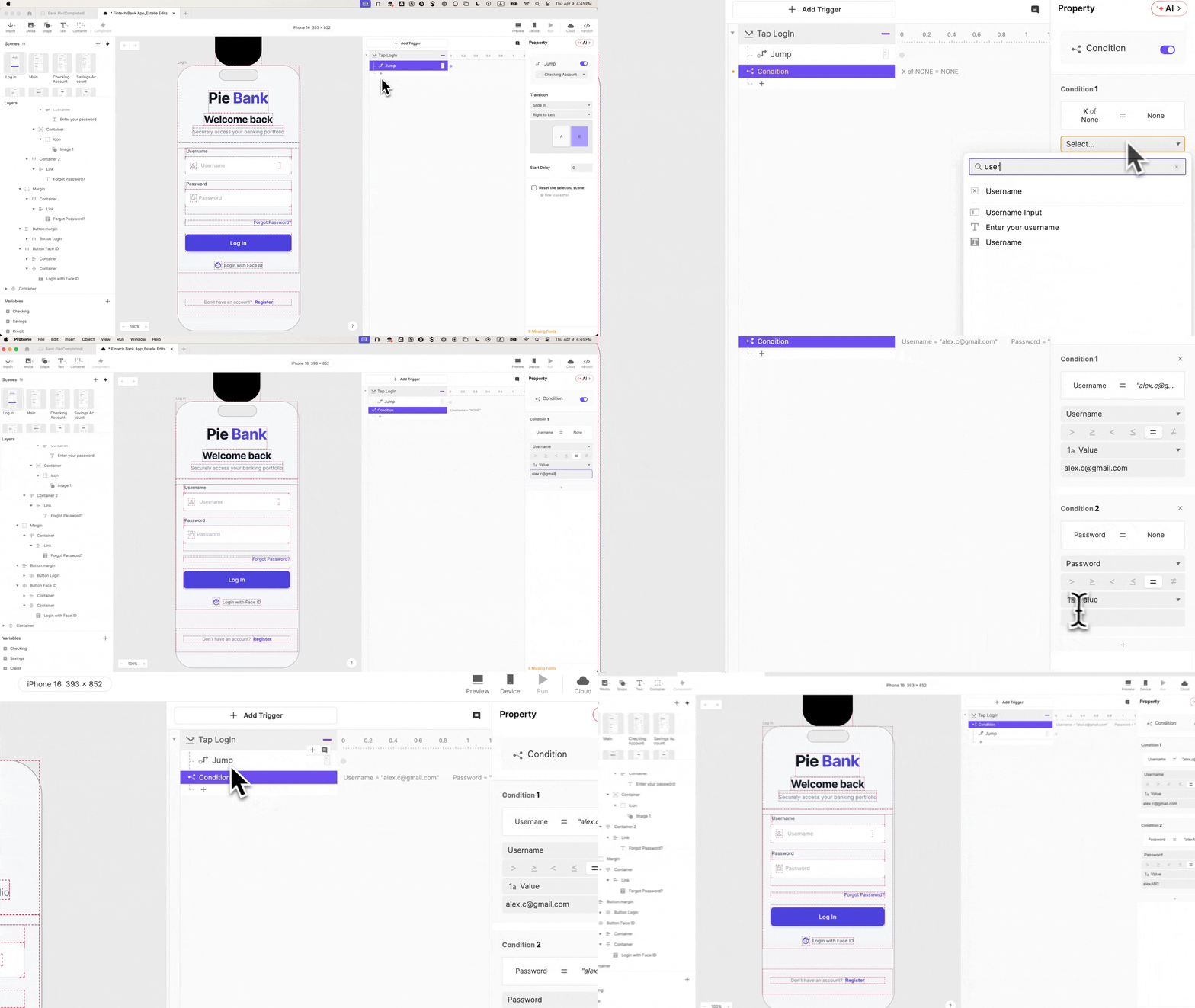
Main Facts: The Crisis of Trust in Digital Banking Prototypes
In the high-stakes world of Financial Technology (FinTech), the distance between a "mockup" and a "product" is measured in user trust. For years, UX researchers have observed a recurring phenomenon in usability labs: the "Prototype Pause." This occurs when a research participant reaches a login screen, attempts to interact with it, and realizes the interface is a hollow shell. In that moment, the psychological contract of the test is broken. The participant stops behaving like a customer and starts behaving like an actor in a play.
Recent industry analysis suggests that low-fidelity prototypes in the banking sector often lead to skewed data. When users encounter a banking app that doesn’t validate their credentials or allows them to "log in" with an empty field, they subconsciously lower their security expectations. For a sector built on the pillars of security and precision, this "Financial Uncanny Valley" is more than a nuisance—it is a threat to the validity of product development.
To combat this, design teams are increasingly turning to advanced prototyping tools like ProtoPie. By moving beyond static transitions and into the realm of conditional logic and variable-based interactions, designers can create "Pie Bank"—a conceptual mobile banking prototype that behaves exactly like a shipped product. This shift from "demonstration" to "simulation" is redefining how the industry approaches user research, engineering handoff, and stakeholder buy-in.
Chronology: A Step-by-Step Guide to Building Functional Authenticity
Creating a prototype that survives the scrutiny of a cynical user requires a methodical approach. The following chronology outlines the process of transforming a static Figma design into a logic-driven login experience.
Phase 1: Structural Integrity and Environment Setup
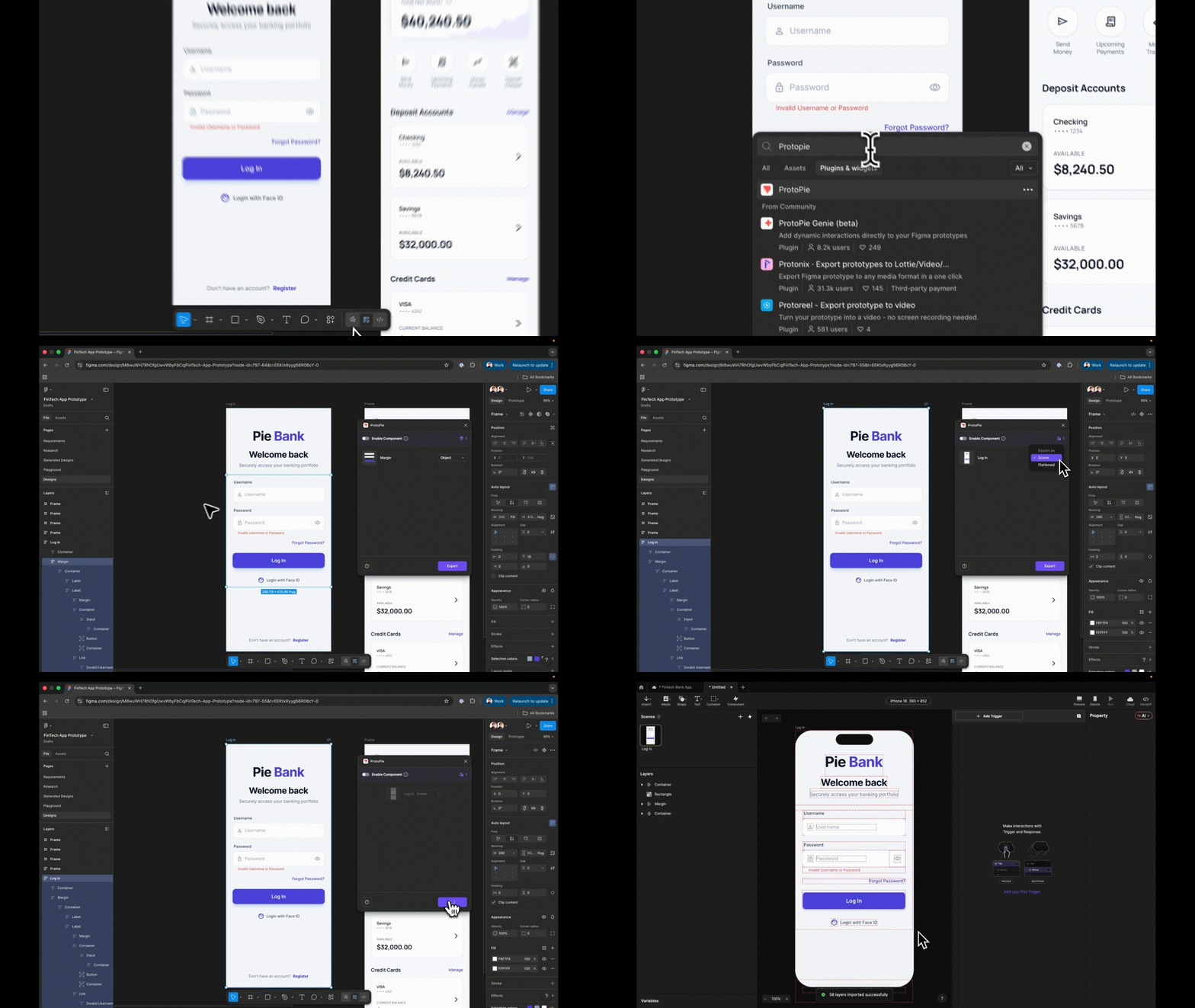
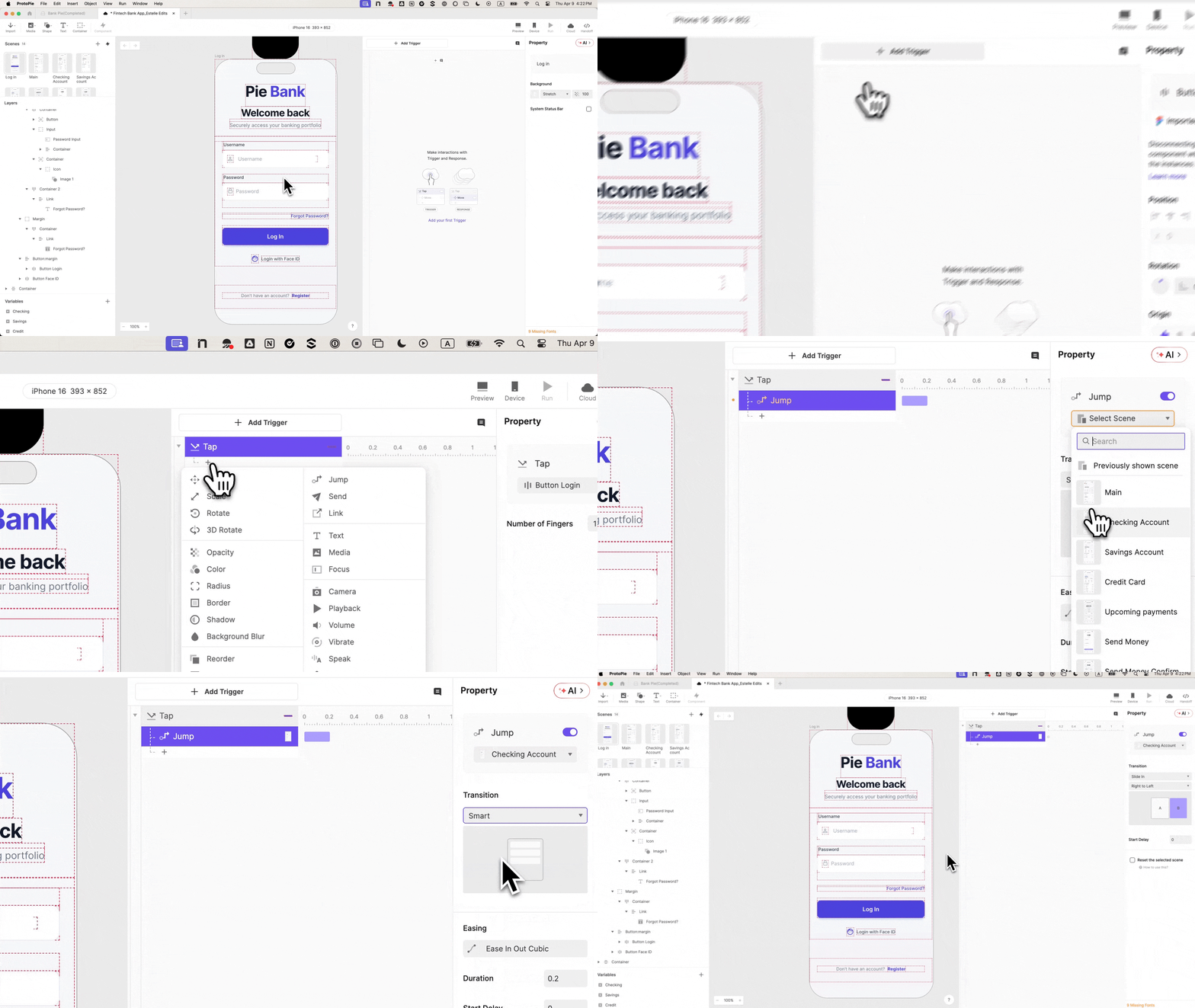
The process begins with the bridge between design and interaction. Using the ProtoPie plugin within Figma, designers must export their frames as Scenes rather than flattened images.
- Step 1: The Import. Choosing "Scene" preserves the layer hierarchy. This is a critical first step because every element—the "Log In" button, the background container, and the individual text fields—must remain a separate, targetable layer.
- Step 2: Semantic Naming. Professionalism in prototyping starts in the layers panel. Renaming "Rectangle 14" to "Input Username" is not merely organizational; it is functional. In ProtoPie, these names are referenced in formulas. Vague naming conventions lead to exponential time loss during the logic-building phase.
Phase 2: From Static Graphics to Interactive Inputs
Once the structure is in place, the designer must replace "fake" text placeholders with functional components.
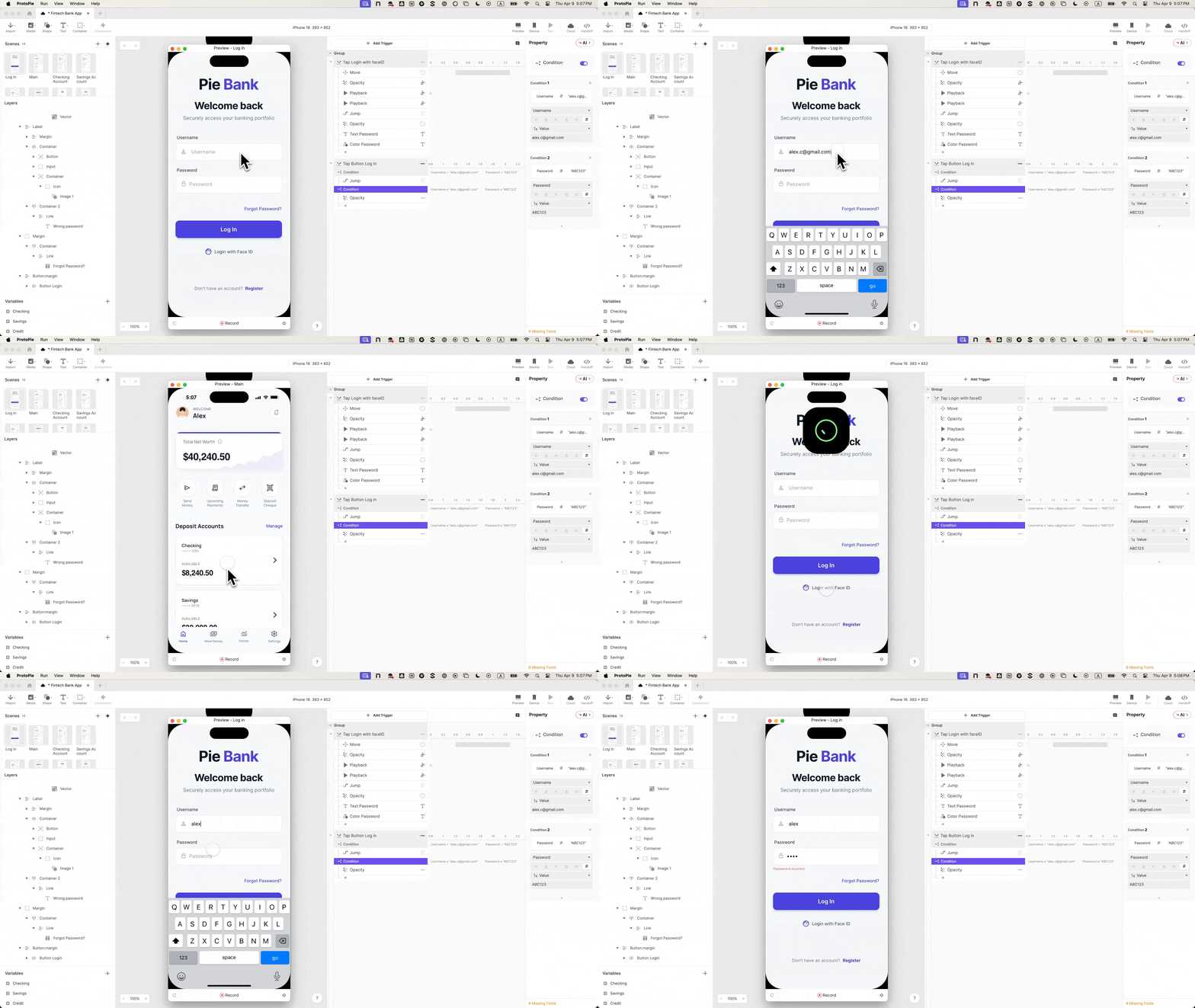
- Step 3: Native Input Layers. ProtoPie’s native Input layer allows participants to use their actual mobile keyboard. By dragging an Input layer onto the canvas and nesting it within the username field, the prototype begins to "feel" real.
- Step 4: Secure Field Masking. Security is a visual language. By setting the input type of the password field to "Text Password," the prototype automatically handles character masking (the dots that hide a password). This single property change removes the need for complex custom logic while reinforcing the user’s sense of security.
Phase 3: The Logic Engine
This is where the prototype gains a "brain." Without variables, a prototype has no memory; it cannot distinguish between a correct or incorrect entry.
- Step 5: Scene Preparation. Before wiring the navigation, a destination "Dashboard" scene must be created. This prevents "broken link" errors during the logic phase.
- Step 6: Variable Binding. By creating Text variables (e.g.,
usernameandpassword), the designer instructs the prototype to remember what the user types. Using the formulainput("Input Username").text, the prototype stores the keystrokes in real-time. - Step 7: Conditional Gates. The "Jump" response to the dashboard is no longer a simple tap. It is placed behind a Condition. The prototype is programmed to only proceed if the
usernameequals a specific value (e.g., "[email protected]") AND thepasswordmeets the criteria.
Phase 4: Error Handling and Biometrics
In the real world, things go wrong. A prototype that only shows the "happy path" is fundamentally dishonest.
- Step 8: The Error State. By building an "Error Text" layer with an initial opacity of 0, designers can create a second condition. If the credentials do not match, the prototype triggers a "Change Property" response, making the error message visible. This tests whether users understand why they failed to log in.
- Step 9: Biometric Simulation. To reach the highest level of fidelity, designers integrate Lottie animations for Face ID. By triggering a Lottie file that mimics the iOS Face ID "spinning" and "check" animation, the prototype crosses the threshold into indistinguishable realism.
- Step 10: Native Timing. The final touch involves staggering response delays. A 0.5s delay for the animation and a 1s delay for the scene jump ensures the transition feels "native" rather than "instant."
Supporting Data: The Impact of High Fidelity on Research Outcomes
Why invest hours into a login screen when the core feature being tested might be a new savings tool? The data suggests that the login is the "Trust Anchor" of the entire session.
- Reduced Cognitive Noise: When a prototype behaves predictably, users focus on the tasks at hand rather than the limitations of the tool. Research indicates that "meta-talk" (participants commenting on the prototype itself) drops by up to 60% when using high-fidelity simulations.
- Accuracy of Error Recovery: In low-fidelity tests, users often skip errors because they assume the prototype is broken. With functional validation, researchers can collect empirical data on how long it takes a user to recover from a mistyped password—a key metric for accessibility and UX friction.
- Stakeholder Confidence: A study of internal design reviews showed that stakeholders are 40% more likely to approve a project when the prototype demonstrates "functional logic" rather than just "visual flow." It moves the conversation from "How would this work?" to "This works."
Official Responses: Perspectives from the Design and Engineering Frontlines
The shift toward high-fidelity prototyping has drawn responses from various sectors of the product development lifecycle.
The Design Perspective:
"We are seeing a move away from ‘click-through’ decks," says a lead UX designer at a major European neo-bank. "With tools like ProtoPie, we aren’t just designing screens; we are designing behaviors. If the login doesn’t feel secure, the user won’t trust the balance we show them on the next screen. High fidelity is no longer a luxury; it’s a requirement for honest feedback."
The Engineering Perspective:
Developers have long complained about the ambiguity of design handoffs. "A static Figma file doesn’t tell me how the error state should fade in or how the Face ID timing should work," explains a Senior iOS Engineer. "When we receive a ProtoPie file, the interaction panel serves as a living documentation. We can see the variables, the delays, and the conditional logic. It cuts down on back-and-forth meetings by nearly 30%."

The Researcher’s Take:
"The goal of a usability session is to simulate reality," says a FinTech Research Consultant. "When we use a ‘fake’ login, we are essentially asking the user to pretend. But you can’t gather reliable data from a person who is pretending. Functional prototypes allow us to see real frustration, real relief, and real behavior."
Implications: The Future of Prototyping in a Post-No-Code World
The evolution of the "Pie Bank" login flow is a microcosm of a larger trend in the tech industry: the democratization of complex logic. We are entering an era where the boundary between "designer" and "developer" is increasingly blurred.
1. The Death of the "Click-Dummy"
The traditional "click-dummy"—a series of static images linked by hotspots—is becoming obsolete in the FinTech space. As users become more tech-savvy, their tolerance for "fake" interactions decreases. Future prototypes will likely be expected to connect to live APIs and real-world data sets to provide even deeper levels of immersion.
2. Reduced Time-to-Market
By identifying usability flaws in a high-fidelity prototype before a single line of production code is written, companies save millions in potential rework. The "build-test-learn" cycle is becoming tighter and more efficient.
3. Enhanced Accessibility Testing
High-fidelity prototypes allow for better testing with assistive technologies. Since ProtoPie can interact with native mobile features like voice commands and haptics, designers can test accessibility features long before the development phase begins.
4. Bridging the Intent-Execution Gap
Ultimately, the greatest implication of this technology is the alignment of intent. When a designer can build a login flow that validates credentials, handles errors, and simulates biometrics without writing code, they are providing a blueprint that is nearly impossible to misinterpret. This ensures that the final product delivered to the customer is exactly what was validated in the research lab.

In conclusion, the "Pie Bank" tutorial is more than a lesson in software; it is a manifesto for the future of user experience. In the world of finance, where every pixel represents a penny and every interaction represents trust, the ability to "do it right" in the prototype phase is the ultimate competitive advantage.
 Nana Wu
  Nana
Nana 