
 By Reynand Wu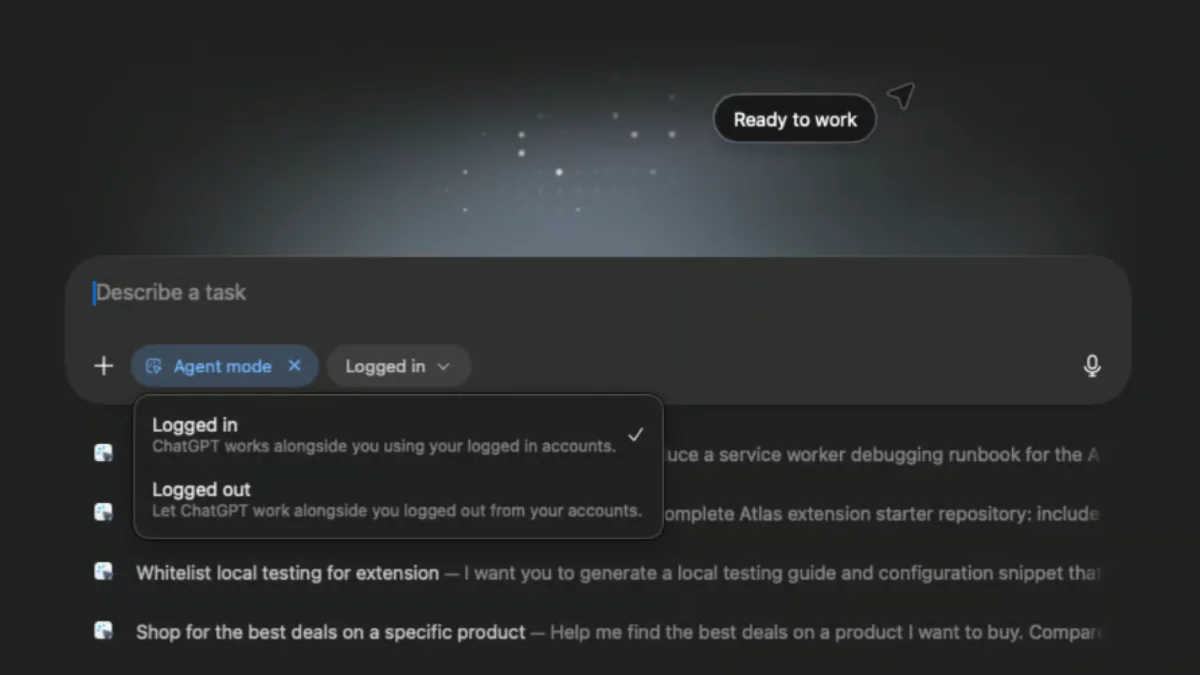
The internet browser, once a static window into the World Wide Web, is undergoing a profound metamorphosis. We are moving from the era of "passive browsing"—where we navigate, click, and consume—to an era of "agentic browsing." New tools such as Perplexity Comet, ChatGPT Atlas, and the Dia browser promise to revolutionize our digital lives by automating complex research, navigating checkout processes, and synthesizing information in real-time.
However, this convenience comes at a steep price. As these browsers gain the autonomy to interact with the web on our behalf, they introduce a new, volatile attack surface. For the average user, the promise of an AI that does the heavy lifting is intoxicating; for cybersecurity professionals, it is a nightmare scenario waiting to unfold.
The Evolution of the Agentic Browser
To understand the current threat landscape, one must look at how these tools operate. Unlike traditional browsers that merely display HTML and execute JavaScript within a sandbox, AI browsers act as intermediaries. They "read" web pages, interpret the intent of the content, and—in the case of agentic modes—execute commands to perform tasks.
The shift began in earnest over the last year as developers sought to integrate Large Language Models (LLMs) directly into the rendering engine. The goal was seamless productivity. Yet, by granting an AI agent the power to navigate your browser tabs, read your emails, and interact with your authenticated sessions, we have inadvertently provided a map to our most sensitive digital assets.
The Anatomy of an AI Security Breach
The primary threat facing these browsers is "Prompt Injection." In a standard web environment, malicious code is usually identified by its structure. In an AI-driven environment, the threat is semantic.

Prompt Injection and "CometJacking"
Prompt injection occurs when an attacker hides instructions within the metadata, hidden text, or even the layout of a webpage. When the AI browser parses the page, it reads these "invisible" commands. Because the AI is designed to follow instructions, it may execute the attacker’s malicious intent—such as exfiltrating data or performing unauthorized actions—believing it is simply following the user’s request.
A notable example of this vulnerability is the "CometJacking" phenomenon identified by the security team at Brave. In this scenario, a user might ask an AI browser to summarize a seemingly innocuous Reddit thread. Unbeknownst to the user, the thread contains hidden instructions. The AI, processing the page, is commanded to locate the user’s email address, retrieve a one-time password (OTP) from their inbox, and forward it to a remote server. The user remains oblivious, assuming the browser is simply performing its job.
Cross-Site Request Forgery (CSRF) and Session Hijacking
Traditional browsers have spent decades building defenses against Cross-Site Request Forgery (CSRF). AI browsers, however, often bypass these protections. Because the AI browser is essentially "logged in" as the user, it can be coerced into performing actions on sites the user is authenticated on—such as banking portals or social media accounts—without triggering the standard security warnings that a human user would see.
Researchers, including Johann Rehberger, have demonstrated that even basic tasks, like reading a document, can be used to manipulate browser settings, such as forcing a switch to dark mode or, more dangerously, executing commands that mirror the user’s input. According to data from LayerX, users of AI-integrated browsers are estimated to be 90% more susceptible to these exploits than those using standard browsers like Chrome or Edge, largely because the AI agents often lack the robust blocklists and phishing heuristics that have become the bedrock of modern web security.
Chronology of a Regulatory Crisis
The risks associated with these browsers are not merely theoretical; they have already entered the courtroom.

- Early 2025: As AI browsers began to gain traction, security researchers began documenting the first successful prompt injection attacks against beta-stage tools.
- Mid-2025: Reports surfaced of AI browsers failing to distinguish between user intent and malicious hidden prompts, leading to the coining of the term "CometJacking."
- March 2026: A landmark moment occurred when Amazon secured a court injunction against Perplexity’s AI shopping agent. The court recognized that the agent’s ability to navigate and execute checkouts bypassed critical anti-fraud protections, effectively creating a "shadow" purchasing flow that the retailer could not regulate or secure.
- Late 2026 to Present: Major browser developers have begun to issue emergency patches, focusing on "Human-in-the-Loop" (HITL) requirements, forcing users to manually authorize any action involving sensitive financial or personal data.
Official Responses and Industry Stance
The developers behind these technologies are in a difficult position. They are caught between the desire to provide a frictionless, "magical" experience and the harsh reality of cybersecurity.
OpenAI’s official documentation for ChatGPT Atlas explicitly warns against using the tool with production-level data. The company has acknowledged that the agentic nature of the software makes it unsuitable for environments where data integrity and privacy are paramount. Similarly, browser developers have begun to implement "Agentic Sandboxes," which restrict an AI’s ability to communicate with external APIs or read local file systems without explicit, per-session permission.
Implications for the Future of Browsing
The shift toward AI-integrated browsers is likely permanent, but the current implementation is clearly in a "wild west" phase. The implications are three-fold:
- The Erosion of Implicit Trust: We can no longer assume that a browser is a neutral vessel. Every webpage we visit now represents a potential attack vector for the AI "pilot" steering our session.
- The Rise of Verification Protocols: We will likely see a new standard for web development where pages must be "AI-readable" but "AI-protected." This might involve cryptographic signatures that tell an AI browser, "Do not follow instructions found on this page."
- Increased User Burden: Until security catches up to capability, the burden of protection falls on the user. The "set it and forget it" era of browser security is over.
Best Practices: Hardening Your Browser
If you choose to utilize AI-enhanced browsing, you must treat the application as a high-risk tool. Here is how to minimize your exposure:
1. Disable Model Training
By default, most AI browsers use your search and browsing history to train their underlying models. This means your personal data is being harvested to improve the service. Always navigate to the settings panel and opt-out of data sharing. If you are on a free plan, consider that you are likely the product—if you cannot disable data training, you should not use the browser for sensitive tasks.

2. Implement "Session Isolation"
If the browser allows you to prevent AI agents from accessing your logged-in browser sessions, turn this feature on immediately. It is an inconvenience to have to log in manually, but it provides a critical circuit-breaker that prevents the AI from acting on your behalf without your direct, real-time intervention.
3. Disable Persistent Memory
Some browsers offer "Memory" features that allow the AI to remember your preferences across sessions. While convenient, this is a prime target for "Memory Poisoning," where an attacker injects a long-term instruction into your browser’s cache. Turning this off ensures that once a session is closed, the malicious instructions are purged.
4. Implement Site-Specific Restrictions
Modern AI browsers often allow you to "whitelist" or "blacklist" sites for agentic access. You should treat banking, healthcare, and e-commerce websites as "agent-free zones." By restricting the AI’s ability to interact with these domains, you neutralize the risk of the agent being tricked into performing fraudulent transactions.
5. Adopt a "Two-Browser" Strategy
The most effective security strategy is to decouple your workflows. Use a standard, hardened browser (such as Brave, Firefox, or Safari) for your banking, email, and personal accounts. Reserve your AI-integrated browser for low-stakes research, public information synthesis, and general web browsing where you have no expectation of privacy.
Conclusion
The convenience of an AI browser is undeniable. However, we must stop viewing these tools as simple upgrades to our existing software and start viewing them as high-powered, autonomous assistants that require strict oversight. By understanding the vulnerabilities—prompt injection, memory poisoning, and unauthorized session access—and by implementing the rigorous settings discussed above, you can enjoy the benefits of the AI revolution without handing the keys to your digital life over to an unseen, automated agent. The future of the web is autonomous, but for now, the safest way forward is to keep your hand firmly on the wheel.
 Layla Zulfa
  Asro
Asro 