
 By Asep Darmawan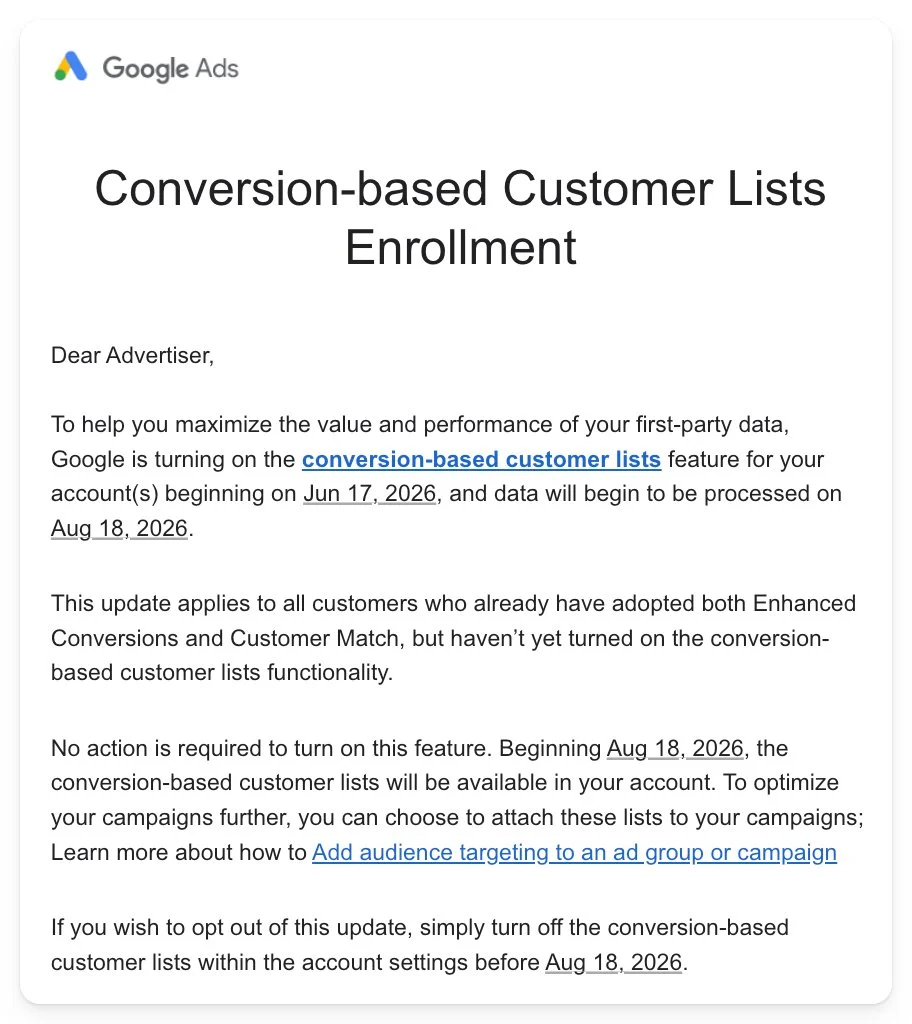
Google is taking another significant step toward automation and first-party data integration. Starting August 18, Google Ads will begin automatically enabling conversion-based customer lists for eligible advertisers. This update is designed to streamline how businesses leverage first-party data collected through conversions to build highly targeted audience segments.
The automatic activation will apply to a specific cohort of advertisers: those who are currently utilizing both Enhanced Conversions and Customer Match but have not yet manually turned on conversion-based customer lists. For these accounts, Google will begin processing data on August 18 to generate these lists automatically, unless the advertiser actively opts out before the deadline.
This shift underscores Google’s ongoing commitment to privacy-centric, first-party data solutions as the digital advertising industry prepares for a landscape without traditional third-party cookies. Below is an in-depth analysis of the update, its technical mechanics, the timeline for deployment, and the strategic implications for digital marketers.
Chronology of the Update
The rollout of this automatic enablement follows a distinct timeline that requires immediate attention from search engine marketing (SEM) professionals and pay-per-click (PPC) advertisers:
- Initial Discovery: The upcoming change was first spotted in late copy communications sent to advertisers. Menachem Ani, founder of JXT Group, highlighted the notification on the social media platform X (formerly Twitter), alerting the broader search marketing community to the impending update.
- Opt-Out Window: Advertisers who do not wish to have conversion-based customer lists automatically generated must navigate to their Google Ads account settings and disable the feature prior to the implementation date.
- August 18 (Data Processing Begins): Google will officially begin processing conversion data to construct these automated lists for all eligible, opted-in accounts.
- Post-August 18 (Deployment & Application): Once the data processing begins, the automatically generated lists will start appearing in the Audience Manager section of affected Google Ads accounts. Advertisers can then manually apply these lists to their campaigns and ad groups for targeting, observation, or exclusion.
Supporting Data: Understanding the Technical Mechanics
To understand the impact of this update, it is essential to analyze the two foundational features that make an advertiser eligible for this automation: Enhanced Conversions and Customer Match.
[User Conversion on Website]
       │
       ▼ (Hashed First-Party Data: Email/Phone via Enhanced Conversions)
[Google Ads Conversion Tracking]
       │
       ▼ (Automated Processing - Starting Aug 18)
[Conversion-Based Customer Lists] ──► [Applied to Campaigns/Ad Groups]
1. Enhanced Conversions
Enhanced Conversions is a feature designed to improve the accuracy of conversion measurement. It works by capturing first-party customer data (such as email addresses, names, home addresses, or phone numbers) provided by users on a website during a conversion event. This data is securely hashed using the industry-standard SHA256 algorithm before being transmitted to Google. Google then matches this hashed data against its logged-in user database to attribute conversions to specific ad interactions more effectively.
2. Customer Match
Customer Match allows advertisers to upload their offline and online customer relationship management (CRM) data (like email lists) to Google Ads. Google uses this data to target ads to those specific customers, find similar audiences (via optimized targeting and smart bidding signals), or exclude existing customers from acquisition campaigns.
The Synergy: Conversion-Based Customer Lists
Manually managing Customer Match lists can be resource-intensive, often requiring regular CSV uploads or complex API integrations with CRM platforms like Salesforce or HubSpot.
Conversion-based customer lists bridge the gap between Enhanced Conversions and Customer Match. Instead of requiring manual data uploads, this feature automatically captures the securely hashed first-party data collected via Enhanced Conversions and pipes it directly into dynamic Customer Match lists.
By automating this pipeline, Google ensures that an advertiser’s first-party audience lists are continuously updated in real-time as new conversions occur on their website.
Official Responses and Industry Reaction
The automated opt-in approach has sparked a familiar debate within the digital marketing community regarding the balance between platform automation and advertiser control.

Google’s Positioning
According to Google’s documentation and communications, the automatic enablement of this feature is intended to help advertisers maximize the value of the data they are already collecting. Google positions this as a low-friction update that requires zero development work from the advertiser’s side.
Because eligible advertisers are already using both Enhanced Conversions (which collects the data) and Customer Match (which uses the data), Google views this automation as a logical step to help advertisers improve their smart bidding signals and audience targeting efficiency without additional administrative overhead.
Industry Perspectives
The initial reaction from the PPC community, led by professionals like Menachem Ani, emphasizes the importance of maintaining strict oversight over automated account changes.
While many practitioners agree that conversion-based customer lists are highly beneficial for campaign performance, some express concern over Google’s increasing reliance on "auto-applied" settings. Critics argue that automatic updates can sometimes conflict with strict internal data governance policies, client-agency agreements, or localized privacy regulations if not audited carefully by account managers.
Strategic Implications for Advertisers
The transition to automated conversion-based customer lists has several wide-ranging implications across compliance, campaign performance, and account management strategy.
1. Privacy and Legal Compliance (GDPR, CCPA, and Consent Mode)
The most critical implication of this update lies in the realm of user privacy and data consent. Because conversion-based customer lists automatically convert conversion data into targetable audience segments, advertisers must ensure their privacy policies and consent frameworks are fully aligned.
- User Consent: Under regulations like the General Data Protection Regulation (GDPR) in Europe and the California Consumer Privacy Act (CCPA/CPRA) in the United States, advertisers must obtain explicit consent from users before using their data for personalized advertising.
- Consent Mode: Advertisers utilizing Google Consent Mode must verify that their setup correctly communicates user consent choices to Google Ads. If a user consents to conversion tracking but declines personalized advertising consent, their data must not be utilized to populate these automated customer lists.
- First-Party Data Policies: Advertisers should review their website’s privacy policies to ensure they clearly state that hashed first-party data may be used for ad personalization and platform-based audience matching.
2. Enhancing Smart Bidding and Performance Max
From a performance standpoint, conversion-based customer lists provide highly valuable signals to Google’s machine learning algorithms.
- Smart Bidding Optimization: Algorithms such as Target CPA (Cost Per Acquisition) and Target ROAS (Return on Ad Spend) rely on rich data points to predict which search queries and users are most likely to convert. Automatically updated customer lists provide these algorithms with a clearer picture of who converted recently, allowing for more precise bidding adjustments.
- Performance Max and Search Campaigns: These lists can be added to Performance Max campaigns as audience signals, steering the campaign toward high-value demographics faster. Additionally, they can be applied to Search and Shopping campaigns to adjust bids for past converters or to exclude them entirely from acquisition-focused ad groups.
3. Reduced Administrative Friction
For mid-sized and smaller advertisers who lack the technical infrastructure to set up direct CRM-to-Google Ads API integrations, this automation levels the playing field. It removes the necessity of exporting CSV files weekly and manually uploading them to the Audience Manager, thereby reducing human error and ensuring that targeting lists do not become stale.
How to Audit and Manage the Update
Advertisers have complete control over whether they participate in this automated rollout. To prepare for the August 18 deadline, account managers should take the following steps:
How to Opt Out of the Automatic Enablement
If you determine that your account is not ready for conversion-based customer lists—either due to compliance concerns, specific data segregation requirements, or strategic preference—you can disable the feature:
- Log into your Google Ads account.
- Navigate to the Tools and Settings icon in the upper navigation menu.
- Under the Shared Library section, select Audience Manager.
- Click on the Settings tab on the left-hand menu.
- Locate the section for Conversion-based customer lists.
- Toggle the setting to Disabled or uncheck the automatic enablement box, then click Save.
How to Leverage the Lists Post-August 18
For advertisers who choose to remain opted in, monitoring and applying the newly generated lists after August 18 is straightforward:
- After the processing date, navigate to Audience Manager > Segments.
- Look for automatically generated lists, which are typically designated with a system-created naming convention indicating they are based on conversion data.
- Apply these segments to your active campaigns. You can apply them as Targeting (limiting your reach strictly to those on the list) or Observation (monitoring performance metrics without narrowing your targeting, allowing for custom bid adjustments).
- Use them as Exclusions in customer acquisition campaigns to ensure your budget is spent purely on reaching net-new prospects rather than existing customers who have already converted.
 Jia Lissa
  Nana Muazin
  Layla Zulfa