
 By Jia Lissa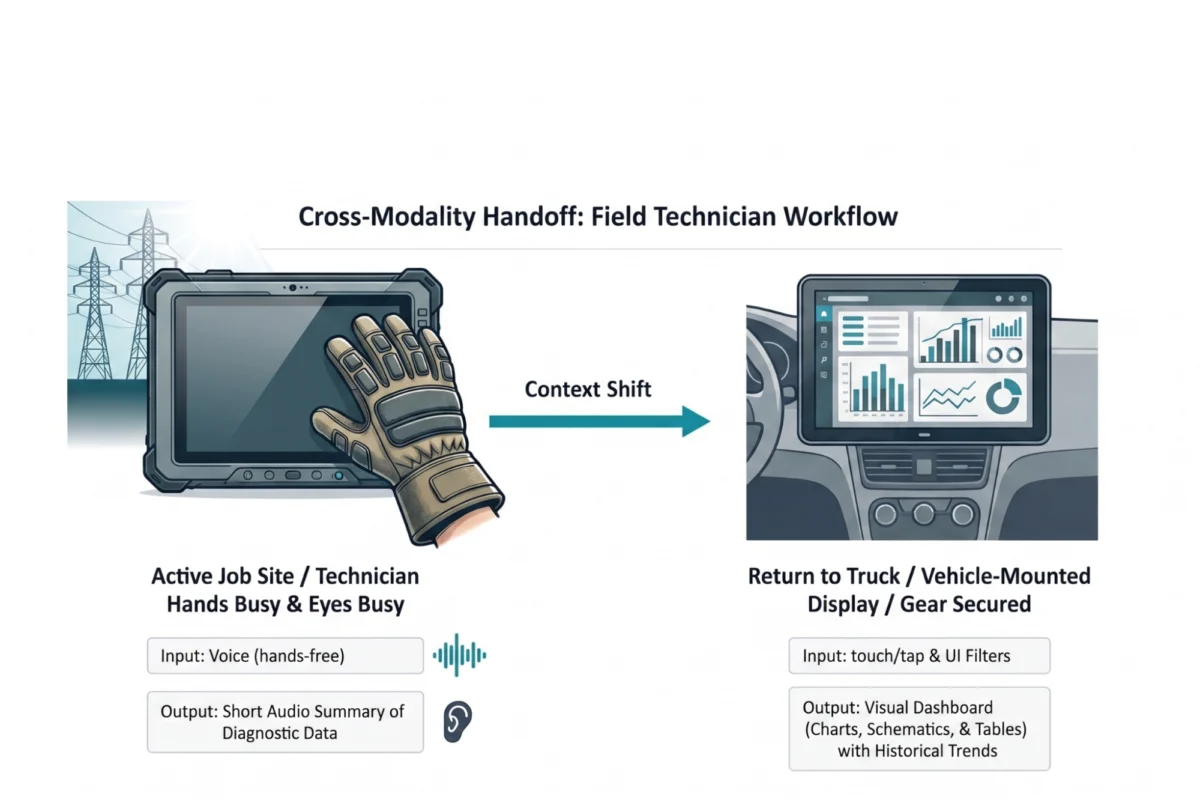
The tech industry has reached a critical juncture in the evolution of Artificial Intelligence. As Large Language Models (LLMs) have become the engine of modern software, a specific design orthodoxy has taken hold: the chat-based interface. From productivity suites to specialized enterprise tools, the "chat bubble" has become the default home for every AI capability. However, experts are increasingly warning of "conversational tunnel vision"—a design failure where the medium of the model (dialogue) dictates the user experience, often at the expense of efficiency, safety, and cognitive ease.
This comprehensive report examines the limitations of the chatbot hegemony and provides a rigorous framework for matching AI modalities to the true context, intent, and cognitive load of the human user.
1. Main Facts: The Crisis of the Default Interface
The current design landscape is dominated by a fundamental misunderstanding of AI integration. Because LLMs are trained on vast datasets of human dialogue, developers have collectively decided that conversation is the most "natural" way to interact with them. This has led to several critical failures in modern User Experience (UX):
- The Adaptation Load: Users are increasingly forced to pay a "psychological tax," altering their natural thought processes and physical behaviors to accommodate the limitations of a text box.
- The Linguistic Barrier: Forcing users to describe complex spatial or logical tasks in prose creates a "creative burden." Prompting is a creative act that many users find exhausting or counter-intuitive.
- The Serial Processing Trap: Text is a serial medium. The human brain must process it word-by-word. In high-stakes environments, this sequential reading creates a bottleneck compared to the parallel processing allowed by visual data (charts, dashboards, or indicators).
- Physical Incompatibility: Chat interfaces frequently fail "modality tests" in real-world scenarios—such as an airport traveler juggling luggage or a technician wearing heavy gloves—where manual typing is physically impossible or dangerous.
The solution lies in modality alignment: the intentional selection of how a person uses their senses (seeing, hearing, touching, speaking) to interact with a system, ensuring the interface adapts to the user rather than the other way around.
2. Chronology: From GUI to the "Blank Slate" Fallacy
To understand how we arrived at this "conversational tunnel vision," we must look at the trajectory of interface design over the last decade:
- The Graphical User Interface (GUI) Era (1990s–2010s): UX was defined by visual cues. Menus, buttons, and icons provided "recognition over recall," showing users exactly what was possible.
- The Rise of NLP and Early Bots (2011–2021): Siri, Alexa, and early customer service bots introduced the promise of hands-free interaction, though they were limited by rigid intent-mapping.
- The Generative AI Explosion (2022–Present): With the release of ChatGPT, the "blank slate" of the chat box became the industry standard. Because the AI could "understand" anything, designers stopped building specific controls, assuming the user would simply ask for what they needed.
- The Current Backlash (2024): Designers and researchers are now identifying a "choice paralysis" among users. Without buttons or sliders, users often don’t know where to start, leading to a decline in tool adoption for specialized professional tasks.
3. Supporting Data: The Framework for Multi-Modal AI
To move beyond the chatbot, product teams must utilize a structured approach to modality selection. This involves three primary tools: the Modality Taxonomy, the Task Audit, and the Input/Output Alignment Matrix.
A Taxonomy of Modalities
Interaction should be categorized by its cognitive and physical rationale.
Input Modalities:

- Button/Tap: Best for binary actions. It eliminates recall overhead and maximizes speed.
- Voice: Essential for "hands-busy" or "eyes-busy" contexts, though limited by social privacy.
- Natural Language Chat: Ideal for exploratory or ambiguous queries where the user is researching options.
- GUI (Sliders/Drag-and-Drop): Necessary for spatial tasks, such as scheduling or image editing, where description is harder than direct manipulation.
Output Modalities:
- Push Notifications: Best for time-sensitive, ambient awareness.
- Visual Dashboards: Essential for high-density, comparative analysis. Humans can spot a trend in a chart in under a second, whereas a text summary takes significantly longer to parse.
- Interactive Canvas: Best for generative tasks, allowing users to manipulate the AI’s output directly.
The Cognitive Spectrum
The "Cognitive Spectrum of Modality" illustrates how mental effort scales. Low-effort, "glanceable" interactions (like a green/red status light) sit at one end, while high-effort, multi-modal experiences (like reviewing a legal contract via chat) sit at the other. Designers must identify where a task sits on this spectrum to avoid over-burdening the user.
The Task Audit
A rigorous Task Audit is the bridge between user research and interface design. It focuses on four key areas:
- Physical Environment: Is it loud? Is the user moving? Are their hands free?
- Social Context: Is the user in a private office or a crowded terminal?
- Cognitive Load: How much focus can the user spare? Are they already performing a high-stakes task?
- Information Fidelity: Does the user need a quick "yes/no" or a deep-dive analysis?
4. Case Study: Adaptive Modality in the High-Voltage Grid
The dangers of conversational tunnel vision are most evident in high-risk professional environments. A recent field study involving technicians servicing high-voltage electrical grids highlights the necessity of adaptive design.

The Problem:
Technicians were originally provided with ruggedized tablets to access AI-driven diagnostic manuals. However, the "input modality" failed: technicians wearing thick, protective rubber gloves could not tap small buttons or type text prompts. Furthermore, the "output modality" failed: screen glare from direct sunlight made reading long paragraphs of diagnostic text nearly impossible, and looking down at a screen while near live wires created a lethal safety hazard.
The Research-Led Solution:
By conducting a Task Audit, the design team implemented a "multi-modal handoff":
- In the Field: The system shifted to a voice-in, audio-out modality. Technicians could ask questions aloud and receive short, spoken summaries of voltage risks. This kept their hands on their tools and their eyes on the wires.
- In the Vehicle: Once the technician returned to their truck, the system automatically handed off the data to a 15-inch visual dashboard. Here, the technician could use parallel processing to view historical trends and grid maps on a high-resolution screen, a task much better suited for visual analysis than audio summaries.
This adaptive approach resulted in a 20% reduction in diagnostic time and a significant increase in safety compliance.
5. Official Responses and Industry Implications
Leading UX researchers argue that the "do-it-all chatbot" is a myth that serves developers more than users. "The allure of the chatbot is that it is a blank slate," says one industry report. "But that blankness is a linguistic barrier. It forces the professional to become a writer when they should be a doctor, an engineer, or a pilot."

Implications for the Future of Product Development
- Accessibility as a Core Driver: Modality choices must multiply pathways to information. A visual dashboard is useless to a visually impaired user; an audio summary is useless in a loud factory. True AI UX must be multi-modal by default to be accessible.
- The Death of the "Prompt Engineer": As interfaces become more sophisticated, the need for users to learn "prompt engineering" will diminish. The interface will provide the necessary sliders, buttons, and contextual triggers to guide the LLM behind the scenes.
- Context-Aware Systems: The next generation of AI will not wait for a chat prompt. It will sense the user’s environment—recognizing that a user is driving or walking—and automatically switch from text to voice or ambient notifications.
6. Conclusion: A Call for Contextual Integrity
The future of AI interface design is not a single chat window, but a diverse ecosystem of visual, vocal, and haptic interactions calibrated to the human experience. While building a chatbot is the path of least resistance for development teams, building an interface that feels like a natural extension of the user’s workflow is the true hallmark of great design.
To avoid conversational tunnel vision, teams must:
- Leave the screen: Observe work where it happens—in the warehouse, the hospital, or the field.
- Audit the load: Measure the physical and cognitive cost of every interaction.
- Match the moment: Ensure the interface evolves as the user moves from a high-focus desk environment to a high-distraction mobile environment.
By grounding modality decisions in field evidence rather than interface convention, we can create AI tools that don’t just "talk" to us, but truly work with us.
Appendix: The Modality Task Audit Checklist
For teams looking to implement these changes, the following "Physical Reality Check" should be performed during the discovery phase:
- Hands: Are they occupied? (e.g., carrying, operating machinery, wearing gloves)
- Eyes: Can they be fixed on a screen, or must they remain on the environment?
- Sound: Is the environment too loud for voice or too quiet for private audio?
- Stakes: Is the user under high stress where reading density must be minimized?
 Nana Wu
  Nana
Nana 