
 By Siti Muinah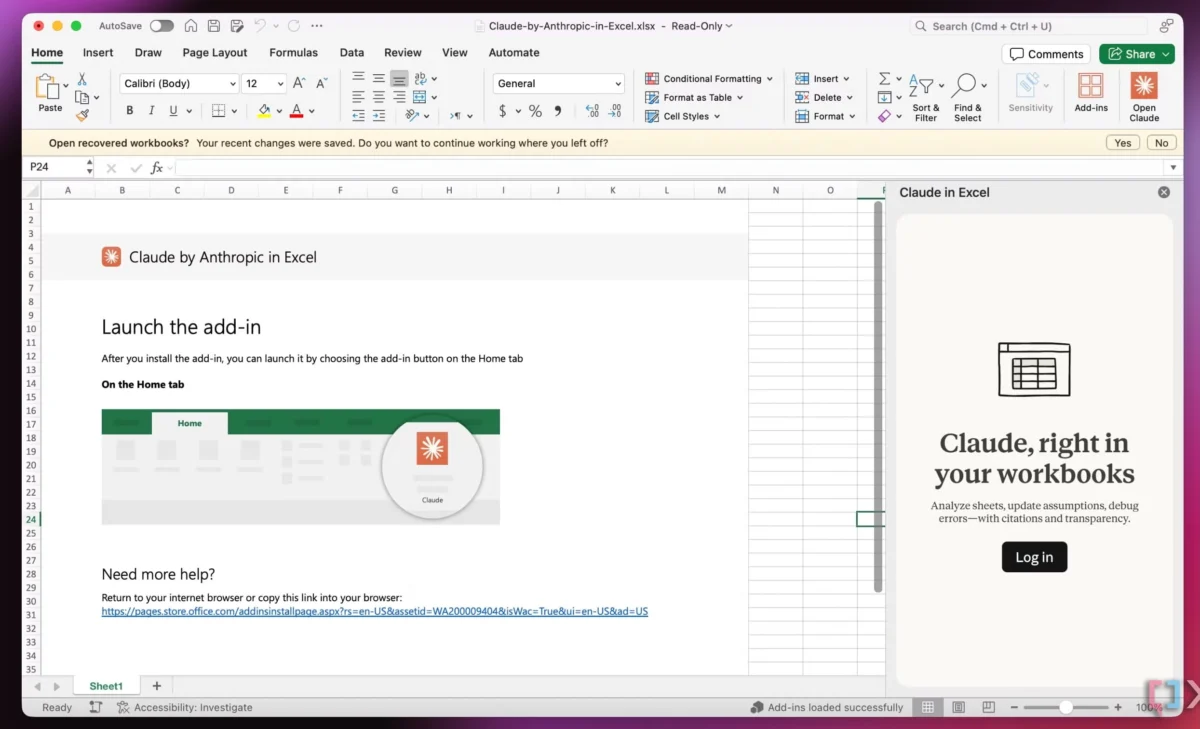
In the rapidly evolving landscape of digital productivity, a paradox has emerged: as the number of "revolutionary" AI tools multiplies, user frustration is reaching an all-time high. The modern professional is besieged by a constant stream of "shiny new objects"—apps, plugins, and platforms promising to "change everything." However, a growing consensus among UX designers and industry experts suggests that what users actually need is not another icon on their taskbar, but the invisible, seamless integration of capabilities into the tools they already use.
This shift in philosophy, often championed by design leaders like Vitaly Friedman of Design Patterns For AI Interfaces, moves away from "AI-first" products toward a concept known as "Quiet AI." By prioritizing established mental models over novel workflows, developers can address high-severity frustrations without adding to the cognitive load of their users.
Main Facts: The End of the "App for Everything" Era
The core argument facing the tech industry today is that the "app for everything" era is effectively over. Users are suffering from "tool fatigue," a state of exhaustion caused by the need to manage multiple subscriptions, learn diverse interfaces, and context-switch between disconnected environments.
The Problem with "AI-First"
The term "AI-first" has become a buzzword for products that place artificial intelligence at the center of the user experience. While these tools often boast impressive raw power, they frequently ignore decades of design evolution. Users have spent years developing mental models for how spreadsheets, file systems, and word processors should function. When an AI-first tool forces a user to navigate Terminal commands or engage in endless back-and-forth chat interactions to perform a simple task, it breaks those mental models, leading to friction rather than efficiency.
The Rise of Quiet AI
In contrast, "Quiet AI" refers to intelligent features that sit in the background. These are not standalone products but integrated capabilities that assist in repetitive, frustrating tasks. Quiet AI does not scream for attention; it waits until it is needed, providing assistance in context. The goal is to solve problems characterized by high severity (the cost of an error is high), high frequency (the task happens often), and high frustration (the task is tedious).
Chronology: From Feature Bloat to Intelligent Integration
To understand where we are going, we must look at the trajectory of software design over the last three decades.
1990s–2000s: The Era of Feature Bloat
During the rise of desktop computing, success was measured by the "feature list." Microsoft Office and Adobe Creative Suite became behemoths by adding every conceivable tool into a single package. While powerful, this led to "bloatware," where 80% of users only used 20% of the features.
2010s: The SaaS Explosion and Silos
The move to the cloud decentralized software. Instead of one giant suite, we moved to specialized SaaS (Software as a Service) tools. We got Slack for communication, Jira for tasks, and Notion for notes. While these were more user-friendly, they created "data silos" and forced users to jump between browser tabs constantly.

2022–2023: The Generative AI Gold Rush
The release of ChatGPT sparked a gold rush. Thousands of startups launched "wrappers"—thin layers of UI over an LLM (Large Language Model). Most of these were standalone websites, requiring users to copy-paste data out of their work environment, into the AI, and back again. This "copy-paste tax" became the new friction.
2024 and Beyond: The Integration Pivot
We are now entering the era of the "Seamless Integration." Companies are realizing that the most valuable AI is the one that lives where the data already resides. This is evidenced by the integration of Claude into Excel or the development of "system-level" AI that understands a user’s entire file structure.
Supporting Data: The Hidden Cost of Context Switching
The push for integrated AI is backed by significant psychological and productivity data. Research into "context switching"—the act of jumping between different tasks or applications—reveals a staggering toll on human performance.
The 20-Minute Recovery Rule
Studies in human-computer interaction suggest that it can take an average of 23 minutes and 15 seconds to return to deep focus after an interruption. Every time a user has to leave their spreadsheet to prompt an AI in a separate browser window, they aren’t just losing the seconds spent clicking; they are resetting their cognitive focus.

Mental Models and Friction
A mental model is a user’s internal map of how a system works. When a tool aligns with a mental model (e.g., a "Folder" should hold files), the cognitive load is low. When a tool defies it (e.g., "To organize your files, please type a prompt in this chat box"), the user must stop doing their work to "work the tool."
Integration solves this by applying AI to the existing model. For example, instead of a new "AI File Manager," the industry is looking at "Folder Instructions." In this model, a standard OS folder is given "rules" (e.g., "Automatically summarize any PDF dropped here"). The user doesn’t learn a new tool; they simply use the folder they’ve known for 30 years, but with a new "superpower."
Official Responses and Expert Perspectives
Designers and engineers are beginning to formalize the rules for this new era. Vitaly Friedman’s Design Patterns For AI Interfaces serves as a foundational guide for this transition.
The Designer’s Manifesto
Friedman argues that the value of AI is not in its "smartness" but in its ability to reduce "slowness and mistakes." He posits that UX professionals must move away from designing "chatbots" and toward designing "affordances"—visual cues that tell a user what an AI can do within a specific context.

The Developer Perspective
From a technical standpoint, the shift toward integrated AI requires a focus on "locally scoped" actions. For instance, if an AI is integrated into a specific folder, it should only have permissions for that folder. This addresses the high-severity concern of data privacy. By limiting the AI’s "eyes" to the immediate task at hand, developers can build trust while providing utility.
Industry Leaders
Microsoft and Google have responded by embedding "Copilots" directly into their ecosystems. However, the critique from the design community remains: even a Copilot can be intrusive if it requires a sidebar that takes up 30% of the screen. The "Quiet AI" ideal is even more minimalist—perhaps just a subtle change in a file icon or a suggested action that appears only when a user hovers over a specific data point.
Implications: The Future of the Operating System
The move toward seamless integration has profound implications for the future of software development and the role of the Operating System (OS).
The OS as the Primary Interface
If the goal is to eliminate tool-switching, the Operating System itself (Windows, macOS, Linux) becomes the most important AI interface. We are likely to see "System-Level AI" that doesn’t feel like an app, but like an upgrade to the plumbing of the computer.
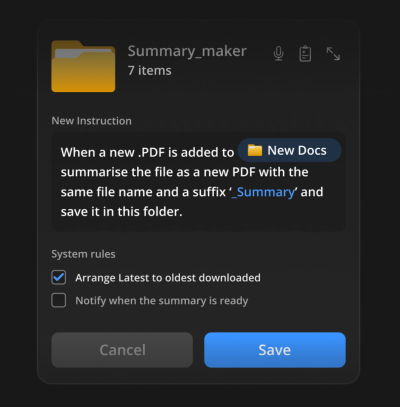
- Intelligent Folders: As discussed, folders will become active participants in workflows, organizing themselves based on project intent.
- Cross-App Intelligence: An AI that sees a date in an email and automatically checks your local calendar without you asking, offering a "one-click" appointment creation.
The "Invisible" Software Market
For developers, the "Quiet AI" trend means the death of the "destination website." Future successful AI products may not have a homepage where users "do work." Instead, they will exist as APIs and integrations that power other tools. The "product" becomes the quality of the integration and the reliability of the automation, rather than the UI of the standalone app.
Reducing the "Frustration Gap"
Ultimately, the implication for the end-user is a reduction in the "frustration gap"—the distance between wanting to do something and knowing how to make the computer do it. By aligning AI with established mental models, we lower the barrier to entry for complex tasks. A user who doesn’t know how to write a complex Excel formula can now simply "describe" the column’s purpose to a Quiet AI assistant sitting within the cell properties.
Conclusion: The Value of Simplicity
The tech industry is at a crossroads. One path leads to a cluttered ecosystem of specialized AI bots that require constant management. The other path—the one advocated by design leaders like Vitaly Friedman—leads to a world where AI is a silent partner, woven into the fabric of our existing digital lives.
As we move forward, the metric for a "good" AI feature will not be how many "smart" things it can do, but how much it allows the user to stay in their flow. Seamless integration is not just a design choice; it is a respect for the user’s time, attention, and existing expertise. In the race to build the most powerful AI, the winner may ultimately be the one who makes the AI disappear.
 Nana Wu
  Nana
Nana 