
 By Reynand Wu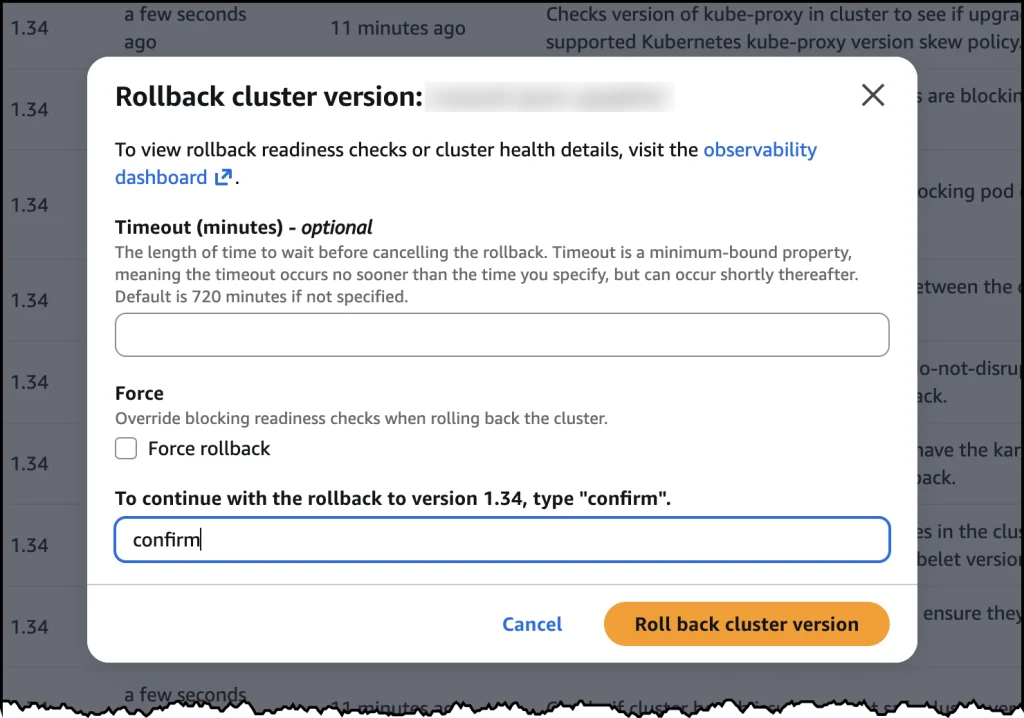
In the high-stakes world of cloud-native infrastructure, the Kubernetes upgrade process has long been viewed as a "one-way door." For years, DevOps teams and platform engineers have operated under the stressful reality that once a control plane upgrade is initiated, there is no turning back. If a breaking change or a compatibility issue surfaced post-upgrade, the only path forward was to "fix forward" under immense pressure, often involving emergency patches, manual reconfiguration, or the catastrophic prospect of rebuilding clusters from scratch.
Today, Amazon Web Services (AWS) has fundamentally altered that narrative. With the announcement of native version rollbacks for Amazon Elastic Kubernetes Service (Amazon EKS), AWS is providing a crucial safety net for cluster administrators. This feature allows users to revert a Kubernetes version upgrade within a seven-day window, effectively introducing an "undo" button to one of the most nerve-wracking tasks in the cloud-native lifecycle.
The Core Transformation: Moving Beyond Emulation
To understand the magnitude of this update, one must consider the historical constraints of the Kubernetes ecosystem. Standard open-source Kubernetes does not natively support control plane rollbacks. While the community has explored mechanisms like KEP-4330—which introduces emulated versions—these solutions often keep clusters in a transitional, "holding" state that is not intended for long-term production stability.
AWS has opted for a more robust approach. Unlike emulation, EKS version rollbacks return a cluster to a fully validated, production-proven version. This is not a simulation; it is a restoration of the exact state the cluster occupied prior to the upgrade.
"Think of it as an undo button," says the AWS EKS engineering team. If a team upgrades from Kubernetes 1.34 to 1.35 and discovers that a critical middleware dependency is no longer compatible, they no longer need to scramble to troubleshoot in a live environment. They can initiate a rollback, and within a standard timeframe, the control plane returns to version 1.34, restoring stability while the team investigates the incompatibility in a non-production environment.
Chronology of a Kubernetes Upgrade Crisis
The anxiety surrounding Kubernetes upgrades is not merely psychological; it is rooted in the aggressive release cadence of the CNCF. With three minor versions released every year, organizations—particularly those in regulated industries like finance, healthcare, and government—often find themselves trapped in a cycle of "upgrade paralysis."
- The "Bake" Period: To mitigate risk, organizations have historically implemented "bake periods," where upgrades are tested in staging environments for weeks.
- Staggered Rollouts: Teams often utilize complex, multi-stage deployment patterns, moving upgrades through small clusters before touching production workloads.
- The Upgrade Delay: Because of the lack of a rollback mechanism, many teams simply skip versions to avoid the risk of failure. This leads to clusters running on outdated versions, leaving them vulnerable to security threats and pushing them toward the dreaded "extended support" timelines.
- The Breaking Point: When an upgrade finally occurs, if a critical application component fails, the lack of a rollback path turns a minor version bump into a high-priority incident, often requiring war-room style remediation.
With the introduction of the EKS rollback feature, this timeline changes significantly. The seven-day safety window effectively eliminates the need for months of paralyzing fear, allowing teams to move faster with the confidence that they have a proven recovery path.
Supporting Data and Technical Implementation
The rollback capability is designed to integrate seamlessly into the existing EKS operational model. It supports the standard incremental upgrade path (rolling back one minor version at a time) and is deeply integrated into the EKS Cluster Insights dashboard.

Proactive Readiness Checks
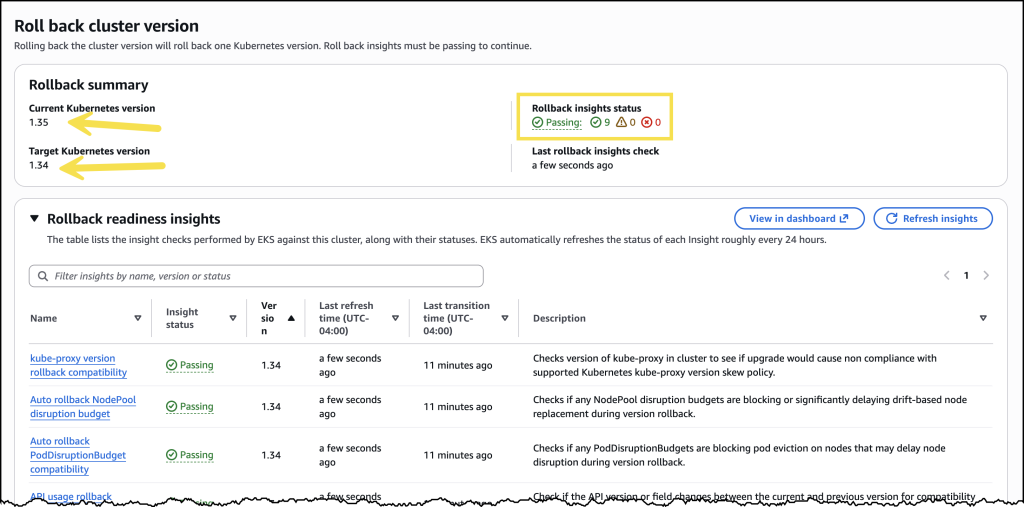
Before a rollback is executed, EKS automatically evaluates the cluster’s readiness. This includes:
- Node Version Compatibility: Checking if the underlying worker nodes are prepared for the reversion.
- Add-on Dependencies: Ensuring that EKS-managed add-ons (like VPC CNI or CoreDNS) are compatible with the target version.
- The Force Option: For experienced administrators who have already performed their own due diligence, the
--forceflag allows them to bypass these automated checks and expedite the process.
The Role of EKS Auto Mode
For organizations leveraging EKS Auto Mode—the fully managed infrastructure experience—the rollback process is even more sophisticated. In Auto Mode, the system manages both the control plane and the nodes. Because rolling back nodes involves potentially disruptive actions to pods, EKS Auto Mode respects Pod Disruption Budgets (PDBs).
To provide granular control, AWS has introduced a new cancel API. If an administrator initiates a rollback and realizes that the node reversion is taking longer than expected due to strict PDB settings, they can now halt the process, adjust their disruption budgets, and resume or change strategy without having to wait for a potentially massive, automated operation to complete.
Implications for the Cloud-Native Ecosystem
The introduction of native rollbacks has profound implications for enterprise cloud strategies.
1. Accelerated Security Posture
By reducing the risk associated with upgrades, AWS is essentially encouraging a more aggressive patch management strategy. Teams that were previously hesitant to move from version 1.30 to 1.31 will now be more inclined to keep their clusters current, thereby closing security gaps faster and ensuring adherence to compliance requirements.
2. Operational Efficiency
The "scramble to troubleshoot" is one of the most expensive activities in a DevOps organization. By providing a stable rollback path, AWS is enabling organizations to shift their focus from incident response to proactive feature development. The reduction in "war room" hours directly translates to lower operational costs and improved developer productivity.
3. Maturation of Managed Kubernetes
This feature highlights the divergence between "Vanilla" Kubernetes and Managed Services like EKS. While the upstream open-source project focuses on core primitives, AWS is building the "operational layer"—the tooling required to make those primitives viable for mission-critical, large-scale enterprise production.
Official Perspective and Availability
AWS has confirmed that version rollbacks are available effective immediately, at no additional cost, across all commercial AWS Regions. This is a significant move, as many enterprise-grade features are often gated behind premium support tiers or additional licensing; by including this in the standard EKS service, AWS is setting a new baseline for what users should expect from a managed Kubernetes provider.
The feature is compatible with all EKS clusters, regardless of whether the user manages their own EC2 nodes or utilizes EKS Auto Mode. The rollback functionality covers all versions currently within the EKS standard and extended support windows.
Getting Started
For administrators ready to test this capability, the process is straightforward:
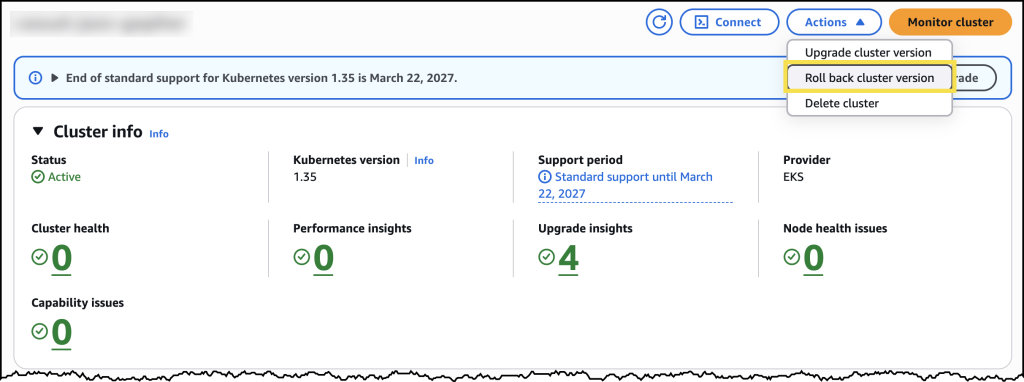
- Console Access: Navigate to the Amazon EKS console, select the cluster, and view the configuration page.
- Insight Review: Utilize the "Rollback Insights" tab to view compatibility reports.
- Execution: Initiate the rollback through the console or CLI, monitoring the progress through the status indicators.
As the industry continues to push toward more automated, "hands-off" infrastructure, the ability to safely revert state is perhaps the most important development in the EKS ecosystem this year. It transforms the Kubernetes upgrade from a "leap of faith" into a standard, manageable, and reversible operational task, providing a necessary level of maturity for the next generation of cloud-native applications.
For further details on implementing this feature, users are encouraged to consult the official Amazon EKS User Guide.
 Neng Nana
  Suro Senen
  Lina Hope