
 By Neng Nana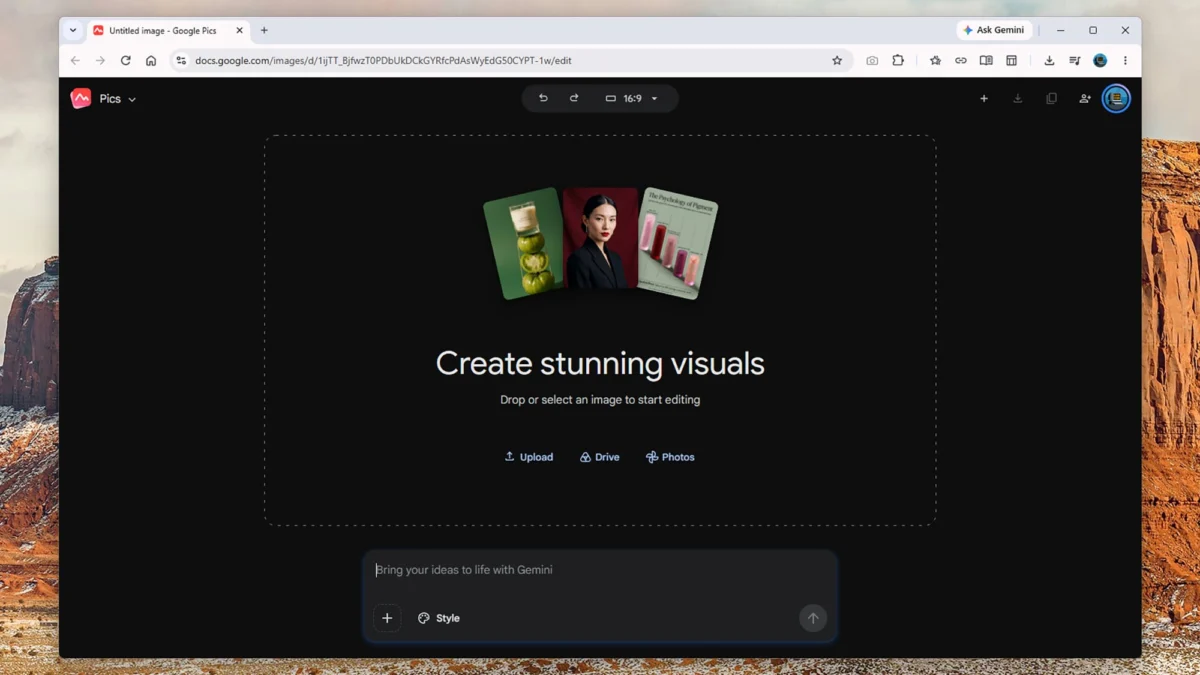
MOUNTAIN VIEW, Calif. — In the fast-paced world of tech conglomerates, few companies launch and sunset applications quite as rapidly as Google. Yet, every so often, a new utility emerges from Mountain View with the potential to fundamentally shift how everyday digital tasks are handled.
The latest entrant to Google’s sprawling ecosystem is Google Pics, a cloud-based web application that bridges the gap between AI-driven text-to-image generation and practical, intuitive editing. Positioned directly alongside Google Docs, Slides, and Sheets within the Google Drive Workspace, Google Pics aims to democratize graphic design and image manipulation. However, like many of Google’s advanced artificial intelligence initiatives, it currently sits behind a paywall, reserved for subscribers of the company’s higher-tier AI plans.
Main Facts: What Is Google Pics?
Google Pics is best described as a hybrid platform: part Canva, part Photoshop, fueled entirely by artificial intelligence. Built upon Google’s Nano Banana AI image generation model, the web app is designed to serve as a one-stop shop for casual creators who need to generate event flyers, social media graphics, or marketing posters, as well as those looking to retouch personal photographs.
Unlike traditional software that relies heavily on complex layers, manual brush strokes, and precise pixel manipulation, Google Pics operates almost exclusively through natural language text prompts.

- Availability: Currently rolled out to users subscribed to the Google AI Pro tier ($19.99 per month) and the Google AI Ultra tiers ($99.99 or $199.99 per month).
- Ecosystem Integration: Fully integrated into Google Drive Workspace, allowing users to access the app seamlessly alongside Docs, Slides, and Sheets without hopping between disparate programs.
- Core Functionality: Combines text-to-image generation (producing photorealistic scenes, illustrations, and marketing materials) with object removal, selective color changes, and direct text editing within generated or uploaded images.
- Usage Limits: Google has implemented a somewhat flexible usage structure, promising "higher access" thresholds until February 2027, with high-resolution image generation consuming limits more rapidly.
Chronology: The Evolution Toward Google Pics
While Google Pics has just arrived on the scene, its DNA can be traced through years of iterative development in Google’s artificial intelligence labs.
- Early Experimentation (2022–2023): As generative AI captured global attention, Google began integrating basic text-to-image capabilities into consumer products like Google Slides and Google Drawings, alongside the evolution of its broader Gemini AI architecture.
- The Rise of Gemini Nano and Imagen (Late 2023–2024): Google refined its generative image models, introducing advanced object erasure and background-generation features into consumer products like Google Photos on Pixel devices.
- Workspace Consolidation (Mid-2025): Recognizing the demand for a collaborative, browser-based alternative to heavy design suites, Google began developing a centralized workspace hub for visual assets.
- The Launch of Google Pics (Late 2025/Early 2026): Google formally launched Google Pics, integrating the Nano Banana model directly into Google Drive for Google AI Pro and Ultra subscribers.
Supporting Data & User Experience: How It Works
Testing the platform reveals an interface optimized for speed and simplicity rather than exhaustive technical control.
Generating Images from Scratch
When opening Google Pics, users are greeted by a clean workspace dominated by a prompt box—reminiscent of the Gemini app interface.
- The Prompt Box: Users type descriptive requests (e.g., "Create an A5 flyer for a 10th birthday party for Jess, happening at the village town hall at 3 p.m.–6 p.m. on Sunday, September 20").
- Styling and Dimensions: A Style box allows users to reference overall aesthetics, while aspect ratio drop-downs let creators specify dimensions for banners, flyers, or square social media posts.
- Thumbnail Variations: Upon entering a prompt, the app generates four or five thumbnail alternatives on the left side of the screen, allowing users to select their preferred output or request additional generations.
Editing Existing Photos
Beyond generating new assets from text, users can upload images from their local machine, Google Drive, or Google Photos.

- AI Object Selection: The app automatically identifies prominent elements in an image—such as "sky," "mountains," or "church"—making them clickable targets.
- Contextual Alterations: Users can drag a bounding box around any element (a stray tourist in a vacation photo, or a single balloon on a party poster) and issue a text command, such as "remove this person" or "make this balloon blue."
- Inpainting and Outpainting: Google’s underlying AI automatically estimates what should occupy the space of removed objects, seamlessly blending backgrounds.
- Direct Text Editing: Unlike flat image files where text is baked into the pixels, Google Pics allows users to select text blocks generated within the app and edit them directly via text rather than running a new generation prompt.
Official Responses and Pricing Strategy
Google’s decision to lock Google Pics behind its premier AI subscriptions ($19.99/month for Pro up to $199.99/month for Ultra) underscores the company’s aggressive push to monetize its heavy infrastructure investments in artificial intelligence.
In official documentation accompanying the launch, Google emphasized that the tool is designed to lower the barrier to entry for professional-looking visual communication. However, tech analysts have pointed out the vague nature of the platform’s usage caps. Google’s support pages state that users will enjoy "higher access" until February 2027, after which structural usage limits or tiered monetization models may shift.
Competitors in the design space have watched closely. While companies like Adobe have aggressively integrated their own Firefly AI models into Photoshop and Illustrator, Google is taking a different approach: embedding lightweight, conversational design tools directly into the productivity software office workers already use every day.
Implications: Will Google Pics Replace Photoshop and Canva?
The short answer is no. Google Pics is intentionally built as a streamlined, bare-bones application.

Where Google Pics Excels
For casual users, small business owners, and educators, Google Pics eliminates the steep learning curve associated with graphic design. Tasks that once required opening a professional software suite—such as aging a car in a photograph by five years, generating a vibrant birthday flyer from scratch, or quickly scrubbing an unwanted object out of a landscape shot—can now be accomplished in seconds using natural language.
Where Traditional Tools Maintain Supremacy
Professional designers and power users will not be abandoning established tools anytime soon. Google Pics lacks several fundamental features required for high-end graphic design:
- No Layer Support: Users cannot stack, blend, or independently manage multiple image layers.
- Limited Pixel-Level Precision: While AI-driven object removal is impressive, it frequently struggles with complex, dense environments (such as busy city streets with multiple overlapping vehicles), occasionally producing artifacts that require human touch-ups.
- Lack of Advanced Vector Tools: For intricate logo design, precise vector manipulation, and multi-page publishing, suites like Adobe Creative Cloud and Canva remain unmatched.
The Workspace Advantage
The true power of Google Pics does not lie in its ability to out-feature Photoshop, but in its frictionless integration with the Google Workspace ecosystem. By allowing users to conjure up custom graphics, marketing flyers, and illustrations without leaving their browser tab—and embedding those tools directly into Docs, Slides, and Sheets—Google is redefining how casual visual content is produced in the modern workplace.
As Google refines its Nano Banana AI model and works toward its 2027 threshold for higher access, Google Pics is poised to become an indispensable daily driver for millions of office workers, educators, and creators who need good design, fast.
 Raul Delapena Setiawan
  Layla Zulfa
  rifanmuazin