
 By Pevita Pearce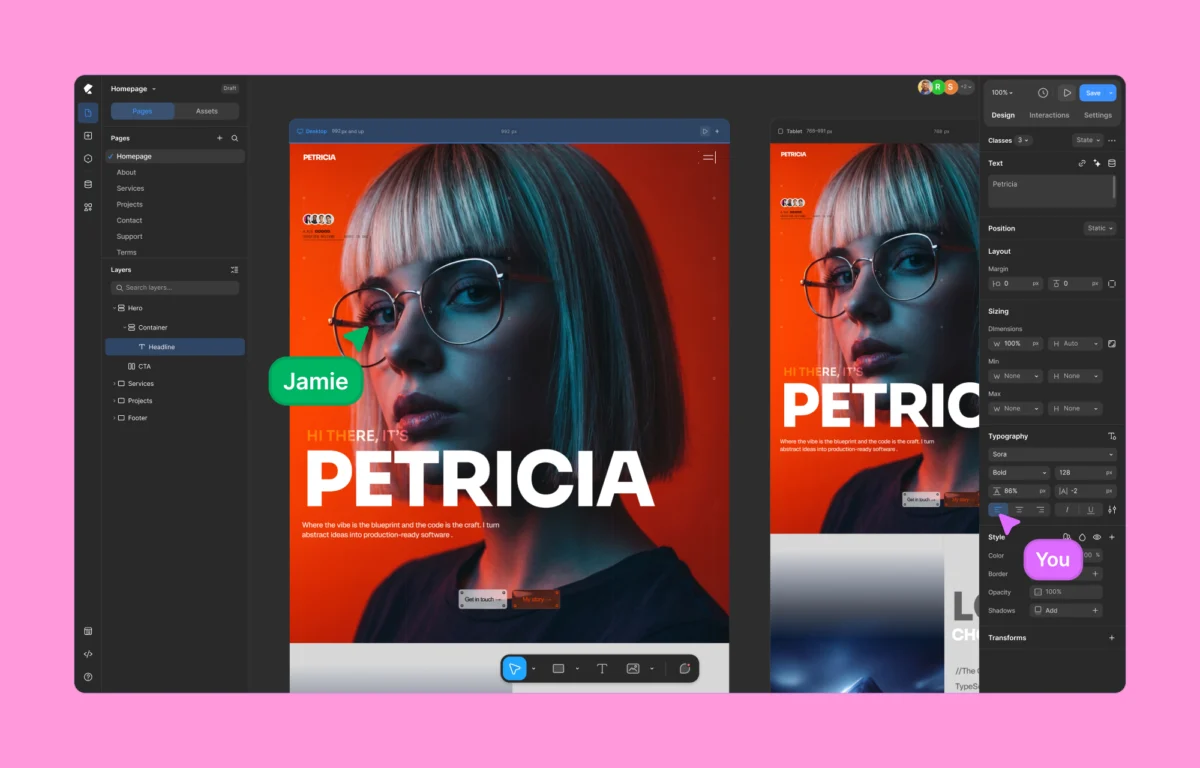
For nearly two decades, the WordPress ecosystem has operated under a standardized set of constraints. Millions of websites have been constructed inside rigid, grid-locked boxes dictated by traditional page builders. While these tools democratized web development by removing the initial barrier of hard coding, they introduced a new set of compromises: bloated DOM trees, heavy reliance on third-party plugins, steep performance penalties, and frustrating layout limitations.
Enter Kirki, a next-generation, no-code visual website builder that is rapidly altering the conversation around WordPress architecture. By introducing the platform’s signature freeform visual builder featuring an infinite canvas, integrated CMS capabilities, and zero-plugin dependency, Kirki aims to bridge the long-standing performance gap between traditional WordPress workflows and modern design tools like Webflow and Figma.
This deep-dive review explores the anatomy of Kirki, evaluating its performance benchmarks, architectural innovations, pricing structures, and long-term implications for the WordPress developer and designer community.
Chronology and Evolution: The Shift from Grid-Locked Boxes to Infinite Canvases
The historical trajectory of WordPress page builders can be traced through distinct generations. The first era relied entirely on PHP-based themes and shortcodes, followed by the second era of row-and-column drag-and-drop builders like Elementor, WPBakery, and Divi. While these tools made visual editing mainstream, their underlying architecture remained anchored to rigid block models, nested <div> wrappers, and heavy script loading.

Kirki’s development represents a third paradigm shift. Conceptualized to address the structural bloat inherent in legacy builders, the project sought to solve a fundamental design paradox: why should designers accustomed to fluid, freeform design environments like Figma be forced to compromise their layouts when bringing them into WordPress?
- The Conceptual Phase: Developers recognized that performance degradation in WordPress was rarely the fault of core software, but rather the cumulative weight of page builder wrappers and auxiliary plugins required to achieve basic modern functionalities (such as custom fields, pop-ups, and animations).
- The Infinite Canvas Integration: Kirki bypassed traditional container systems by developing a freeform infinite canvas. This allowed users to pan, zoom, layer, and position elements without the structural handcuffs of standard grid systems.
- Ecosystem Expansion: Following the rollout of its core visual builder, Kirki expanded to include native dynamic content management, a CSS class-based styling engine, and timeline-based animation controls, culminating in a robust platform capable of rivalling standalone SaaS design tools.
Comparative Performance Data: Kirki vs. Legacy Builders
Performance is no longer a secondary consideration; it is directly tied to search engine optimization (SEO), user retention, and conversion rates. To evaluate how Kirki’s architectural choices translate into real-world speed, independent benchmark tests were conducted comparing Kirki against established market leaders like Elementor.

Test Parameters and Benchmarks
Both builders were installed on clean, identical WordPress environments running the default Twenty Twenty-Five theme. Identical layouts—comprising hero sections, dynamic grids, typography modules, and calls-to-action—were constructed using comparable design elements. Google Lighthouse audits were then executed to measure First Contentful Paint (FCP), Time to Interactive (TTI), and overall Core Web Vitals.
- DOM Complexity: Kirki generated a significantly leaner Document Object Model (DOM), utilizing semantic HTML structures with minimal wrapper elements and zero unnecessary
<div>layers. Conversely, legacy builders produced heavily nested markup structures, triggering cascading style sheet recalculations that slowed down rendering times. - Load Times: Due to its lack of third-party plugin bloat and lightweight asset delivery, Kirki consistently outperformed legacy competitors in Lighthouse performance audits, achieving higher scores across mobile and desktop evaluations.
- Code Quality Output: Front-end developers examining raw source code noted that Kirki’s output closely mirrors hand-written semantic HTML and CSS, eliminating the stylesheet bloat that has historically plagued WordPress sites.
Architectural Deep Dive: Core Features and Innovations
Kirki’s rapid adoption stems from its comprehensive suite of built-in features, designed to eliminate the need for auxiliary plugins.

1. Freeform Infinite Canvas and Responsive Workflows
Unlike traditional builders that force users to toggle back and forth between desktop, tablet, and mobile previews, Kirki introduces concurrent editing across all responsive views.
- Side-by-Side Visibility: Desktop, tablet, landscape, and mobile views can be viewed and edited simultaneously on the infinite canvas.
- Intelligent Cascading: Changes made at larger breakpoints flow downward automatically, reducing repetitive styling tasks while maintaining absolute control over custom breakpoints.
2. Instant Figma-to-WordPress Handoff
For design agencies, the handoff phase between UI/UX designers and developers has historically been a bottleneck. Kirki bridges this gap by enabling direct imports of Figma designs into the WordPress editor. Imported layouts retain responsive scaling parameters out-of-the-box, drastically compressing project turnaround times.

3. Native Dynamic Content Management
Historically, achieving advanced dynamic layouts in WordPress required pairing a page builder with external plugins like Advanced Custom Fields (ACF). Kirki integrates a native Dynamic Content Manager, allowing users to:
- Connect custom post types and taxonomies visually.
- Bind custom fields directly to canvas elements without writing code.
- Manage complex relational data streams natively within the builder interface.
4. Class-Based Styling and CSS Variables
To ensure long-term site scalability, Kirki utilizes a class-based styling system. When an element is styled, those attributes are saved as reusable CSS classes. Paired with Global CSS Variables, administrators can update global design tokens—such as primary brand colors, typographic scales, and spacing variables—across an entire website instantly. Advanced users retain the freedom to inject custom CSS or page-level JavaScript.

5. Visual Interactions and Timeline-Based Animations
Moving beyond basic entrance animations, Kirki features a timeline-based animation editor. Designers can visually construct scroll-based triggers, parallax effects, hover states, and character-by-character text animations without relying on heavy JavaScript libraries.
6. Real-Time Collaboration and Built-In Quality Control
Reflecting the collaborative nature of modern web design, Kirki introduces multi-user co-editing. Team members can work on the same page simultaneously, viewing color-coded cursors and live changes in real time. Furthermore, the built-in Page Audit tool proactively scans layouts for missing alt text, broken links, accessibility flaws, and SEO vulnerabilities before publication.

Financial Analysis: Transparent Pricing vs. Hidden Paywalls
A frequent criticism of the WordPress plugin ecosystem is the hidden cost of ownership. While many builders advertise low entry barriers, critical features—such as pop-up builders, form managers, and dynamic content tools—are frequently locked behind expensive tier upgrades or require separate third-party subscriptions.
Kirki adopts an all-inclusive pricing model:

- The Free Version: Unlike restricted "freemium" teasers, Kirki’s free tier (available via WordPress.org) is a fully functional builder offering access to the infinite canvas and core design features without financial commitment.
- Starter Plan ($59/year): Designed for single-site deployment, unlocking all premium features, dynamic tools, and template libraries without hidden upsells.
- Lifetime Plan ($499): A one-time purchase option aimed at agencies and freelancers seeking unlimited perpetual usage without recurring subscription overhead.
When compared against competitors whose bundled feature sets often scale past $100–$200 annually per site once necessary add-ons are included, Kirki’s transparent pricing represents a significant cost-efficiency advantage.
Official Industry Reception and User Feedback
The initial market response from freelance developers, agency owners, and enterprise consultants has been overwhelmingly positive. Early adopters frequently characterize Kirki not merely as another WordPress plugin, but as the long-awaited bridge between WordPress flexibility and SaaS-grade design environments like Framer and Webflow.

"For years, building custom experiences in WordPress meant sacrificing speed and stacking plugins. Kirki changes the architectural calculus by giving us clean code, real-time collaboration, and a true infinite canvas in one unified package." — Anonymous Agency Lead & Early Adopter
Industry analysts note that tools prioritizing clean DOM output and zero-plugin dependency are increasingly favored as Core Web Vitals become strict ranking factors for search engine algorithms.

Implications for the WordPress Ecosystem
Kirki’s market entry signals a broader maturation of the WordPress ecosystem. As headless architecture and decoupled CMS platforms pressure traditional monolithic platforms, tools that modernize the visual authoring experience while respecting performance metrics are vital for WordPress’s continued dominance.
Key Implications:
- Reduced Plugin Fatigue: By bundling dynamic content management, form builders, popup creation, and integration hubs into a single core platform, site administrators face fewer vulnerabilities associated with plugin bloat and software conflicts.
- Agency Efficiency: The combination of Figma importing, real-time multi-user co-editing, and class-based styling streamlines agency workflows, shortening delivery timelines for complex client projects.
- Performance Accountability: As clients demand lightning-fast digital experiences, builders that fail to produce clean, semantic HTML will likely lose market share to performance-first alternatives like Kirki.
Verdict: Is Kirki the Future of WordPress?
The empirical evidence derived from performance benchmarks, architectural reviews, and feature comparisons leads to a definitive conclusion: Kirki successfully addresses the foundational weaknesses that have plagued traditional WordPress page builders for years.

By refusing to compromise between design freedom and technical performance, Kirki provides an all-in-one ecosystem that empowers designers, developers, and enterprises alike. For professionals seeking to build scalable, high-performance, visually stunning WordPress websites without the friction of bloated code and fragmented plugin stacks, Kirki stands out not just as a viable alternative, but as a compelling blueprint for the future of WordPress site building.
 Asep Darmawan
  Sagoh
Sagoh  Raul Delapena Setiawan