Abstract & Executive Summary: In modern enterprises, the volume of accessible data has reached unprecedented heights. Yet, weekly standups and quarterly reviews routinely conclude with teams nodding at performance decks without reaching a single actionable decision. Authored by data design experts and explored through the lens of user experience (UX) strategy, this report examines why traditional dashboards fail. By integrating structured UX methodologies—focusing on context, audience framing, and intended insights before opening a single BI tool—organizations can transition from publishing inert "data graveyards" to deploying functional, decision-driving instruments.
1. Main Facts: The Core Crisis of Modern Data Visualization
Data visualization sits at the volatile intersection of two traditionally siloed disciplines: raw data analytics and human-centric design. While organizations invest heavily in gathering metrics across sales, product, marketing, and operations, the outputs frequently suffer from a fatal flaw: they are technically correct yet communicatively inert.
The Paradox of Availability: Despite the abundance of business intelligence (BI) tools, metrics rarely inspire directional changes or strategic pivots.
The Blame Shifting: When meetings stall, stakeholders typically blame the data—demanding greater granularity, deeper datasets, or more information before acting.
The Root Cause: The failure is rarely technical. Instead, charts are built based on what data is available rather than what question needs answering. Audiences are generalized rather than deeply understood, and the fundamental question—What should actually change as a result of seeing this data?—is rarely asked.
When treated as complementary disciplines, UX design and data visualization solve the exact same foundational problem: getting the right information to the right person in a way that shifts human behavior.
2. Chronology: From Static Tables to Cognitive Visual Frameworks
To understand the evolution of how we process quantitative information, one must trace the historical milestones that decoupled raw numbers from visual storytelling.
1973 — Anscombe’s Diagnostic Awakening: Statistician Francis Anscombe published a landmark paper demonstrating that four completely distinct datasets could share identical summary statistics—matching means, variances, correlation coefficients, and regression lines. When plotted on scatterplots, however, their operational truths could not be more divergent. Anscombe proved that visualization is not merely cosmetic; it exposes realities that raw numbers actively conceal.
Late 20th Century — The Codification of Data-Ink: Edward Tufte introduced the "data-ink ratio," advocating for visual hygiene where every mark on a chart serves the data rather than decorating it. While vital for isolated charts, this minimalist approach historically overlooked complex organizational realities where stakeholders require context, not just stark simplicity.
The Modern Era — The Rise of UX-Driven Dashboards: Analysts and product teams began recognizing that a chart is never read in isolation. It is consumed by a stressed, time-poor human being embedded within a specific corporate context. This realization triggered a migration toward "appropriate complexity"—tailoring density to the psychological and operational needs of the user.
3. Supporting Data: The Anatomy of Visual Communication
The effectiveness of a visual narrative depends heavily on matching its form to human cognitive limits. Two primary case studies illustrate this dynamic:
The Scale of Macro-History
Consider Visual Capitalist’s History of Pandemics. Traditional formats would present this information as a massive, exhausting data table of casualty counts. Instead, the design maps historical pandemics on a single timeline using proportional bubble layouts. Before the human brain processes a single data label, the visual system instantly registers the staggering scale of the Black Death relative to all other historical events.
Density as a Variable: Analysts vs. Executives
Data density must scale with the user’s accountability:
The Analyst’s View: High-density path-exploration graphs map granular, session-level user journeys. Analysts require this atomic depth to diagnose friction points, isolate behavior nodes, and uncover underperforming ad spend.
The Executive’s View: Leaders require heavily synthesized translations. Optimized for fast strategic or budgetary decisions, executive dashboards strip away raw noise to highlight core growth drivers.
“In data visualization, simplicity is not a fixed virtue — the right level of it is contingent on who is reading, and what they need to do.”
4. Methodological Framework: The 80% Rule Before the Chart
Industry benchmarks indicate that roughly 80% of a dashboard’s ultimate success is determined upstream—long before a designer touches a canvas or pulls a dataset. This pre-design phase requires answering three non-negotiable questions:
1. Context: What Are We Trying to Show?
Teams often pull existing telemetry and build visualizations around convenience. A vague goal like "Show me how the product is performing" yields a useless, unfocused interface. A contextualized goal—such as "Identify which features drive retention among users who signed up in Q1"—establishes a metric, a specific population, and an implied action.
E-commerce Example: A data-first approach dumps every click, scroll, and device metric onto one screen, leaving teams paralyzed. A context-first approach asks, "At which step of the checkout do users drop off?" This immediately filters out 90% of the noise, highlighting a payment-screen bottleneck ready for immediate redesign.
2. Audience: Who Is This For, and How Do They Think?
Audience profiling rests on two pillars: familiarity (data literacy) and accountability (the professional stakes attached to the numbers). Handing a dense, multi-layered exploratory graph to an executive who needs a high-level pulse check creates cognitive friction. Conversely, giving an oversimplified summary to an analyst strips away their diagnostic tools.
3. Insight: What Should Change When This Lands?
Information reflects what is, while insight dictates what happens next.
The False Alarm: A passive monitoring dashboard flags a sudden 15% drop in bookings. Lacking contextual depth, leadership panics and orders a costly redesign of the checkout flow.
The Insight-Driven Response: A well-structured dashboard maps the drop against marketing campaigns and traffic channels. It reveals that user conversion is stable; the sitewide rate was merely diluted by a massive influx of low-intent traffic from a newly scaled ad buy. The team pauses the campaign instead of breaking a functional app.
5. Case Study: Deploying a User-Centric B2B SaaS Dashboard
To witness these principles in action, consider a project for an enterprise talent management SaaS platform tracking complex professional competencies.
The Brief and The Trap
The client maintained a massive archive of daily user telemetry and issued an open-ended brief: "We have an immense archive of user activity; now we need to present it to enterprise teams." Falling back on default metrics like "time spent on platform" would have been easy, but time spent is merely a proxy—it logs presence, not mastery.
The team pivoted to more meaningful signals: competency scores by domain, certification completion rates, and historical performance trajectories. Time spent was relegated to a supporting metric, used only to flag underutilized modules.
Structural Differentiation: Individual vs. Manager
Rather than using identical charts with altered scales, the workspace was split into two distinct mental models:
For Individual Contributors: The interface served as a self-directed mirror. It was hyper-granular and personal, helping professionals track pacing, identify personal skill gaps, and establish a weekly priority list every Monday morning.
For Managers: The view bypassed micro-milestones to provide a macro pulse check on team vulnerabilities. It highlighted group progression trends and surfaced exact moments where human check-ins or mentorship interventions were required. An unexpected addition—a side-by-side comparison tool for two team members—became the platform’s most celebrated feature.
Choosing the Right Geometry: Bar Charts vs. Radar Charts
To help individual users instantly assess performance across eight distinct competency areas, linear bar charts were discarded in favor of radar charts.
By organizing multiple variables across axes radiating from a central point using polar coordinates, the interface synthesizes disparate metrics into a single geometric shape. A balanced polygon immediately signifies well-rounded proficiency, while a sharply skewed shape instantly exposes critical vulnerabilities at or below a 25% threshold.
Color as a Cognitive Anchor
Brand colors were embedded directly into the data model from day one. By maintaining color consistency across every chart, filter, and breakdown, users subconsciously absorbed the platform’s visual language before even realizing they were learning it.
6. Organizational Implications and Future Outlook
The transition from passive reporting to active insight yields measurable organizational returns. When dashboards are engineered through a UX lens:
Proactive Interventions Replace Post-Mortems: Leaders stop using data to dissect a "bad month" after the fact, relying instead on real-time visual signals to correct course before minor dips compound into critical failures.
Reduced Churn and Increased Engagement: Platform telemetry routinely demonstrates spikes in weekly active usage of analytics features, accompanied by a tangible reduction in customer churn as tools become genuinely functional in daily workflows.
Cultural Shift in Decision-Making: Meetings transition from passive listening sessions to rapid, data-informed alignment phases.
Closing Recommendations
The next time your organization commissions a dashboard, an executive report, or a public-facing data product, step away from the BI software and the design canvas. Focus your initial effort on the human decisions waiting on the other side of the screen. By treating data visualization as an upstream architectural choice rather than a downstream formatting chore, your metrics will finally stop being a passive record of the past and start serving as an engine for future growth.

 By Jia Lissa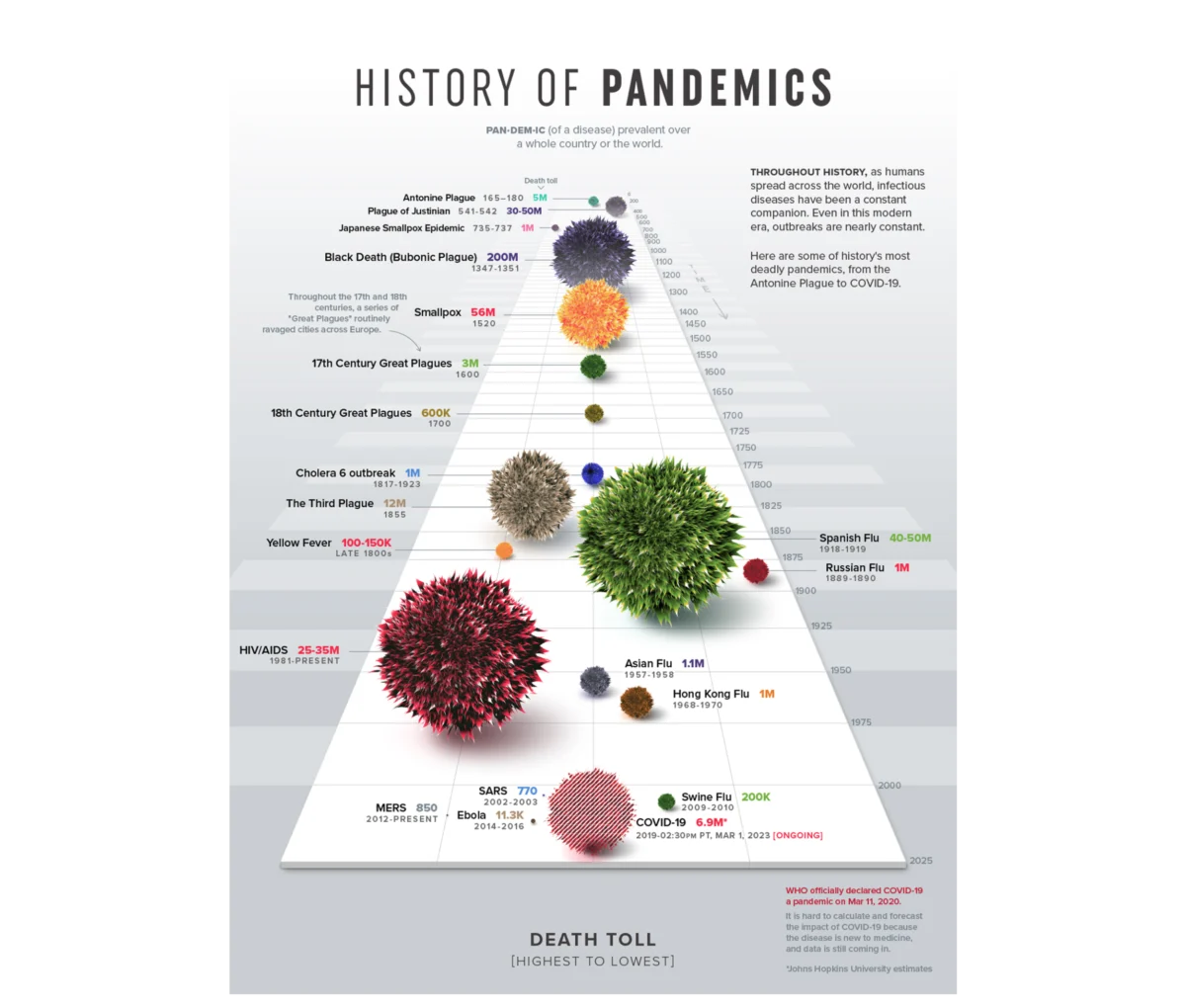


 Azzam Bilal Chamdy
  Nila Kartika Wati
  Evan Lee Salim