
 By Basiran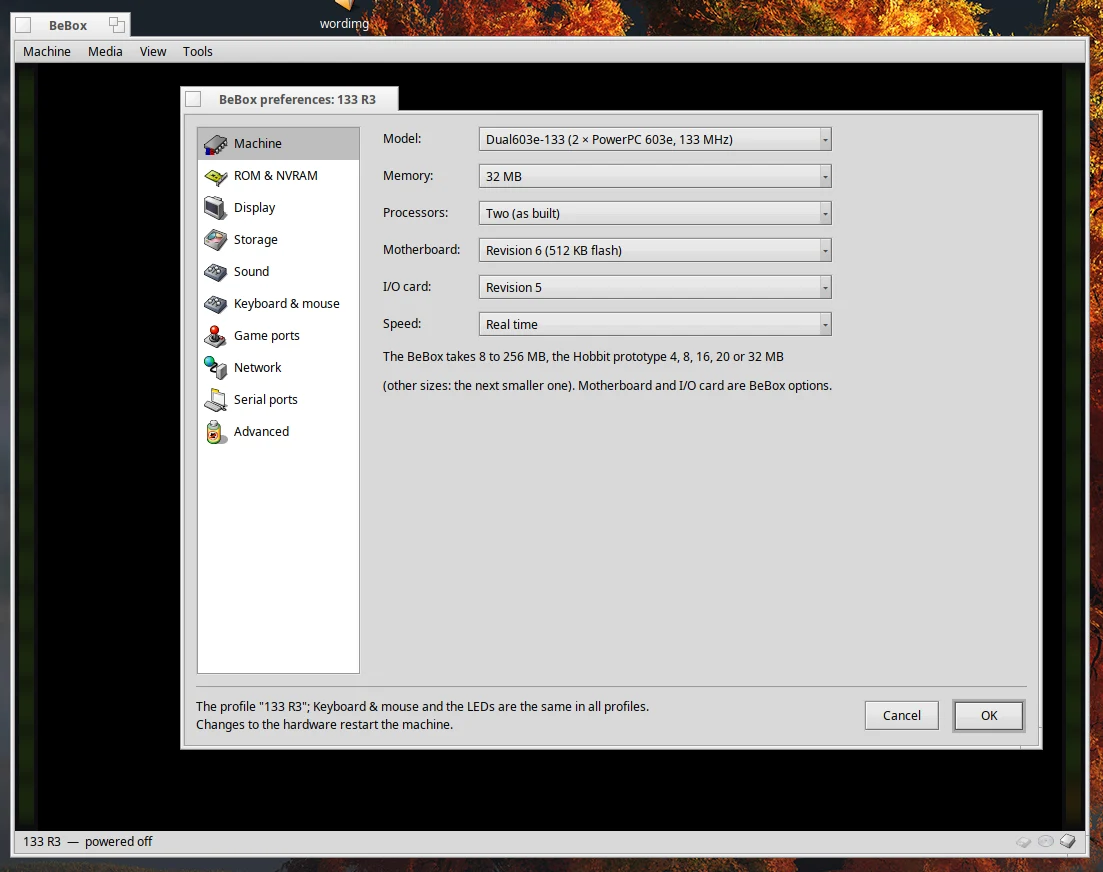
In the annals of computing history, few platforms command as much nostalgic reverence as the BeBox. Developed by Be Inc., the dual-processor machine served as the foundational hardware for the legendary BeOS—a multimedia-focused operating system that was years ahead of its time. Today, a new project for the Haiku operating system is breathing life into this dormant hardware, allowing enthusiasts and historians to run BeOS in its original, multi-processor glory through a sophisticated new application: BeBox.
Main Facts: A Digital Time Machine
The BeBox emulator is not merely a virtual machine; it is a dedicated piece of software engineering designed to replicate the unique architecture of Be Inc.’s original hardware. Built specifically for Haiku, the emulator allows users to run BeOS for PowerPC—spanning from the early Developer Release 6 (DR6) all the way through the final stable version, R5.0.3.
The emulator is remarkably comprehensive. It replicates both the classic Dual603-66 and the more powerful Dual603e-133 PowerPC models. Even more impressively, the project covers the "Hobbit" era—the rare 1993–1994 prototypes built around two AT&T Hobbit processors. By utilizing the original boot ROMs and disk images, the emulator offers a high-fidelity experience that captures the "blinkenlights" interface—the iconic dual columns of front-panel LEDs that provided a visual representation of CPU load, a hallmark feature of the original BeBox.
Chronology: From Hobbit Prototypes to R5.0.3
To understand the significance of this emulator, one must appreciate the trajectory of Be Inc. The journey began with the Hobbit prototypes. These machines were the testing grounds for the revolutionary BeOS kernel and its window server. Before the shift to PowerPC architecture, these Hobbit-based machines relied on the BeBus and three specialized AT&T DSP3210 signal processors.
Following the Hobbit phase, Be Inc. pivoted to the PowerPC architecture, leading to the release of the BeBox. This period saw the rapid evolution of BeOS through a series of Developer Releases (DR6, DR7, DR8) and eventually the "Preview Releases" (PR1, PR2) and the final retail versions (R3, R4.5, and R5).
The BeBox emulator maps this history through its "Profile" system. Recognizing that different versions of BeOS require specific hardware configurations, the emulator allows users to create isolated environments. Each profile stores unique settings, such as NVRAM, boot ROM state, and disk configurations, enabling seamless transitions between the experimental early builds and the polished final retail releases.

Supporting Data: Technical Capabilities and Limitations
The emulation core, written in portable C++17, is a testament to modern software craftsmanship. It currently supports a wide array of hardware features, including:
- CPU: Dual PowerPC 603/603e or AT&T Hobbit emulation.
- Storage: Support for raw and QCOW2 disk images, including thin provisioning.
- Networking: A functional Ethernet implementation (NE2000 compatible), allowing for standard TCP/IP networking within the emulated environment.
- Integration: Advanced shared folder functionality that allows users to map Haiku directories directly into the BeOS environment, simplifying file transfers and data persistence.
However, the emulator is still a work in progress. Notable omissions include the original parallel port, the famous "GeekPort" (a collection of I/O pins that made the original BeBox a favorite among hobbyists), MIDI, and infrared ports. On the Hobbit side, the three DSPs and their associated audio/modem subsystems remain unimplemented, though the system remains functional enough for users to explore the 1993-94 interface and software environment.
Official Context and Technical Nuance
While the software is incredibly capable, the developers are quick to note that the emulator is provided as a tool for interaction, not as a repository for copyrighted materials. The BeBox ROMs and the BeOS binaries themselves are not included; users must provide their own legally acquired images.

The project also provides a robust command-line utility, bebox-img, for managing disk images. This tool is vital for users navigating the archaic file systems of the early Hobbit era. Because early versions of BeOS cannot natively read the Hobbit’s proprietary file system, bebox-img serves as a bridge, allowing users to extract data, headers, and source code, which can then be shared with later, BFS-compatible versions of BeOS.
For power users, the emulator exposes a sophisticated scripting interface via the hey messaging system. Users can automate the emulation environment—controlling power states, triggering screen captures, monitoring CPU load (the "blinkenlights"), and even simulating keystrokes. This makes the emulator an ideal environment for automated testing and historical research.
Implications: Why Emulate a 30-Year-Old Machine?
The release of the BeBox emulator is more than just a nostalgic exercise. It represents a critical milestone in digital preservation. Much of the early software written for the BeBox was lost to the physical degradation of original hardware. By virtualizing these machines, the project ensures that the work of early BeOS developers—including the original source code, UI concepts, and kernel designs—remains accessible to researchers and hobbyists.

Furthermore, it serves as a bridge between two worlds: the defunct but beloved BeOS and the thriving, open-source Haiku. By running the emulator on Haiku, users are essentially nesting the legacy of Be Inc. within its spiritual successor.
The project’s architecture—modular, cross-platform, and scriptable—also sets a high bar for future emulation projects. By documenting the hardware design in the design/ folder, the authors have created an educational resource that demystifies the complex, multi-processor architecture of the 1990s.
Conclusion: The Legacy Continues
Whether you are a veteran of the BeOS era who remembers the glow of the dual-CPU LEDs or a newcomer interested in the history of alternative operating systems, the BeBox emulator offers a rare window into a "what if" moment in computing history.

As development continues, the emulator promises to bridge more gaps, potentially restoring the lost functionality of the GeekPort or the DSPs. For now, it stands as a robust, highly functional, and deeply respectful tribute to one of the most innovative hardware platforms ever built. To run the BeBox is to hold a piece of history in your hands—or rather, in your windows—proving that while hardware may become obsolete, the brilliance of its software design can endure indefinitely.
Technical Appendix: Getting Started
For those looking to dive in, the setup process is streamlined:
- Build: Ensure you have the necessary development headers (
haiku_devel,zlib_devel,libslirp_devel) on your Haiku system. - Configuration: Use the
BeBoxGUI to create a new profile for the target release (e.g., R5.0.3). - Mounting: Point the emulator to your CD ISO or disk image via the storage preferences.
- Booting: Initiate the boot sequence, and watch as the virtual front panel LEDs flicker to life, signaling that the BeOS kernel is once again ready to run.
With the release of this project, the BeBox finds a new, permanent home, shielded from the ravages of time and hardware failure, waiting for the next generation of users to boot it up and see what all the excitement was about.
 Sagoh
Sagoh  Pevita Pearce
  Layla Zulfa