
 By Laily UPN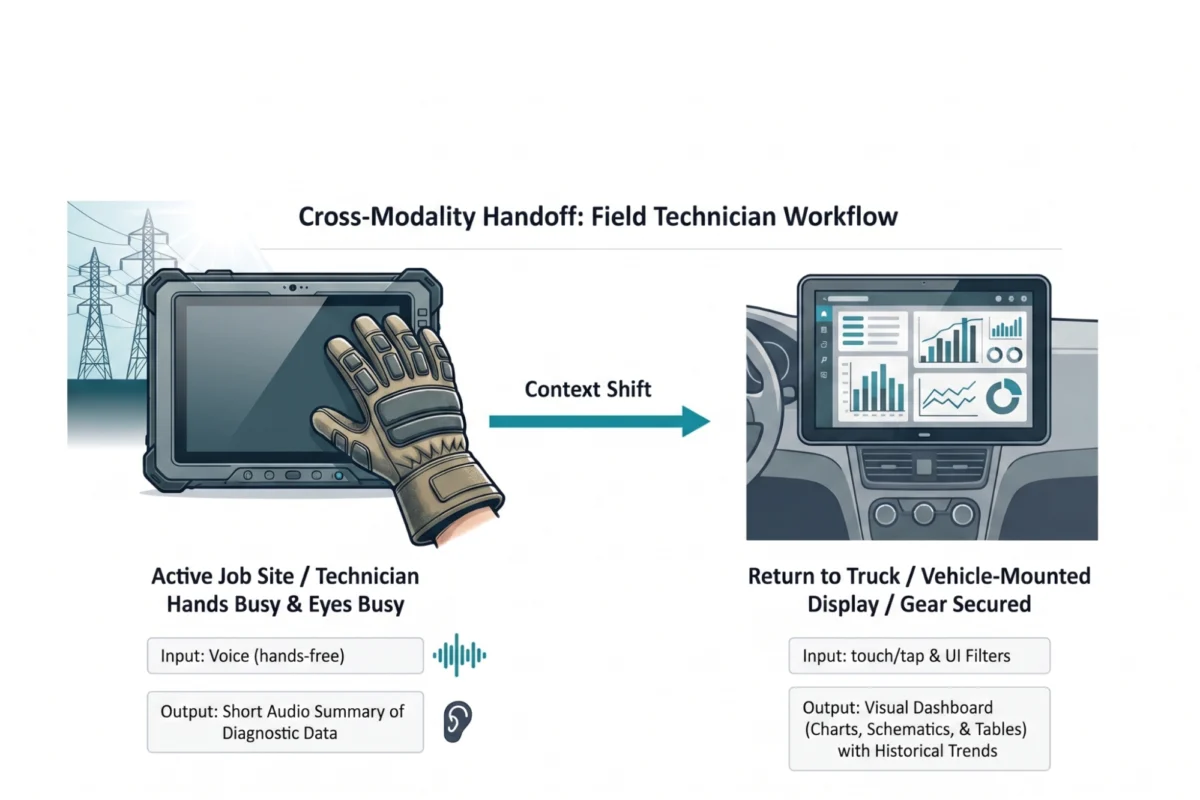
Main Facts: The Crisis of Modality in AI Design
The design community has entered a period of "conversational tunnel vision." Because Large Language Models (LLMs) are fundamentally trained on dialogue data, the tech industry has collectively, and perhaps prematurely, decided that the chat bubble is the natural home for every AI capability. While the chat interface is a powerful tool, it is increasingly being treated as the only tool. This reliance on text-heavy interaction is creating a significant rift between system capability and user experience (UX).
The core of the issue lies in modality—the way a person uses their senses (seeing, hearing, touching, speaking, or typing) to interact with a system. Great UX is about matching these modalities to a user’s specific context, intent, and cognitive load. When an interface fails to adapt to the user, the user is forced to adapt to the interface, resulting in what psychologists call "adaptation load"—a psychological tax paid when natural thought processes are distorted to accommodate a machine.
To move beyond the chatbot, product teams must adopt a rigorous approach to modality selection. This involves moving away from "chat-first" defaults and toward a framework that prioritizes the physical and cognitive realities of the user. Through tools like the Task Audit and the Input/Output Alignment Matrix, designers can ensure that AI tools serve as seamless extensions of human intent rather than barriers to it.
Chronology: From Graphical Interfaces to the Linguistic Barrier
The evolution of user interfaces has moved through distinct eras, each solving the problems of the last while introducing new constraints.
The Era of Recognition (GUI)
For decades, the Graphical User Interface (GUI) reigned supreme. It relied on recognition rather than recall. Users didn’t need to remember commands; they saw buttons, menus, and icons that signaled available actions. This lowered the cognitive barrier to entry for millions of people.
The Rise of the LLM and the "Blank Slate"
With the advent of high-performing LLMs, the industry shifted toward natural language. The allure of the chatbot was its perceived flexibility—a blank slate that could, in theory, handle any request. However, this "blank slate" reintroduced a problem the GUI had solved: choice paralysis. Without visual cues, users are forced to guess what the AI can do, creating a linguistic barrier where the user must become a "prompt engineer" just to perform basic tasks.
The Current Stagnation: Conversational Tunnel Vision
We are currently in a period where the novelty of chatting with an AI has masked the inefficiency of the medium. Product teams are defaulting to chat interfaces because they are easier to build and deploy, often ignoring the fact that for many professional tasks—such as data analysis, spatial scheduling, or creative editing—a text box is the least efficient input method available.
Supporting Data: The Cognitive and Physical Cost of Text
To understand why the chatbot often fails, we must examine the data regarding cognitive load and information processing.
Input: The Linguistic Barrier
Composing a prompt is a creative act that requires translating a vague thought into a specific, structured command. For many, this is a high-effort task.
- The Data Analyst: Instead of clicking a "filter" button (recognition), the analyst must describe complex logic in a sentence (recall and synthesis).
- The Manager: Dragging and dropping a calendar block is intuitive and spatial. Describing that shift in text adds a layer of "interpretive work" that makes the task feel more difficult than the manual alternative.
Output: Serial vs. Parallel Processing
The human brain processes different modalities at different speeds. Text is a serial medium; the brain must process one word after another to extract meaning. This is necessary for nuanced legal or medical analysis but disastrous for rapid decision-making.

- Visual Modalities: Allow for parallel processing. A user can spot a trend in a line graph or an outlier in a color-coded dashboard in less than a second.
- The Reading Assignment: When an AI responds to a simple status query with three paragraphs of text, it transfers the "interpretive work" to the user. The quick visual check is replaced by a reading assignment, increasing the "cognitive tax" on the professional.
The Airport Scenario: A Failure of Context
Consider a traveler in a loud airport. They are "hands-busy" (carrying bags) and "eyes-busy" (navigating crowds).
- Input Failure: The app forces them to type a 10-digit booking code into a tiny chat box while walking.
- Output Failure: Instead of a large, high-contrast gate number, the AI provides a narrative paragraph about weather patterns.
In this instance, the "smart" tool failed because its modality was misaligned with the user’s physical and cognitive state.
Official Responses: A New Standard for Task Auditing
Industry leaders and UX researchers are now calling for a formalized Task Audit before any interface design begins. This move represents an "official" pivot away from interface convention and toward evidence-based design. The audit focuses on four critical pillars:
- Physical Constraints: Is the user stationary or moving? Are their hands free? What is the lighting and noise level?
- Social Context: Is the user in a private office or a public space? Can they use voice commands without violating privacy or social norms?
- Cognitive Load: How much mental effort is already being expended? Does the user need a "glanceable" update or deep, analytical data?
- Fidelity Requirements: Does the task require a binary "yes/no" or a high-resolution interactive canvas for creative work?
The Modality Taxonomy
To standardize this process, the industry is adopting a shared vocabulary for interaction methods:
| Modality (Input) | Best For | Rationale |
|---|---|---|
| Button / Tap | Binary actions | Maximizes speed; eliminates recall. |
| Voice | Hands/Eyes-busy | Offloads physical interaction to speech. |
| Natural Language | Ambiguous queries | Offers freedom for exploratory tasks. |
| GUI (Sliders/Drag) | Spatial tasks | Prevents errors in complex parameter setting. |
| Gesture | Sterile/Hands-free | Allows interaction without surface contact. |
| Modality (Output) | Best For | Rationale |
|---|---|---|
| Push Notification | Ambient awareness | Processed at a glance; low distraction. |
| Audio Summary | Moving contexts | Keeps eyes on surroundings; high safety. |
| Visual Dashboard | Comparative analysis | Enables parallel processing of data trends. |
| Interactive Canvas | Generative tasks | Allows direct manipulation of AI output. |
Case Study: Adaptive Modality for High-Voltage Field Technicians
A compelling example of this framework in action is found in the utility sector. Field technicians servicing high-voltage electrical grids face some of the most extreme "hands-busy, eyes-busy" environments in existence.
The Problem
Technicians traditionally used ruggedized tablets to access manuals. However, wearing heavy protective gloves made touchscreens unusable. Furthermore, reading dense text while balanced in a bucket truck created a dangerous level of cognitive distraction.

The Research
A Task Audit revealed that technicians needed Glance Verification. They didn’t need a narrative description of a fault; they needed to know if a line was safe to touch. Focused interviews confirmed that screen glare from direct sunlight often rendered text-heavy reports unreadable.
The Resolution: The Multi-Modal Handoff
The solution was an adaptive system that shifts modality based on the technician’s location:
- On the Job Site: The technician uses Voice Input and receives Audio Output. This allows them to keep their hands in their gloves and their eyes on the high-voltage wires. The AI provides short, spoken summaries of diagnostic data.
- In the Vehicle: Once the technician returns to the truck, the system automatically "hands off" the data to a 15-inch Visual Dashboard. This allows for the parallel processing of complex schematics and historical trends that were impossible to digest via audio.
Results: This context-aware approach reduced diagnostic time by 20% and significantly increased safety compliance and tool adoption among veteran crews.
Implications: The Future of Ambient and Context-Aware AI
The shift away from conversational tunnel vision has profound implications for the future of technology.
1. The Rise of Ambient Computing
As we move past the chat box, AI will become more "ambient"—operating in the background and providing information through the most efficient channel possible (haptic pulses, audio cues, or augmented reality overlays) without demanding a break in the user’s primary concentration.

2. Accessibility as a Default
Designing for different modalities is fundamentally an exercise in accessibility. By providing multiple pathways to information—such as audio alternatives for visual dashboards—designers create products that are more resilient and inclusive for users with disabilities.
3. The Psychological Well-being of the User
By reducing the "adaptation load," we can mitigate the mental fatigue associated with modern software. When a tool feels like a natural extension of a user’s work, it reduces anxiety and increases the likelihood of long-term adoption.
4. A Call to Action for Designers
The design brief of the future is not found on a screen; it is found in the field. Designers must leave their desks and observe work where it happens—in the warehouse, the operating room, and the airport terminal. The physical and social realities of these spaces are not "edge cases"—they are the core requirements of successful AI implementation.
In conclusion, an AI model is only as brilliant as the interface that delivers its insights. If we continue to package world-changing intelligence in lazy, text-only interfaces, we will continue to fail our users. The future of AI is multi-modal, context-aware, and human-centric. It is time to close the chat window and open our eyes to the environment.
 Nana Wu
  Nana
Nana 