
 By Nana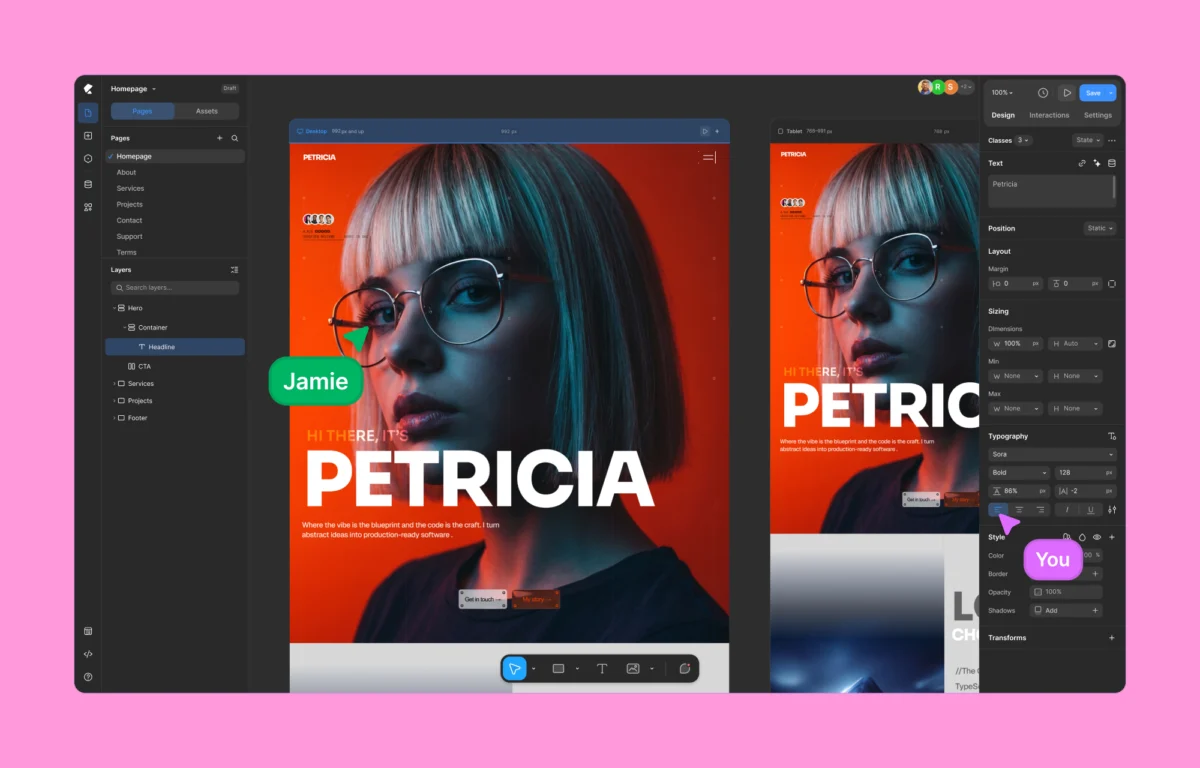
For over a decade, building a WordPress website without writing code has meant working within strict operational boundaries. Traditional page builders popularized the drag-and-drop paradigm, transforming the web development landscape by democratizing design. However, this accessibility historically came with a heavy technical debt: rigid box layouts, an over-reliance on third-party plugins, heavily nested DOM structures, and bloated code output that directly impacts site performance, SEO, and Core Web Vitals.
Enter Kirki, a next-generation, no-code visual website builder that disrupts traditional WordPress workflows. Featuring a freeform infinite canvas, native dynamic content management, real-time multi-user co-editing, and a zero-plugin dependency architecture, Kirki positions itself not merely as an alternative to legacy tools, but as a fundamental reimagining of how WordPress sites are conceptualized, built, and optimized.

The Evolution of WordPress Page Building: A Chronology of Limitations
To understand the industry significance of Kirki, it is necessary to examine how WordPress site building has evolved:

- The Early Era (Pre-2015): Development relied almost exclusively on custom-coded themes, complex child-theme hierarchies, and early framework generators. Customizing a layout required direct interventions in PHP, CSS, and HTML.
- The Boxed Builder Boom (2015–2020): Tools like Elementor, WPBakery, and Divi emerged, introducing row-and-column systems. While efficient for rapid prototyping, these platforms forced developers to house elements inside rigid grids, leading to excessive HTML markup and slow script execution.
- The Component & Design System Era (2020–Present): Modern UI/UX workflows pioneered by standalone software like Figma and Webflow set a higher standard for layout flexibility, class-based styling, and vector-like precision. WordPress users increasingly demanded similar freedom without abandoning the CMS’s powerful blogging and plugin ecosystem.
- The Kirki Paradigm Shift: By introducing an infinite canvas, side-by-side responsive editing, and an all-in-one feature set, Kirki bridges the gap between modern standalone design tools and the world’s most popular content management system.
Performance Auditing: Kirki vs. Legacy Builders
Performance is no longer a secondary metric; it dictates search engine rankings, bounce rates, and overall user conversion. To evaluate how Kirki performs against established tools, recent benchmark tests pitted Kirki against Elementor under identical, controlled test conditions.

Test Environment Parameters
- CMS Setup: Clean, fresh installation of WordPress.
- Theme: Default Twenty Twenty-Five theme.
- Test Layout: Identical modern landing page structure featuring hero sections, feature grids, testimonial sliders, and call-to-action blocks.
- Benchmarking Tools: Google Lighthouse audits measuring load time, interactivity, and Core Web Vitals.
The Findings: Code Output and Speed
The performance audit revealed a stark contrast in technical efficiency:

- DOM Complexity: Kirki generated a streamlined, semantic HTML structure with minimal wrapper elements and a significantly lower count of
<div>tags. Elementor’s output, by contrast, featured deeply nested markup and auxiliary JavaScript wrappers, even on a basic layout. - Core Web Vitals: Kirki consistently outscored the competitor across performance metrics, exhibiting faster First Contentful Paint (FCP) and lower Total Blocking Time (TBT).
- The Verdict on Efficiency: For developers and agencies prioritizing technical hygiene and SEO optimization, Kirki’s lightweight code output delivers a measurable advantage.
Core Architectural Features of Kirki
Kirki’s feature set is built around eliminating the traditional bottlenecks of WordPress development. Rather than acting as a simple visual skin over WordPress, the platform integrates heavy-duty design and development features natively.

1. The Freeform Infinite Canvas
Moving away from rigid rows and columns, Kirki provides an infinite canvas environment. Designers can pan freely, zoom in and out, place elements with absolute or flexible positioning, overlap design sections, and handle complex layer management visually. For users transitioning from Figma or Webflow, the learning curve is minimal.

2. Concurrent Multi-Device Responsive Editing
Responsive design is traditionally handled by toggling between desktop, tablet, and mobile viewing modes—a process that often breaks layout flows. Kirki introduces concurrent, side-by-side editing across all responsive viewports simultaneously. Adjustments cascade intelligently down smaller breakpoints, minimizing repetitive styling tasks.

3. Native Dynamic Content Management
Historically, dynamic data binding in WordPress required third-party plugins such as Advanced Custom Fields (ACF). Kirki incorporates a native Dynamic Content Manager, allowing users to bind custom post types, taxonomy fields, and user data directly to visual elements without external dependencies or custom coding.

4. Class-Based Styling and Global CSS Variables
Borrowing best practices from modern CSS architecture, Kirki utilizes a class-based styling system. Edits applied to an element propagate automatically across assigned classes. Combined with Global CSS Variables, users can establish master design tokens (colors, typography scales, spacing units) that govern the entire site architecture.

5. Visual Interaction and Timeline-Based Animation
Going beyond basic hover states, Kirki features a timeline-based animation editor. Creators can build complex, scroll-triggered interactions, motion paths, and granular text animations (by character, word, or block) directly within the interface without relying on third-party animation libraries.

6. Real-Time Team Co-Editing and Quality Control
Addressing the needs of agencies and collaborative teams, Kirki implements real-time multi-user co-editing. Team members can view live cursor movements, leave pinned comments directly on canvas elements, and track edits concurrently. Furthermore, a built-in Page Audit tool scans layouts for broken links, missing alt text, and accessibility vulnerabilities prior to publication.

Pricing Models and Accessibility
Kirki offers a transparent pricing structure designed to appeal to freelancers, agencies, and enterprise users alike:

- The Free Version: Available directly from the WordPress.org repository, the free tier is remarkably robust, enabling users to build modern websites on an infinite canvas without financial barriers.
- Starter Plan: Priced at $59 per year for a single site, this tier unlocks all premium features, including dynamic content, the pop-up builder, form management, and the template library.
- Lifetime Plan: Available for a one-time fee of $499, offering unlimited lifetime access and updates without recurring renewals.
Unlike competitors that lock advanced features behind tiered upsells or require auxiliary plugin purchases, Kirki bundles its entire ecosystem into every Pro plan from day one.

Implications for the WordPress Ecosystem
The introduction of tools like Kirki signals a mature phase in the WordPress plugin economy. As users increasingly expect the fluidity of modern SaaS design applications (such as Framer and Webflow) within self-hosted environments, legacy builders face mounting pressure to modernize their core codebases.

For professional web designers, developers, and business owners, Kirki offers a compelling value proposition:

- For Designers: Unrestricted visual freedom and a seamless Figma-to-WordPress import workflow.
- For Developers: Clean, semantic code output, global CSS variables, and the ability to inject custom JavaScript/CSS when needed.
- For Business Owners: Lower plugin bloat, faster page speeds, enhanced SEO performance, and a lower total cost of ownership through all-in-one pricing.
Official Response and Community Reception
Initial industry reactions have positioned Kirki as a watershed moment for WordPress architecture. Early adopters and community reviewers have praised the platform for successfully bridging the gap between no-code simplicity and developer-grade performance.

While learning a new layout paradigm requires a brief adaptation period for developers accustomed to traditional boxed builders, the long-term efficiency gains in speed, code quality, and workflow continuity have established Kirki as a serious contender in the modern CMS landscape.

Conclusion
Kirki successfully challenges the compromises that WordPress users have navigated for years. By pairing an infinite canvas and real-time collaboration with clean code output and native dynamic content, it redefines what is possible within a self-hosted content management system.

Whether you are seeking to optimize your site’s Core Web Vitals, eliminate plugin clutter, or achieve pixel-perfect design control, Kirki provides a future-proof foundation for the next generation of web development.
 Nana Wu
  Lina Irawan
  Asep Darmawan