In the fast-paced ecosystem of modern technology, a familiar pattern repeats itself every few months: a fresh wave of digital tools is unveiled, heralded by industry pioneers as the ultimate silver bullet designed to revolutionize our daily workflows. We are constantly told that we are just one app download, one complex terminal command, or one dazzling chatbot interface away from peak productivity. Yet, behind the gleaming marketing copy and the venture capital enthusiasm, a quiet fatigue is setting in among everyday users.
The core issue facing modern software design is not a scarcity of tools; rather, it is an overabundance of them. Users do not lie awake at night wishing they had yet another standalone dashboard to monitor, another login credential to manage, or another browser tab to juggle. What they desperately need—and what successful products are finally beginning to deliver—are seamless integrations of powerful capabilities that align with established human mental models.
This paradigm shift moves away from loud, disruptive "AI-first" architectures and leans instead toward "Quiet AI": contextual, invisible assistants embedded directly where the actual work happens.
1. The Main Facts: Redefining Value in Software Design
The modern knowledge worker’s day is characterized by fragmentation. Constantly switching between multiple applications, views, and data sources every few minutes destroys focus, slows down production, and dramatically increases the margin for error.
To combat this, the tech industry is being forced to re-evaluate how artificial intelligence is delivered. Instead of forcing users to adapt to disruptive, novel workflows—such as constantly prompting chat interfaces or executing specialized command-line scripts—designers are looking at how AI can be injected natively into existing environments.
The Fatigue of More: Users do not experience an emotional spike when introduced to "smart" workflows that require a steep learning curve. They care about high-severity, high-frequency, and high-frustration bottlenecks.
The Rise of Quiet AI: Rather than demanding constant attention, Quiet AI acts as an invisible background assistant. It handles repetitive, mundane tasks autonomously or semi-autonomously without demanding validation at every turn.
Contextual Presence: Prime examples of this philosophy include Claude’s deep integrations within traditional powerhouse productivity suites like Microsoft Excel, Word, and PowerPoint. Users can analyze specific data rows, summarize notes, or draft content directly within the native application, eliminating the friction of context switching.
2. Chronology of a Paradigm Shift: From Standalone Chatbots to System-Level Integration
To understand how we arrived at the current era of seamless integration, it helps to trace the chronological evolution of artificial intelligence in consumer and enterprise software over the past several years.
Phase 1: The Novelty Era and Standalone Chatbots (2022–2023)
Following the widespread public release of generative pre-trained transformers, the initial market reaction was defined by standalone web wrappers and dedicated chat interfaces. Users were expected to open a separate browser tab, copy-paste data out of their working documents, craft complex prompts, and paste the results back into their original applications. While technologically impressive, this back-and-forth interaction model imposed a heavy cognitive tax, treating AI as a destination rather than a capability.
Phase 2: The "AI-First" Overcorrection (2023–2024)
As software developers rushed to capitalize on the trend, the market saw a flood of "AI-first" products. Entire applications were built from the ground up assuming that users wanted to interact primarily with a conversational agent. However, these platforms frequently ignored decades of established human-computer interaction (HCI) research and UI design patterns. Users were forced to unlearn deeply ingrained muscle memory—such as file hierarchies, keyboard shortcuts, and visual document manipulation—in favor of conversational syntax.
Phase 3: The Integration and Quiet AI Era (Present)
Recognizing the friction of standalone tools, product designers and UX architects began shifting toward context-aware, system-level integrations. Rather than building new tools, developers began embedding intelligence directly into existing file systems, operating systems, and productivity suites. This brings us to contemporary innovations like system-level folder instructions, allowing artificial intelligence to operate transparently behind the scenes of everyday file management.
3. Supporting Data and UX Case Studies
Evaluating the success of digital products requires looking closely at user friction metrics, context-switching penalties, and cognitive load theories.
The Cost of Context Switching
According to workplace productivity research, knowledge workers toggle between different apps and websites nearly 1,200 times a day, wasting up to four hours a week just re-orienting themselves after a distraction. When AI tools are sequestered in separate applications, they contribute directly to this fragmentation rather than alleviating it.
Case Study: Folder Instructions for System-Level AI
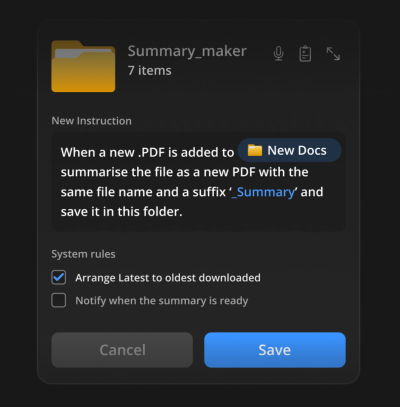
A compelling illustration of Quiet AI in action is the concept of "folder instructions" popularized by UX designer Karthikeya GS. Instead of requiring users to open a dedicated summarizing app or write custom scripts every time they handle documents, this pattern embeds intelligence directly into the file system.
Intent-Driven Architecture: Users can define what a specific directory is supposed to do based on its real-world purpose—such as a folder dedicated to a "Passport Application" or a "PDF Summary Repository."
Localized Automation: The folder instructions dictate how files placed inside should be organized, processed, summarized, or sub-categorized.
Scoped Permissions: Crucially, these capabilities operate locally and transparently within the boundaries defined by the user, respecting existing mental models of how files and folders have behaved on personal computers for decades.
By turning passive directories into active, rule-following assistants, the software delivers immediate value without forcing the user to learn a new interface.
4. Official Responses and Industry Perspectives
UX designers, human-computer interaction researchers, and product strategists are increasingly vocal about the need to curb the proliferation of redundant software.
"We often hear about shiny new tools that change everything. But in practice, most people don’t need more tools to deal with in their daily lives. What we actually need are better integrations of useful capabilities that neatly align with our existing and established mental models."
— Vitaly Friedman, UX Consultant and Educator
Industry leaders note that the greatest barrier to software adoption is rarely a lack of powerful features; it is the cognitive overhead required to integrate those features into an already crowded daily routine. When technology companies prioritize "AI-first" branding over human-centric design, they risk alienating users who simply want to complete their tasks with minimal resistance.
Furthermore, enterprise feedback indicates that IT administrators and security teams are growing wary of sprawling toolsets. Solutions that operate natively within trusted ecosystems (such as Microsoft Office or standard operating system file managers) face significantly less friction during procurement and deployment compared to standalone applications that require independent security audits and data-sharing agreements.
5. Implications for the Future of Product Design
The movement away from isolated AI applications and toward quiet, integrated utilities carries profound implications for software developers, product designers, and consumers alike.
For Product Designers
The role of the UI/UX designer is pivoting away from inventing novel interaction paradigms and toward mastering the art of the invisible interface. Success will no longer be measured by how flashy or conversational a chatbot interface looks, but by how naturally capabilities blend into existing workflows. Designers must study established mental models deeply before attempting to augment them.
For Software Developers
Engineering teams must shift focus from building standalone platforms to creating robust, secure APIs and modular plugins that can be injected into the software environments users already inhabit. Building the next big app is no longer the primary challenge; building interoperable components that reduce user fatigue is the ultimate goal.
For Enterprise Buyers and Consumers
Organizations will likely tighten their purses regarding standalone subscriptions, favoring software ecosystems that natively incorporate smart, background automation. Users can look forward to a cleaner digital landscape—one where technology works quietly in the background, reducing errors, eliminating repetitive administrative chores, and respecting the habits formed over years of digital interaction.
Meet "Design Patterns For AI Interfaces"
For professionals looking to dive deeper into crafting intuitive, human-centered digital experiences, industry veteran Vitaly Friedman has released Design Patterns For AI Interfaces.
This comprehensive video course features hundreds of real-life examples, practical case studies, and actionable UX guidelines designed to help product designers build artificial intelligence features that people genuinely want to use. The curriculum bridges the gap between raw technological capability and thoughtful interface design.
What’s Included: Hundreds of real-world examples, deep dives into UX patterns, and strategic guidelines for modern applications.
Live Training: A companion live UX training workshop is scheduled for later this year.

 By Nana Wu




 Nana
Nana  Lina Irawan