
 By Asro
In the relentless march of technological innovation, a recurring narrative plagues the software industry: the promise that yet another standalone tool will fundamentally revolutionize daily productivity. Whether it is a flashy "smart" workspace, a complex command-line interface, or a conversational agent demanding endless back-and-forth chat interactions, the tech ecosystem is saturated with solutions looking for problems.
However, a critical misalignment exists between what tech developers build and what users actually require. Modern knowledge workers do not wake up wishing they had more applications to juggle. They do not want to spend their mornings context-switching between a dozen disparate browser tabs, copying and pasting data from one proprietary ecosystem to another.
Instead, the modern user craves seamless integration—the deployment of useful, high-impact capabilities that slip quietly into already established mental models. As artificial intelligence reshapes software design, the industry is reaching a tipping point. The true measure of a successful AI implementation is no longer how loudly it announces its presence, but how invisibly it solves high-severity, high-frequency, and high-frustration problems right where the work is already happening.
Main Facts: The Paradigm Shift to Invisible AI
At the core of this UX revolution is a fundamental rejection of the "AI-first" dogma that has dominated venture capital and product roadmaps over the last few years. While AI-first products excel at accelerating raw production, they frequently ignore decades of delicate, iterative design decisions that have shaped how humans naturally interact with computers.
- The Fatigue of Tool Overload: Users are suffering from software fatigue. Introducing standalone AI apps adds to the cognitive load of learning, managing, and maintaining multiple subscriptions and interfaces.
- The Rise of "Quiet AI": The most effective artificial intelligence tools are invisible. They operate in the background, handling repetitive, mundane tasks without demanding constant human supervision or attention.
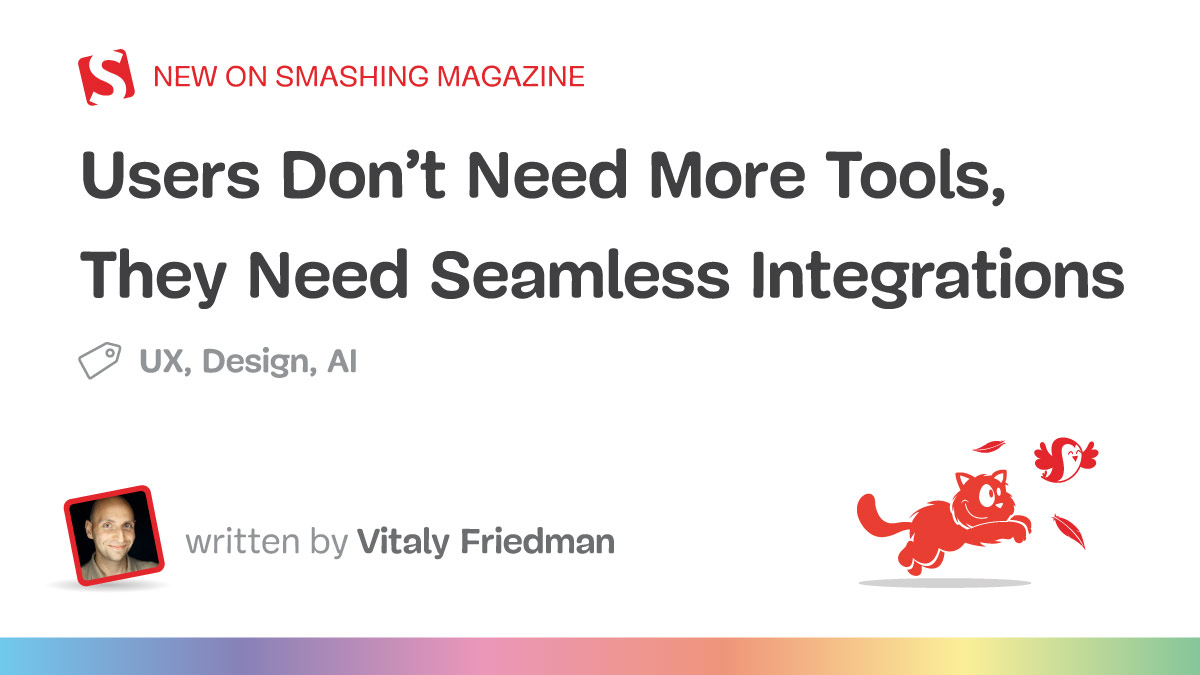
- Contextual Presence: Rather than forcing users to navigate to a separate chat interface, successful integrations—such as embedding intelligence directly into spreadsheet cells or file directories—bring capabilities directly to the point of action.
- Mental Model Alignment: Good UX respects established habits. By anchoring automation to familiar paradigms (like folders and files), systems can introduce complex AI behavior without steep learning curves.
Chronology: How We Got Here
To understand why the software industry is pivoting away from standalone applications toward integrated environments, it is helpful to trace the evolution of productivity tools over the past two decades.
Phase 1: The Fragmentation Era (2010s)
As cloud computing matured, software unbundled. Instead of monolithic suites like Microsoft Office handling everything, specialized Software-as-a-Service (SaaS) startups emerged. Suddenly, teams had dedicated tools for project management, note-taking, team communication, customer support, and calendar management. While this allowed best-of-breed software choices, it birthed the modern crisis of context-switching.
Phase 2: The Generative AI Gold Rush (2022–2024)
Following the public explosion of large language models (LLMs), the market flooded with "AI-first wrappers." Thousands of startups launched standalone chat interfaces, AI writing assistants, and prompt-engineering platforms. Users were expected to open a separate browser tab, paste their raw data into a chat box, copy the output, and paste it back into their actual work environment. Friction remained extraordinarily high.
Phase 3: The Integration and "Quiet AI" Movement (Present Day)
Recognizing that users resist leaving their primary workflows, platform giants and forward-thinking designers began embedding AI natively into legacy environments. The focus shifted from "What amazing things can this AI do on its own?" to "How can AI silently eliminate friction inside Excel, Word, and system-level file managers?"

Supporting Data and Industry Observations
The shift toward quiet, integrated AI is backed by shifting user behaviors and design psychology. When given a choice between a powerful standalone application and a modest capability built directly into their existing software, users consistently favor the latter for daily tasks.
Case Study: Claude’s Integration in Microsoft Office
A prime example of this philosophy in action is the integration of advanced language models directly into enterprise staples like Microsoft Excel, PowerPoint, and Word. Instead of forcing an analyst to export data into a separate web application, parse it via prompt engineering, and re-import the findings, tools like Claude allow users to analyze specific rows and columns in situ.
The cognitive load drops to near zero. The user stays within the familiar matrix of the spreadsheet, maintaining their mental model of how data relates, while the AI performs heavy lifting behind the scenes.
Case Study: System-Level AI and Folder Instructions
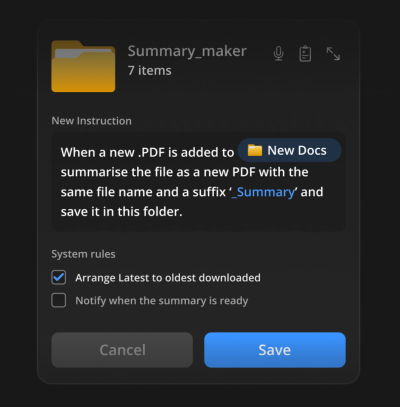
Another breakthrough in quiet UX is the concept of Folder Instructions. Conceptualized by designers exploring system-level AI (such as Karthikeya GS in pioneering UX frameworks), this pattern allows users to assign specific operational rules directly to standard operating system folders.

Rather than opening a separate automation dashboard, a user can right-click a folder labeled "Passport Application" or "PDF Summaries," input plain-text instructions, and let the system execute rules automatically as files are dropped in.
- Local Scoping: Permissions and automated actions remain localized to that specific directory.
- Intent-Driven Design: The user defines the purpose once; the system executes it continuously without requiring ongoing manual intervention.
- Zero New Habits: Because it leverages the centuries-old mental model of the computer "folder," the feature requires virtually zero onboarding.
Official Responses and Expert Perspectives
Industry leaders and UX educators have begun speaking out against the trap of over-engineered AI products.
"I’ve always been puzzled by the notion of ‘AI-first’ products," notes Vitaly Friedman, renowned UX consultant and instructor of Design Patterns For AI Interfaces. "They might speed up production, but we need to know really well first what we actually want to build. AI-first often doesn’t account for years of small and big design decisions that have shaped expectations and mental models over the years."
Friedman advocates passionately for Quiet AI—systems that sit quietly in the background, executing micro-tasks without demanding a standing ovation for every minor output.

Enterprise software vendors are listening. Product roadmaps across Silicon Valley are pivoting away from building "the next big dashboard" toward API integrations that allow AI engines to dissolve into existing enterprise fabrics like Salesforce, Slack, and operating system file explorers. The consensus among top-tier product designers is clear: the best interface is no interface at all, but rather an invisible enhancement of the tools people already know how to use.
Implications for the Future of Software Design
The transition from standalone AI apps to quiet, integrated workflows carries profound implications for product managers, designers, and software developers alike.
1. The Death of the Feature-Heavy Standalone App
Startups whose entire value proposition relies on a generic wrapper around a foundational LLM face an existential threat. If a capability can be easily ingested into an incumbent platform (like Microsoft, Google, Apple, or Adobe), users will rarely pay for or maintain a separate subscription for it.
2. UX Complexity Shifts from UI to Intent Architecture
Designing for Quiet AI requires a different skill set. Designers must focus less on building flashy button layouts and more on intent architecture—how users communicate rules, boundaries, and permissions to background systems safely and intuitively.
3. Productivity Reclaimed
Ultimately, the reduction of friction directly translates to fewer errors, less mental fatigue, and reclaimed hours for knowledge workers. When software stops screaming for attention and simply starts doing what is asked of it within familiar environments, technology finally begins to serve human beings, rather than demanding human beings serve the technology.
Brought to you by Design Patterns For AI Interfaces, a comprehensive video course featuring hundreds of real-life examples and UX guidelines designed to help creators build AI features that people actually want to use.
 Azzam Bilal Chamdy
  Nila Kartika Wati
  Evan Lee Salim