
 By Nana
By Smashing Editorial
Published: Special UX Industry Report
Executive Summary: The Tool Fatigue Epidemic
We live in an era of relentless software saturation. Every week brings a chorus of announcements promoting revolutionary applications, hyper-intelligent workflows, complex Terminal command-line tricks, and endless back-and-forth chat interfaces designed to change how we work. Yet, beneath the veneer of technological progress, a quiet fatigue has settled over the digital workforce.
Users do not wake up wishing for more icons on their desktops, more login credentials to memorize, or more standalone dashboards to monitor. They are exhausted by context-switching.
The core thesis emerging across modern UX design is strikingly simple: people do not need more tools in their daily lives. What they desperately need are seamless integrations of useful features that match established mental models—capabilities that solve high-severity, high-frequency, and high-frustration problems right where the work is already happening.
1. Main Facts: The Shift from ‘AI-First’ to ‘Quiet AI’
The digital product landscape is currently divided by a fundamental philosophical split: the loud, intrusive "AI-First" paradigm versus the subtle, contextual approach known as "Quiet AI."
The Pitfalls of "AI-First" Thinking
For the past few years, the tech industry has been fixated on "AI-First" product development. While these tools often speed up raw production, they frequently suffer from a critical flaw: they ignore decades of accumulated design decisions, user habits, and established mental models. Forcing users to abandon familiar environments to interact with a standalone chatbot or a brand-new interface creates friction. It treats AI as a destination rather than an enabler.
The Rise of "Quiet AI"
By contrast, "Quiet AI" champions invisibility. These systems operate quietly in the background, executing small, repetitive, and cognitively draining tasks on the user’s behalf. They do not demand attention with flashing lights or intrusive pop-ups; instead, they integrate cleanly into existing software ecosystems.
Prime examples of this philosophy include Claude’s deep integrations within Microsoft Excel, PowerPoint, and Word. Rather than forcing an analyst to export data into a separate web browser window, upload a CSV, and converse with a chatbot, Quiet AI brings analytical capabilities directly into the spreadsheet cells where the user is already working.

[Traditional Workflow]  -->  Export Data  -->  Open Browser  -->  Upload CSV  -->  Chat Interface  -->  Copy/Paste Back
[Quiet AI Workflow]     -->  Direct In-Context Assistance (Excel/Word/Folders)
2. Chronology: How We Arrived at System-Level Automation
To understand where interface design is heading, it helps to examine the chronological evolution of software interaction over the last four decades:
- The Command-Line Era (1970s–1980s): Users interacted directly with the operating system via text commands. High cognitive load, steep learning curves, but immense direct control.
- The Desktop Metaphor (1980s–2000s): Graphical User Interfaces (GUIs) introduced folders, documents, and trash cans. This revolutionized computing because it mapped digital actions directly onto physical, real-world mental models (e.g., storing paper inside a manila folder).
- The Cloud & SaaS Explosion (2010s–Early 2020s): Software fragmented across hundreds of browser-based web apps. While collaboration improved, users suffered from extreme application sprawl, juggling dozens of tabs and disconnected platforms.
- The Generative AI Boom (2022–2024): Standalone chat interfaces dominated the market. Users were given powerful engines trapped inside conversational chatboxes, requiring constant copy-pasting between disparate applications.
- The Era of Seamless Integration (Present Day): Design is pivoting back to system-level integration. Instead of building new apps, AI is being embedded directly into the foundational layers of operating systems and office suites—such as smart folders and in-app assistants.
3. Supporting Data & Innovations: Folder Instructions for System-Level AI
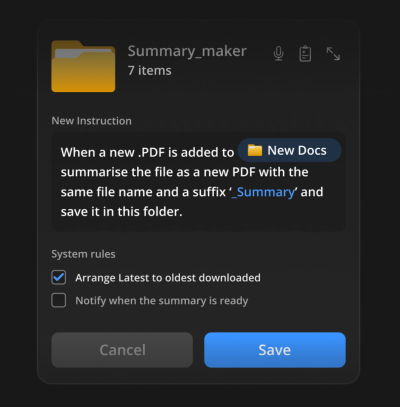
A brilliant manifestation of this modern integration philosophy is the concept of Folder Instructions for System-Level AI (pioneered by designers like Karthikeya GS).
Rather than requiring users to manually organize files or open an AI app to summarize a stack of documents, this pattern embeds intelligence directly into the file system architecture.
How Folder Instructions Work
Users can define specific behavioural rules and intentions directly upon creating a folder. For instance:

- The Passport Application Folder: A user creates a folder for an upcoming renewal. They set system rules: "Automatically scan uploaded PDFs for missing documents, verify photo dimensions against government guidelines, and draft a checklist of remaining requirements."
- The PDF Summary Folder: A user configures a research directory so that any academic paper dropped inside automatically generates a concise three-bullet executive summary text file alongside it.
These actions happen locally and contextually. The system takes care of the mundane overhead based on intent established once by the user, respecting existing mental models of file hierarchy without requiring the user to learn a brand-new software suite.
4. Industry Responses and Expert Perspectives
Leading UX designers, enterprise architects, and product strategists are increasingly speaking out against tool proliferation, urging a return to user-centric, frictionless design principles.
"User value doesn’t emerge from forcing people to juggle multiple applications, views, and sources every few minutes. That’s when they are slowed down, and that’s when they make critical mistakes. Value comes from helping users do the actual work by reducing friction, eliminating slowdowns, and automating the tasks that otherwise demand too much manual effort."
— Vitaly Friedman, UX Consultant and Creator of Design Patterns For AI Interfaces
Industry feedback loops indicate that enterprise clients are becoming increasingly resistant to "shelf-ware"—software tools that employees are forced to adopt but ultimately abandon due to context-switching fatigue. The mandate from procurement teams is clear: integrate into our existing stack or do not bother pitching.

5. Implications for the Future of Product Design
The shift toward quiet, integrated AI carries profound implications for product managers, UX designers, and software developers alike.
1. The Death of the Standalone Dashboard
As AI capabilities become commoditized and embedded into operating systems and core enterprise software (like Microsoft 365, Google Workspace, and macOS/Windows file systems), standalone utility apps face an existential threat. If a feature can be accomplished via a system-level instruction inside a folder or spreadsheet, users will reject software that requires a separate login.
2. Redefining UX Success Metrics
Product success will no longer be measured by "Daily Active Users (DAU) spent inside our proprietary app." Instead, the new metric of success will be friction reduction—how quickly and invisibly a system helps a user complete a task within their primary workflow environment.
3. Training the Next Generation of Designers
Educational frameworks must adapt. Designers must move beyond wireframing isolated screens and learn how to design system-level behaviors, contextual triggers, and invisible assistance models. This exact need inspired comprehensive educational initiatives like Design Patterns For AI Interfaces, a video course and training program equipping designers with hundreds of real-world patterns to build features people actually incorporate into their routines.
Conclusion
The digital workspace does not need another shiny object. It needs calm, capable, and quiet systems that respect human cognition. By focusing on seamless integration, honoring established mental models, and leveraging paradigms like folder instructions and in-context AI assistants, product designers can finally deliver on the true promise of technology: making our lives easier, not more complicated.
Brought to you by Design Patterns For AI Interfaces, a friendly video course on UX and interface design patterns by Vitaly Friedman. Explore real-life examples, guidelines, and upcoming live training workshops.
 Iffa Jayyana
  Azzam Bilal Chamdy
  Nila Kartika Wati