
 By Iffa Jayyana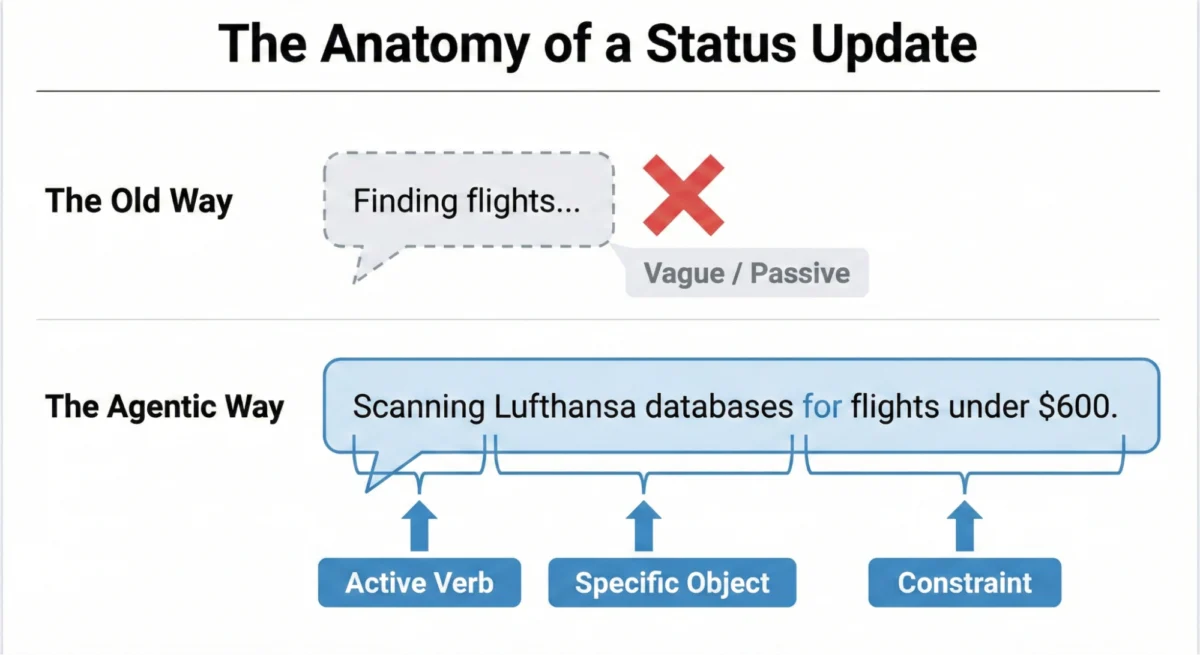
By Smashing Editorial
As artificial intelligence evolves from passive, query-response chat windows into proactive, autonomous agents capable of executing complex multi-step workflows, the design paradigms that have governed digital interfaces for the past three decades are rapidly fracturing.
In the first part of this series, we examined the Decision Node Audit—a methodological approach used to map out the internal logic of an AI system and isolate the probabilistic moments that require systemic transparency. Yet, identifying when an AI needs to be transparent is only half the battle. Once your Transparency Matrix is defined and engineering teams are aligned on backend API triggers, the ultimate challenge emerges: How do we visually and textually communicate this complexity to the user?
We are currently burdened by a legacy design problem. For thirty years, interface designers have relied on a singular, ubiquitous pattern to handle latency and system processing: the spinner. Whether it is a spinning wheel, a pulsing throbber, or a linear progress bar, these legacy patterns communicate a very specific technical reality. They tell the user that the system is retrieving data from a server, and that the delay is merely a byproduct of bandwidth constraints or file sizes.
Agentic AI, however, introduces an entirely new psychological and temporal dimension to wait times. When an autonomous agent pauses for twenty seconds, it is not simply downloading a file; it is thinking. It is synthesizing variables, evaluating branching logic, weighing probabilities, executing tool calls, and constructing tailored solutions. When we force this active cognitive process into a passive, looping spinning icon, users experience immediate cognitive friction, anxiety, and distrust. Without contextual feedback, users cannot tell if the system is actively working, quietly stalled, or catastrophically crashed.
To build sustainable user trust in the age of autonomous systems, we must fundamentally transform waiting periods from moments of anxiety into opportunities for profound reassurance. We must shift from a passive, ambiguous "Something is happening" to an active, accountable "Here is precisely how I am working to solve your problem."
1. The Anatomy of Clear Status Updates: Moving Beyond Vague Placeholders
True transparency is rarely just a visual design problem; it is fundamentally a linguistic one. The microcopy we choose dictates whether an AI feels like a reliable digital colleague or a broken black box.
We must officially retire generic, static-era placeholders like "Loading," "Working," or "Processing." These terms belong to an era of simple, predictable software. To construct modern status updates, designers must implement a structured formula that mirrors the active agency of the system: an Action Word, a Specific Item, and defined Limits.

Consider a real-world enterprise scenario: deploying an agentic AI designed to autonomously manage executive calendars and coordinate recurring cross-functional meetings.
If an AI displays a generic status message such as "Checking availability" for an indeterminate window of time, users feel unmoored. While they understand that a calendar is being evaluated, they are left entirely in the dark. Whose calendar is being queried? What sequential steps precede or follow this action? Did the AI retain the original contextual constraints, such as participant time zones or meeting goals? Waiting under these conditions feels less like anticipating a digital tool and more like opening a wrapped gift you suspect might be a practical joke.
Conversely, industry implementations like Perplexity AI demonstrate how real-time, granular status updates can eliminate user ambiguity. When a user submits a complex query, Perplexity’s interface dynamically displays a live, updating list of search terms and database queries as they are executed. Users are never forced to guess what the underlying model is doing.
The Agentic Update Formula
To operationalize this clarity, we break the system’s runtime behavior into a structured formula:

$$textAction Word + textSpecific Item + textLimits/Constraints$$
- Weak, Unhelpful Update: "Searching for flights…"
- Strong, Formulaic Update: "Filtering economy flights for JFK to LHR under $800, excluding overnight layovers."
This formula immediately signals to the user that the system not only comprehended their explicit prompt but is actively executing the task within predetermined operational boundaries.
2. Matching Tone to the Risk Matrix
Should an AI sound like an enthusiastic human companion or a precise, mechanical tool? The answer is dictated entirely by the task’s stakes, which can be evaluated using the Impact/Risk Matrix established during your initial Decision Node Audit.
- Low-Risk, Consumer Tasks: For casual, low-friction interactions (such as drafting an email or organizing personal media), a friendly, conversational tone reduces friction and creates an approachable, effortless experience.
- High-Risk, Enterprise Tasks: High-stakes operations—such as executing automated financial transfers, modifying production databases, or underwriting commercial loans—demand absolute mechanical precision and clarity. A prompt that playfully declares, "I’m thinking really hard about your money!" during a major asset transfer will instantly induce panic. Instead, high-risk interfaces require clinical, direct transparency: "Verifying account routing numbers against regulatory compliance lists."
While the Impact/Risk Matrix provides a necessary baseline, the ultimate determinant of an AI’s voice and tone must be rigorous user research. No heuristic framework can predict the exact microcopy that builds comfort versus anxiety across diverse user segments. Designers must run qualitative studies to observe user reactions in context, ensuring the AI’s persona matches the psychological needs of the professional relying on it.

3. A Library of Agentic Interface Patterns
Words alone cannot carry the weight of system transparency. A brilliant sentence hidden inside an unscalable layout is still a systemic failure. Just as an engine requires a chassis, our status update formulas require dedicated interface containers matched precisely to the weight of the task.
+--------------------------+-------------------------------------------------------------+-----------------------------------+--------------------------------------------+
| Pattern                  | Best Use Case                                               | User’s Underlying Anxiety         | The Trust Signal                           |
+--------------------------+-------------------------------------------------------------+-----------------------------------+--------------------------------------------+
| The Living Breadcrumb    | Low-stakes, background tasks (e.g., drafting emails).       | Did the system freeze?            | I am active, but I won’t disturb you.      |
| The Dynamic Checklist    | High-stakes workflows with variable time (e.g., transfers). | Is it stuck? What step is taking time?| I have a plan; I am executing Step 2.      |
| The Thinking Toggle      | Expert tools or deep data analysis (e.g., code generation). | Is this hallucinating or factual? | I have nothing to hide; here are my logs.  |
| The Audit Trail          | Post-task review and verification across all outcomes.      | How do I verify this output?      | Here is the immutable receipt of my work.  |
+--------------------------+-------------------------------------------------------------+-----------------------------------+--------------------------------------------+
Table 1: Four core design patterns designed to transform AI latency into user confidence.
The Living Breadcrumb
For low-priority background processes—such as an AI silently drafting a contextual email reply inside a messaging client—disruptive overlays or blocking loaders are unacceptable. Instead, designers can deploy the Living Breadcrumb.
The Living Breadcrumb is a subtle, animated status indicator residing quietly within the application border or menu tray. Rather than showing a static icon, it smoothly transitions between micro-updates: Reading email thread… $rightarrow$ Drafting response… $rightarrow$ Checking tone constraints…. It provides quiet, ambient assurance that the background agent is operational without demanding the user’s active focus.

The Dynamic Checklist
For mission-critical workflows with variable execution times—such as complex multi-currency banking transactions or large-scale data migrations—the Dynamic Checklist serves as an indispensable cognitive anchor.
Instead of an ambiguous progress bar, the Dynamic Checklist outlines every sequential step the agentic workflow is programmed to execute, clearly denoting completed actions, the active step in progress, and pending operations. For example, in an enterprise software migration, the UI might display:
- ☑ Extracting schema from legacy database (Completed)
- 🔄 Transforming relational structures to vector embeddings (In Progress — 14s elapsed)
- ⏳ Validating constraints against target environment (Pending)
This pattern neutralizes the psychological sting of unpredictable processing times. If Step 2 unexpectedly takes an extra fifteen seconds due to system load, the user experiences zero panic; they retain full visibility into where the delay is occurring and understand that it is a normal part of a complex sequence.
Technical Implementation Note: Designing a dynamic checklist requires a robust full-stack architecture. Unlike basic loading flags, this pattern relies on front-end state management listeners tied directly to back-end webhook events, ensuring real-time synchronization with the agent’s actual workflow position.

The Thinking Toggle
For power users, software engineers, and compliance officers who require exhaustive proof of work, the Thinking Toggle introduces progressive disclosure.
Implemented as a simple UI chevron or "View System Logs" button, this control allows users to expand standard status microcopy into a sanitized, human-readable terminal view of the agent’s internal logic:
Evaluating query parameters against schema v4...Executing tool call: fetch_weather_api(lat=37.77, lon=-122.41)...Confidence score: 0.94. Proceeding to response generation.
While casual users will safely ignore this toggle, its mere presence acts as a powerful psychological trust signal, assuring the user that the system is fully auditable and hiding nothing.
Security Caveat: Raw logs must always be heavily sanitized and abstracted before presentation. This prevents the accidental exposure of proprietary business logic, internal database column names, or sensitive API access tokens.

4. Designing for Partial Success and Tool Disentanglement
Traditional software operates on binary logic: a file either saves successfully, or the transaction completely fails. Agentic AI, however, thrives in probabilistic shades of gray. An autonomous travel agent might successfully book flights, reserve rental cars, and organize itineraries, yet fail at the final hurdle to secure a single specific restaurant reservation.
Applying a stark, red "Request Failed" error banner to this scenario is a trust-destroying mistake. It communicates total system collapse when the agent has actually achieved 90% of the requested task.
Instead, agentic interfaces must be meticulously engineered to communicate partial success:
- Clearly segment what was achieved and what requires human intervention: "Flights and hotel secured. Restaurant reservation unavailable—would you like me to find an alternative or let you book manually?"
Furthermore, interfaces must ruthlessly disentangle AI failures from external tool failures. If an autonomous assistant attempts to read a user calendar, but the corporate Google Calendar API is suffering an outage, the error copy must protect the agent’s reputation:

- Poor Copy (Destroys Trust): "AI Assistant failed to retrieve your schedule."
- Clear, Disentangled Copy (Preserves Trust): "Your assistant is ready, but the connection to Google Calendar is currently down. Retrying in 30 seconds…"
5. The Audit Trail: Securing Trust After the Fact
Real-time transparency is inherently fleeting. If a user walks away from their desk while an agent processes a complex multi-hour workflow, they will return to a finished screen. If the resulting output deviates from their expectations, they have no real-time mental model of how the system arrived at that conclusion.
This necessitates a persistent Audit Trail—a post-task "receipt" accessible via a permanent history log or interaction summary.
A prominent case study in the dangers of omitting audit trails involves early generative AI memory features. As highlighted by developer Simon Willison regarding ChatGPT’s persistent memory rollouts, models began cross-referencing silent dossiers of user data compiled from historical conversations. When an AI generated an image containing a specific geographic sign ("Half Moon Bay") that the user never explicitly requested, it revealed that background data cross-referencing was actively occurring without a clear, accessible audit log or timeline.
This absence of transparent tracking disguised surveillance-like personalization as magic, leaving users bewildered and anxious. The Audit Trail pattern directly solves this issue. By providing an immutable, plain-language log of what data was accessed, which tools were called, and why specific choices were made, systems convert blind reliance into verifiable confidence.

Implications and Enterprise Reality
Ultimately, designing interfaces for agentic AI forces a shift in our core philosophy as digital creators. We are no longer designing magic tricks dependent on misdirection and hidden black boxes; we are designing collaborative digital colleagues.
For enterprise professionals—such as insurance underwriters generating fifty complex quotes a day—attention is a scarce commodity. These users rarely sit and watch progress bars; they trigger a task, switch browser tabs to answer emails, and evaluate the final output against their deeply ingrained domain expertise.
If the system returns an expected output, trust compounds silently. But if the system returns an anomaly and all real-time explanatory breadcrumbs have vanished with the loading spinner, the expert will instantly abandon the tool, treating the AI as an untrustworthy liability rather than a productivity accelerator.
By anchoring our designs in clear status microcopy, dynamic checklists, partial-success states, and persistent audit trails, we move past the superficial gloss of AI hype. We deliver systems defined by predictability, reliability, and profound understanding—transforming autonomous AI from an opaque technological enigma into a dependable pillar of modern software interaction.
 Lina Hope
  Asep Darmawan
  Ali Ikhwan