
 By Jia Lissa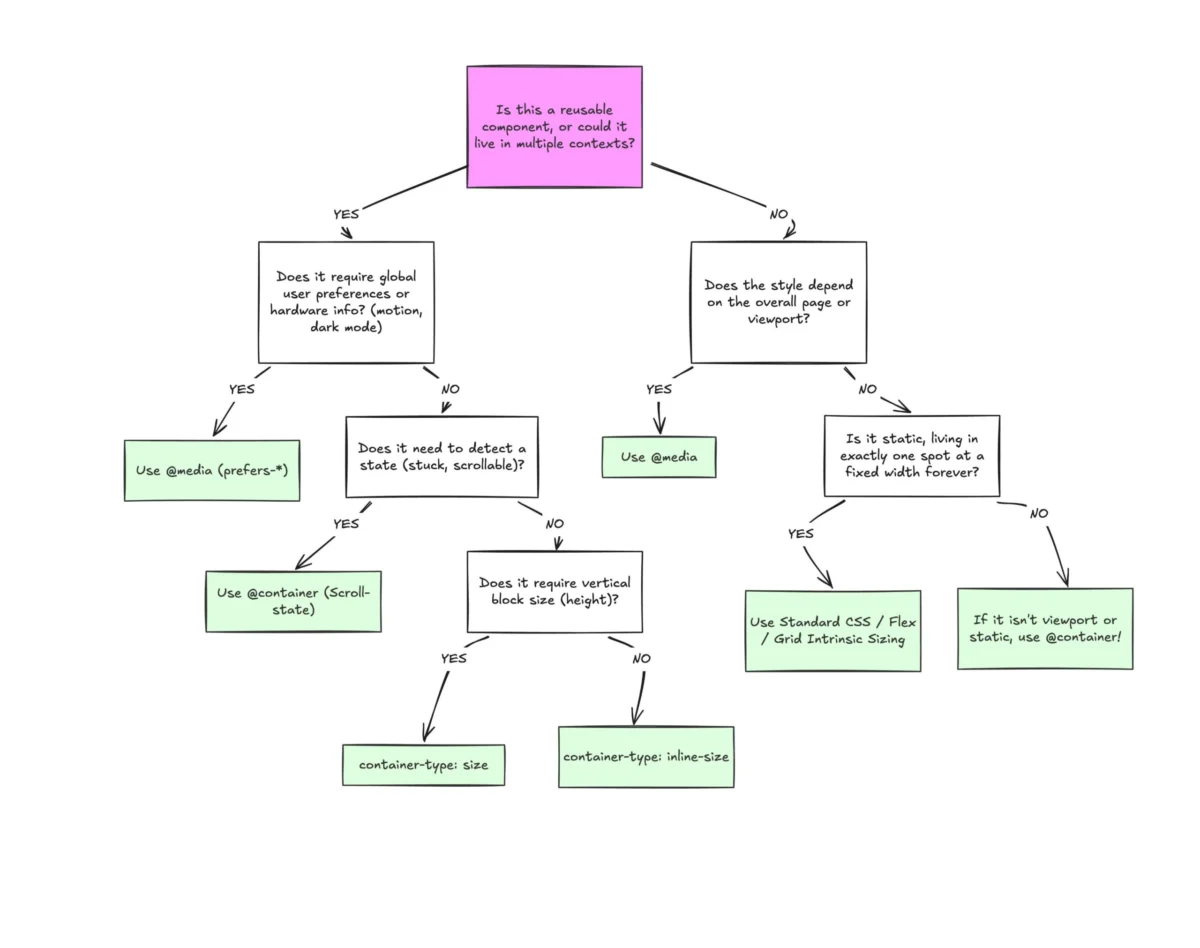
Despite boasting broad browser support hovering around 94% globally, CSS container queries remain surprisingly underused, frequently misunderstood, and widely misapplied by front-end developers. Years after their initial release and subsequent integration into modern web design tooling, industry surveys reveal a stark paradox: while developer awareness of the feature is remarkably high, actual implementation lags significantly behind.
To understand why container queries have suffered from a slow and bumpy adoption curve, we must look past their syntax. At first glance, container queries look almost identical to traditional media queries. Because of this visual familiarity, developers often assume they serve the same foundational purpose and operate under the same architectural logic.
They do not. Treating container queries as mere drop-in replacements for media queries fundamentally misunderstands how modern, component-driven web architecture operates. By exploring the differences between macro- and micro-layouts, examining real-world applications like fluid typography and flex-wrap detection, and acknowledging vital implementation caveats, developers can finally harness container queries to build truly resilient, context-aware web applications.
The Adoption Paradox: High Awareness, Low Utilization
When CSS container queries first rolled out across major browser engines, many developers experienced a collective moment of skepticism. For over a decade, media queries had been the undisputed gold standard of responsive web design. The immediate reaction from a significant portion of the developer community was simple: “Why do we need a new specification when media queries already handle screen resizing?”
This initial resistance is understandable, but the lingering hesitation is puzzling. According to data from the 2025 State of CSS survey, approximately 86% of developers are fully aware of container queries. Yet, only 41.4% actively use them in production codebases. While developer surveys are inherently imperfect and subject to localized sampling biases, this metric serves as the industry’s most reliable indicator of feature adoption.
The issue was highlighted prominently by educator and developer advocate Kevin Powell during his keynote at SmashingConf Amsterdam. Powell bluntly stated that the adoption trajectory for container queries has been "terrible." This slow uptake is ironic given that the ability for a UI component to adapt natively to the size of its outer container sat comfortably at the absolute top of community CSS wishlists for years.
The root cause of this underutilization isn’t necessarily developer apathy—it is misapplication. When developers do experiment with container queries, they frequently write them as if they were targeting the global viewport. Because the syntax (@container) mirrors the familiar @media structure, old habits die hard, leading to brittle layouts and a misunderstanding of what container queries are actually designed to solve.
The Limitations of the Viewport Proxy
To grasp the necessity of container queries, we must first recognize that the viewport has always been a proxy. Media queries gave web developers the illusion that screen width alone dictates how a responsive application should adapt to its environment.
When a developer writes a standard media query:
@media (min-width: 1024px)
  .card
    display: flex;
They are asking the browser a very specific, isolated question: “How wide is the screen right now?”
The media query answers that question accurately based on the browser window’s dimensions. However, consider what happens when that exact .card component is placed inside a grid cell that is restricted to a cramped 300px width on a massive 1920px desktop monitor.
The media query remains oblivious to this local constraint. Because the overall viewport is still 1920px, the min-width: 1024px condition evaluates to true, forcing the component to apply its wide-screen styles even though it only has 300 pixels of actual horizontal space. The result? Content deforms, text overflows, layouts break, and user interfaces degrade.
As Kevin Powell famously noted:
"Media queries are dumb. Not dumb in terms of the concept, but dumb in that they don’t know very much. In fact, most people assume that they know more than they do."
In modern web development, we no longer build static documents; we build dynamic, reusable component libraries. Relying on an external window size to dictate the internal behavior of a modular component is an architectural mismatch. Furthermore, data shows there are now over 2,300 unique viewport sizes actively tracked across the modern web ecosystem. Accounting for this fragmentation manually via media queries is a losing battle.
Macro-Layouts vs. Micro-Layouts: Shifting the Paradigm
The easiest way to conceptualize the boundary between media queries and container queries is to evaluate them through the lens of layout scope: Macro-layouts versus micro-layouts, or Page-level layout versus component-level layout.
1. Media Queries Are for Macro-Layouts (Looking Outward)
Media queries are designed to observe macro-level environmental factors. They look outward at the browser window, system preferences (such as prefers-color-scheme or prefers-reduced-motion), and hardware capabilities (like touch support). They govern global structural patterns:
- Shifting a website from a multi-column page grid to a single column on mobile.
- Adjusting primary header and footer positioning.
- Managing global page spacing and high-level architectural breakpoints.
2. Container Queries Are for Micro-Layouts (Looking Inward)
Container queries are built to observe micro-level constraints inside a component. They look inward, asking a smarter question: “How much space is available for me in this specific spot, right now?”

By registering an element as a container, components become entirely self-reliant. They adapt based on their immediate container’s dimensions rather than an arbitrary screen width. Reusable UI pieces—such as cards, widgets, form controls, and navigation bars—benefit immensely from this approach.
Here is how the earlier card example looks when refactored using a container query:
.card-wrapper
  container-name: card;
  container-type: inline-size;


@container card (min-width: 450px)
  .card
    display: flex;
    flex-direction: row;
In this setup, the card does not care whether it is viewed on an iPhone, an iPad, or a 4K desktop monitor. It only cares whether its direct parent wrapper (.card-wrapper) has at least 450px of horizontal inline space available. If it does, it expands horizontally; if not, it falls back gracefully to a stacked layout.
Practical Applications: Beyond Basic Width Checks
To truly leverage container queries, developers must explore advanced use cases where traditional media queries fall entirely flat, such as fluid typography scaling and flex-wrap detection.
Fluid Typography Inside Components
Historically, responsive typography relied on viewport-relative units like vw or vh combined with CSS clamp() functions to scale text smoothly across screen sizes:
.card-title
  font-size: clamp(100%, 1rem + 2vw, 24px);
While this creates fluid text on the page level, it breaks down when a component is relocated to a confined space like a sidebar. Because the typography was bound to the global viewport, the text can become disproportionately massive or microscopic relative to its local container.
Container queries introduce dedicated container length units—such as cqi (container query inline size) and cqb (container query block size). By pairing these units with CSS clamp(), developers can achieve true component-level fluid typography:
.card-title
  font-size: clamp(1rem, .5rem + 3cqi, 2rem);
Now, the font size scales dynamically in direct proportion to the container holding it, completely independent of the browser window.
Flexbox Wrap Detection Without JavaScript
One of the most exciting capabilities unlocked by container queries is the ability to detect internal layout shifts, such as flex item wrapping.

Flexbox is exceptional at wrapping items automatically (flex-wrap: wrap) when a row runs out of space. However, CSS has traditionally lacked a way to style an item after it wraps. Historically, developers had to resort to JavaScript solutions—such as implementing a ResizeObserver—to monitor these layout changes.
By nesting container queries inside flex items, developers can achieve wrap detection purely in CSS. By allowing a flex item to grow (flex-grow: 1) while simultaneously querying its inline size, we can alter its internal styling the moment wrapping occurs:
/* The flex parent container */
.flex-layout
  display: flex;
  flex-wrap: wrap;


/* Register individual flex items as containers */
.flex-item
  container-type: inline-size;
  flex: 1 1 390px; /* Grow to fill space, wrap when space drops below 390px */


/* Default narrow card styles */
.card
  display: flex;
  flex-direction: column;
  background: #f4f4f4;


/* When the container expands past 600px, adapt layout */
@container (min-width: 600px)
  .card
    flex-direction: row;
    align-items: center;
    background: #e2f0d9;
As the parent container shrinks, forcing cards onto secondary rows, the individual item expands, triggering the container query and transforming its internal layout seamlessly.
Known Side Effects and Architectural Caveats
Despite their immense power, container queries introduce specific constraints and side effects that developers must navigate carefully.
-
Containers Cannot Query Themselves:
An element cannot declare itself as a container and simultaneously target itself within a container query block based on its own dimensions. Doing so would create an infinite calculation loop. Instead, container queries require a clear parent-child DOM relationship where an outer wrapper acts as the container, and inner descendants respond to those measured dimensions. -
The Danger of Layout Collapse (Block-Size Queries):
If a developer defines a container usingcontainer-type: size(which measures both inline and block dimensions) without providing an explicit height, min-height, or aspect-ratio, the container will instantly collapse to0px. The browser evaluates the container’s dimensions independently of its internal children to prevent infinite loops. To avoid this, developers should default tocontainer-type: inline-sizeunless block-dimension querying is strictly required. -
Incompatibility with CSS Custom Properties:
Currently, container queries cannot evaluate custom CSS properties directly within their conditions (e.g.,@container (min-width: var(--breakpoint-lg))will fail). Because CSS custom properties cascade dynamically down the DOM tree and can be modified within the very blocks they influence, allowing them in container queries would introduce severe parsing and performance hazards.
Conclusion: Re-imagining Responsive Design
CSS container queries are not intended to completely eradicate media queries. Both tools occupy vital, complementary roles within modern web engineering. Media queries remain the optimal choice for macro-level structural adjustments and global environmental checks, while container queries excel at micro-level, component-driven responsiveness.
The persistent friction surrounding container queries stems primarily from our collective habit of viewing them through the lens of traditional media queries. By moving away from viewport-centric thinking and embracing container-driven architectures, developers can build truly modular, resilient components that adapt naturally to whatever context they inhabit. In an era defined by component reuse and fragmented screen landscapes, letting content dictate layout is not just a preference—it is the logical future of web design.
 Iffa Jayyana
  Azzam Bilal Chamdy
  Nila Kartika Wati