
 By Jia Lissa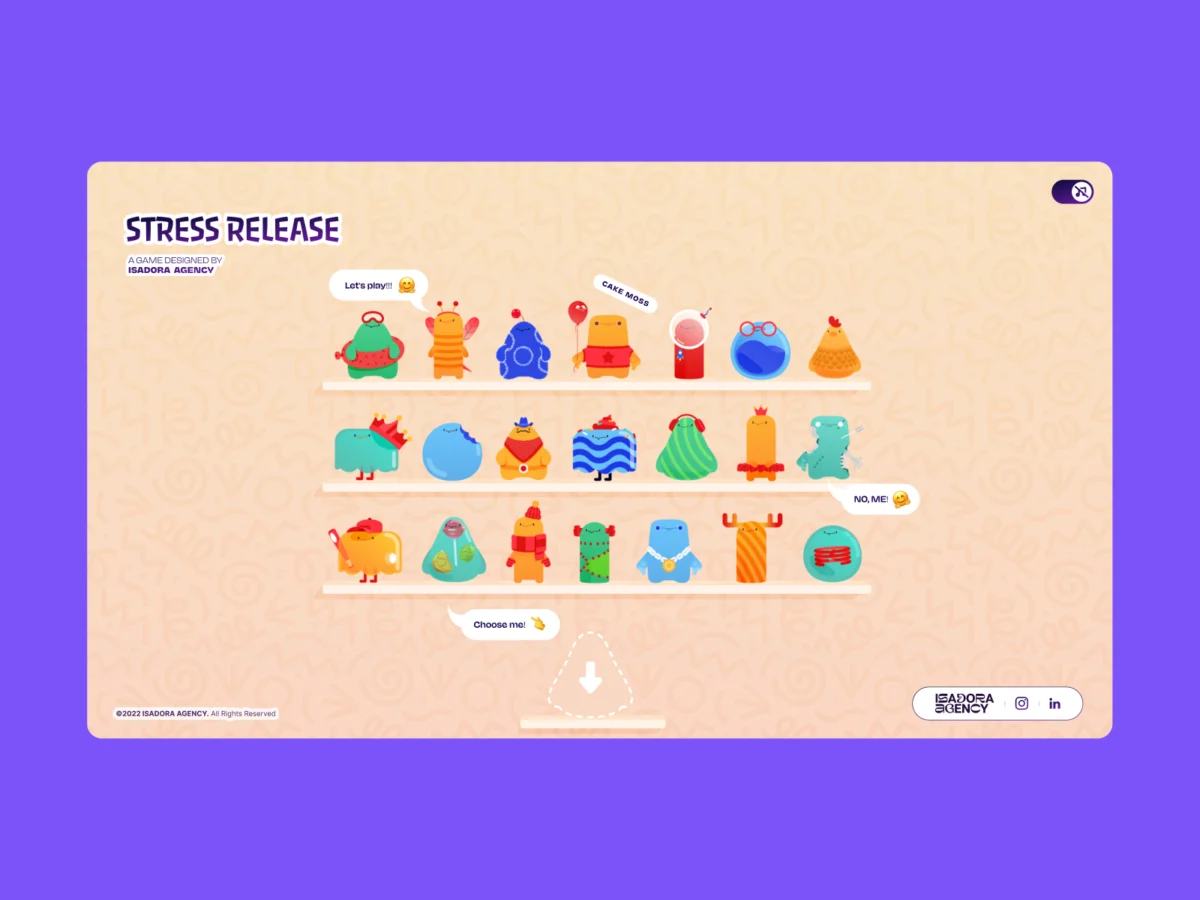
When tasked with building a highly interactive, tactile web experience, the underlying technical architecture must serve the art direction—not constrain it. In the modern web development landscape, whenever front-end developers and UX engineers are tasked with crafting an interface that feels bouncy, squishy, or destructive, the industry-standard reflex is nearly always the same: reach for a physics engine. Frameworks like Matter.js, Cannon.js, or bespoke WebGL solutions have long served as the gold standard for creating immersive, gamified web applications.
However, choosing the path of least algorithmic resistance does not always yield the best artistic outcome. When the development and design team at the Isadora Agency set out to build Stress Release—a digital stress-relief squeeze toy designed to let burnt-out creatives smash, stretch, and distort animated UI characters—they initially walked down the familiar physics-engine path. Their objective was straightforward on paper: construct a deeply engaging, highly tactile experience where every single user click yielded a satisfying, squishy reaction.
Yet, as the engineering team began prototyping, a fundamental conflict emerged. Physics engines are phenomenal at producing plausible motion, but what the project’s animators had created was intentional motion.
Instead of relying on rigid-body simulations or procedural physics calculations that forced animated characters to behave like unpredictable rubber balls bouncing across a canvas, the team needed total, deterministic control. They required characters to react in exact, meticulously storyboarded ways. Consequently, Isadora Agency made a bold architectural choice: they scrapped the physics engine entirely.
This article details how the engineering team constructed a real-time, highly responsive digital stress toy without a single line of WebGL or Matter.js, relying instead on programmatic Lottie state controls, standard DOM manipulation, and fundamental distance-based math.
The Design Requirements: The Supremacy of Intentional Motion
The core mandate for Stress Release was absolute deterministic control. The agency’s motion designers had hand-crafted bespoke .json Lottie files that required exact, frame-by-frame sequencing to achieve their comedic and visual payoff.
For example, the game’s signature “mega squeeze” reaction demanded a precise 181-frame build-up sequence followed by a sharply timed release animation. To honor this level of craftsmanship, the development architecture could not afford to let algorithmic approximations overwrite the animators’ carefully timed keyframes.
In interactive gamification, the tighter the feedback loop between the user action (clicking), the visual consequence (squishing), and the reward (scoring), the more crucial precise frame control becomes. By opting for programmatic state control utilizing Lottie’s native API, the developers ensured that the interaction layer acted as a clean, instantaneous trigger for the animation layer, preserving every artistic nuance.
Creating Tactile Feedback: Mapping DOM Elements to Lottie States
Because the architecture relied on Lottie and the standard Document Object Model (DOM), rendering was handled natively by the Lottie runtime, which interprets JSON vector animations directly into SVGs within the browser. Developers could select UI elements using standard IDs and CSS classes, orchestrating their behavior through a seamless blend of Lottie animation segments, CSS transforms, and lightweight click-event math.
Radial Input Mapping and Trigonometric Hitboxes
To achieve a deeply satisfying “tactile feel” upon striking a character, the team implemented radial input mapping. The primary hurdle was translating raw page coordinates from a click or tap event into the character’s local coordinate space.

Every user interaction was measured against the character’s exact center point, subsequently translating that spatial data into score values, feedback intensity, and the precise placement of visual explosion effects:
// Character's center point in its own coordinate space
var x_center = parseFloat($("#playChar").width()  / 2);
var y_center = parseFloat($("#playChar").height() / 2);

// Click position relative to the character's top-left corner
var offset = $("#playChar").offset(); // document-relative position
var X = parseFloat(e.pageX - offset.left);
var Y = parseFloat(e.pageY - offset.top);

// Vector from center to click point
var a = parseFloat(X - x_center);
var b = parseFloat(Y - y_center);
Following this vector extraction, the straight-line distance from the center of the click was calculated using the Pythagorean theorem:
var distance = Math.hypot(a, b);This single mathematical metric governed the entire interaction loop: determining the score rewarded to the user, the visual feedback intensity, and the exact screen coordinates where the impact explosion animation would fire:
// Distance zones map to point rewards
if      (distance < 10)  givePts = 100; // bullseye
else if (distance < 40)  givePts = getRndInteger(70, 90);
else if (distance < 70)  givePts = getRndInteger(40, 70);
else if (distance < 100) givePts = getRndInteger(20, 40);
else if (distance < 120) givePts = getRndInteger(10, 20);
else if (distance < 145) givePts = getRndInteger(1,  10);
else givePts = 0; // miss

// Explosion Lottie repositioned to the exact click point
var shiftPosition = window.innerWidth < 1023 ? -20 : 200;
$("#explosionChar").css(
  "margin-left": a + shiftPosition + "px",
  "margin-top":  b + shiftPosition + "px",
);

// Fire the squish animation instantly
explosion.goToAndPlay(0);
The Concentric Zone Model
This approach established a concentric zone system—a virtual dartboard of scoring rings centered on the character. Significantly, the visual complexity of the Lottie SVG had zero impact on hit detection; the programmatic hitbox remained a clean, predictable circle.
Furthermore, because the explosion Lottie animation was dynamically repositioned to the exact $(a, b)$ vector used for scoring, the visual blast always manifested precisely where the player clicked. This spatial accuracy successfully manufactured the tactile illusion of physically striking the character entirely through basic math and DOM positioning.

Interaction Handling: Controlling the Narrative Flow
By utilizing DOM-managed SVG elements, desktop mouse clicks and mobile touch events could be handled directly via native event listeners. This eliminated the need for complex raycasting, canvas coordinate remapping layers, or external physics loops, keeping the interaction model lightweight and transparent.
Lottie natively managed the squish and bounce physics internally via pre-rendered animation curves. Each character possessed a structured inventory of animation sections—including looping idle states, progressive reaction frames, and terminal end states—stored as distinct frame ranges:
// Animation sections defined as frame ranges per character
const play_segments = [
  charId: 0,
  sections:
    idle:     [0,  40],   // looping idle state
    squeeze1: [41, 80],   // light reaction
    squeeze2: [81, 120],  // medium reaction
    squeeze3: [121, 160], // heavy reaction
  ,
  playOrder: ["squeeze1", "squeeze2", "squeeze3"],
  endAnimation: [161, 200]
];
Upon every valid click, the application advanced through the pre-defined play order, immediately firing the corresponding segment while locking out redundant inputs mid-animation:
function stepAnim()
  let p         = play_segments[0];
  let i         = p["playOrder"][curr_order_play];
  let playNow   = p["sections"][i];

  playChar.stop();                    // halt current segment immediately
  playChar.loop = false;              // no looping - play once and stop
  playChar.playSegments(playNow, true); // jump to exact frames, force immediately

  curr_order_play++;
  canPlayAnim = 0;                    // lock out further clicks mid-animation

  if (curr_order_play > p["playOrder"].length - 1)
    curr_order_play = 0;              // cycle back to start of sequence
Once a reaction segment completed its run, execution logic gracefully handed control back to the character’s idle loop:
playChar.onComplete = function()
  canPlayAnim = 1;          // unlock clicks again
  if (!playEnd) playIdleState();
;

function playIdleState()
  playChar.playSegments([0, 40], true); // return to idle loop
  playChar.loop = true;
For specialized interactions like the "mega squeeze" build-up, the timeline looped continuously on a dedicated frame range until explicitly triggered by the user:

// Loop the "ready to release" frames until player activates
indikL.loop = true;
indikL.playSegments([181, 302], true);

// On activation - play the release sequence once
indikL.loop = false;
indikL.playSegments([96, 396], true);
indikL.goToAndStop(0, true); // hard reset after completion
Responsive Benefits and Mobile Performance Optimization
A secondary advantage of committing to a DOM-centric architecture was seamless responsiveness. Bypassing canvas-based WebGL environments meant avoiding the steep complexity of scaling collision bounding boxes across wildly varying screen sizes and device viewports.
The engineering team handled responsiveness entirely via dynamic CSS custom properties (variables). By recalculating viewport dimensions on resize events, the underlying layout reacted instantaneously, allowing Lottie SVGs to scale fluidly within their container elements without sacrificing internal state:
const appHeight = () =>
  const doc = document.documentElement;
  doc.style.setProperty("--doc-height", `$window.innerHeightpx`);
  doc.style.setProperty("--doc-width", `$doc.clientWidthpx`);
;
window.addEventListener("resize", appHeight);
appHeight(); // run immediately on init
Addressing the Lottie File-Size Overhead
Total art-direction control, however, came with a notable engineering trade-off: file weight and parsing overhead.
Lottie JSON files can quickly become bloated. With 21 distinct character animations and multiple explosion variants required for the application, maintaining high frame rates—particularly on resource-constrained mobile devices—demanded aggressive optimization strategies.
To preserve butter-smooth performance, the team deployed targeted quality adjustments across different application views:

// Shelf screen - 21 animations playing simultaneously
shelf = lottie.loadAnimation(
  container: document.getElementById("charShelf" + i),
  renderer: "svg",
  loop: true,
  autoplay: true,
  path: "assets/shelf/" + shelfFolders[i] + "/" + shelfFolders[i] + ".json",
);
lottie.setQuality(0.5); // 50% quality - reduces interpolation calculations
shelf.setSpeed(0.6);    // 60% speed - fewer frame calculations per second

// Play screen - single focused character
playChar = lottie.loadAnimation(
  container: document.getElementById("playChar"),
  renderer: "svg",
  loop: true,
  autoplay: true,
  path: chosenChar.url,
);
lottie.setQuality(1); // full quality - only one animation at a time
By dialing down rendering quality and playback speed on secondary background elements (such as the character selection shelf containing 21 concurrent animations), the browser saved vital CPU cycles for the primary interactive character state.
Conclusion: Matching Technology to Design Intent
When evaluating technical stacks for gamified, highly interactive web experiences, development teams must allow explicit design requirements to dictate technological choices rather than defaulting to industry buzzwords or over-engineered frameworks.
By mapping Lottie’s native timeline capabilities directly to the DOM via calculated vector mathematics, Isadora Agency successfully delivered a rich, tactile user experience while retaining absolute, uncompromised control over their designers’ artistic vision.
The project stands as a testament to a core engineering truth: when art direction demands precision, deterministic code will always outperform probabilistic simulation.
 Iffa Jayyana
  Azzam Bilal Chamdy
  Nila Kartika Wati