
 By Raul Delapena Setiawan
The coveted blue checkmark on Instagram has long been a digital symbol of status, authenticity, and influence. Once reserved exclusively for celebrities, major public figures, and prominent global brands, the verification badge served as a digital passport proving that an account was genuinely who it claimed to be. Today, however, the landscape of social media validation has undergone a seismic shift.

With the introduction of paid subscriptions like Meta Verified, the pathway to securing that iconic badge has opened up to everyday creators and businesses willing to pay a monthly fee. Yet, traditional verification methods still exist for those who meet strict criteria of public notability.

Navigating the dual paths of free review and paid subscription can be daunting. This comprehensive guide breaks down the core mechanics of Instagram verification, compares the two primary routes, provides a step-by-step application walkthrough, and outlines actionable strategies to boost your credibility online.

Main Facts: Understanding Instagram Verification Today
At its core, Instagram verification is the process of awarding a blue checkmark badge next to a username. This visual marker signals to the platform’s massive user base that an account truly belongs to the individual, artist, brand, or organization it represents.

While the resulting badge looks identical regardless of how it was earned, the mechanisms behind traditional verification and paid subscriptions are fundamentally different.
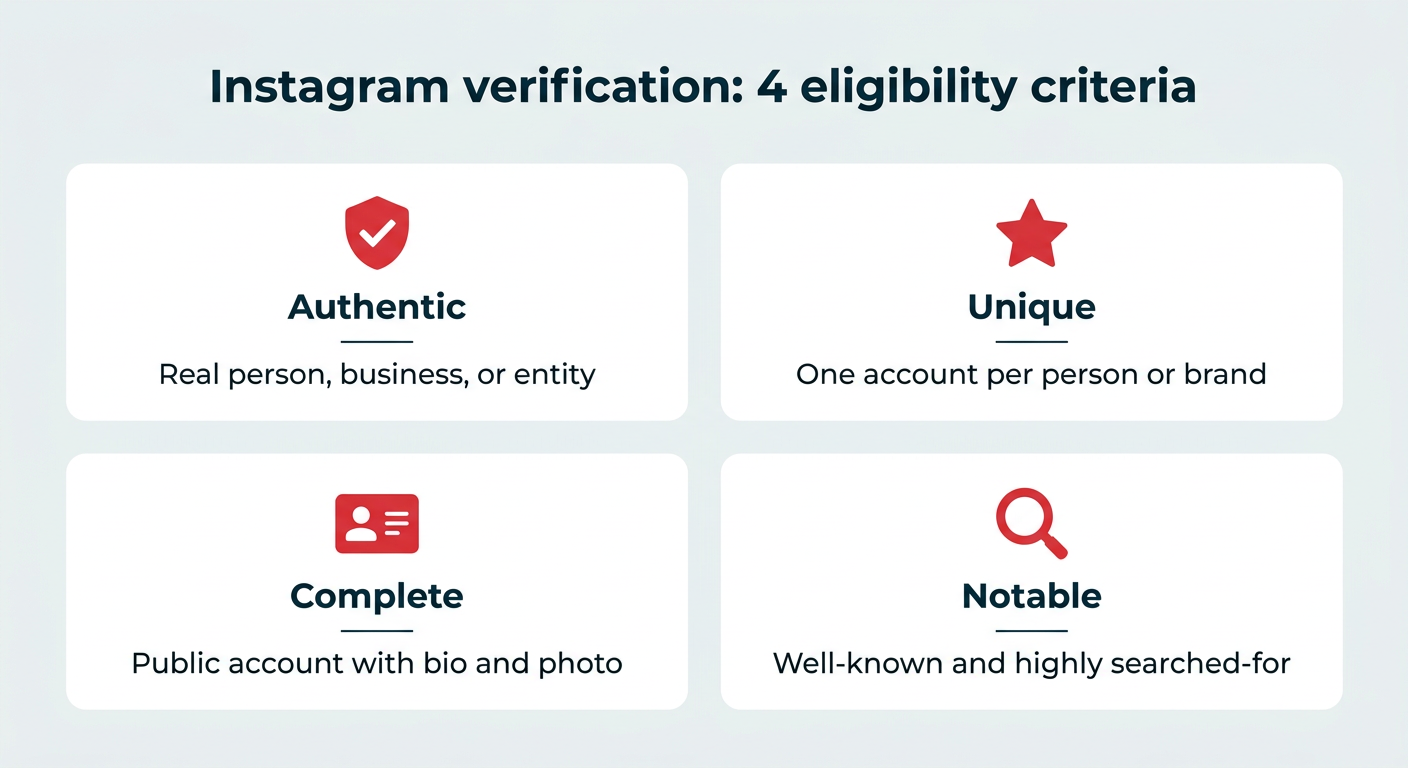
- Traditional Verification (Free Review): Designed for notable public figures, celebrities, and prominent brands. It requires proof of authenticity and off-platform notoriety (such as press mentions), but it costs nothing.
- Meta Verified (Paid Subscription): Introduced to democratize access, this subscription model allows anyone 18 or older to buy a blue badge, provided they submit a government-issued ID and meet basic profile requirements. Pricing starts at $11.99/month on the web and $14.99/month on iOS and Android for individuals, with tiered business pricing available.
Despite the differences in acquisition, both methods aim to achieve the same ultimate goal: establishing trust, deterring impersonation, and enhancing a user’s visibility within search results and comment sections.
Chronology: The Evolution of the Blue Checkmark
To understand how Instagram verification reached its current state, it helps to look back at how the feature evolved:
- The Era of Exclusivity: For years, Instagram’s traditional verification process was shrouded in mystery. Hand-picked by platform administrators, the blue check was awarded strictly to "notable and unique" entities. Most everyday users and small businesses had zero visibility into how decisions were made, rendering verification an unattainable milestone.
- The Introduction of the In-App Request Form: To bring transparency to the process, Instagram eventually introduced a native in-app request form, allowing anyone to submit documentation proving their authenticity and public interest. However, the strict notability threshold remained a major bottleneck.
- The Launch of Meta Verified: Facing industry trends toward creator monetization and security, Meta launched Meta Verified. Initially rolled out in select markets, this subscription model shattered the traditional barrier to entry by trading the strict "notability" requirement for a monthly fee and identity verification via a government-issued ID. Today, Meta Verified is available globally for both individual creators and businesses across tiered subscription structures.
Supporting Data: Traditional Verification vs. Meta Verified
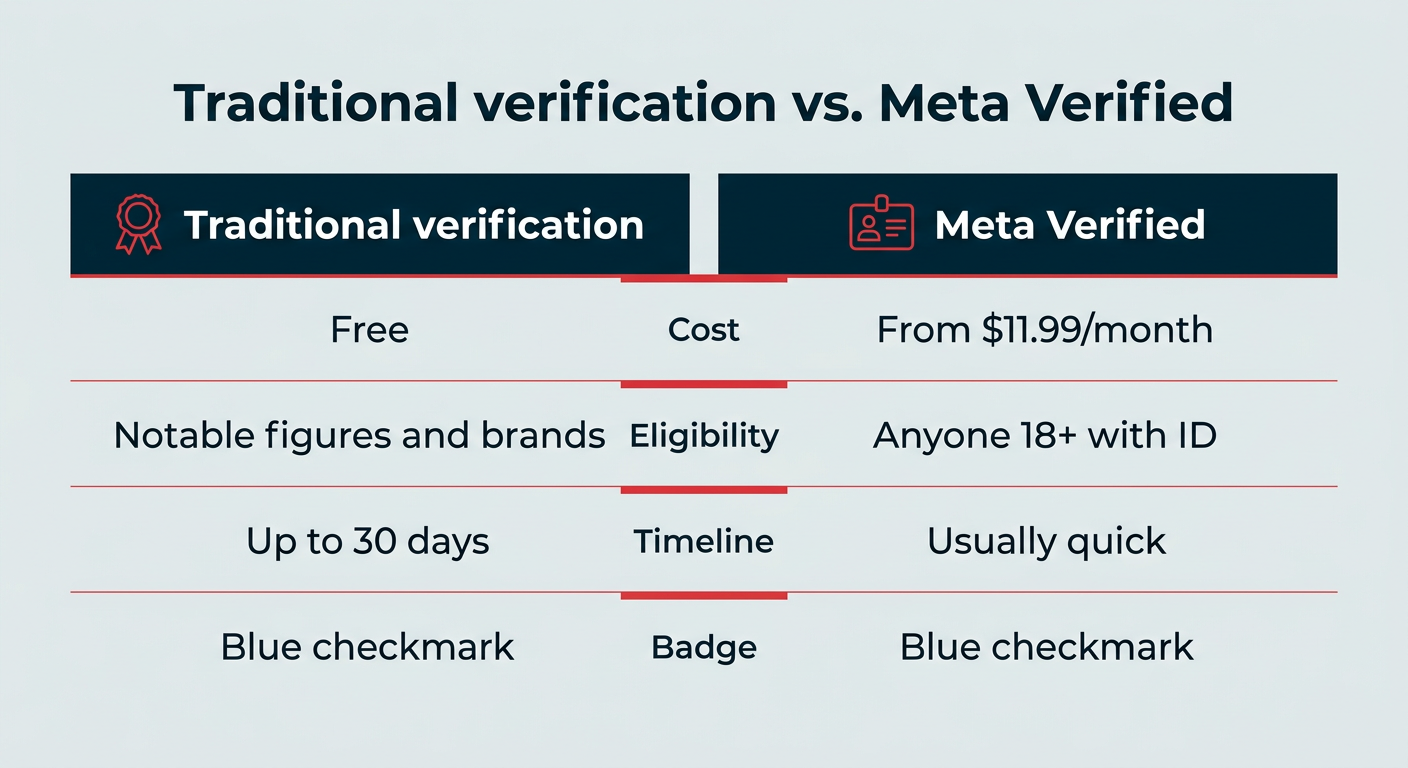
Choosing the right path depends heavily on your brand’s current footprint, budget, and timeline. The following breakdown highlights how the two approaches compare across key metrics:

| Feature | Traditional Verification | Meta Verified |
|---|---|---|
| Cost | Free | From $11.99/mo (web) / $14.99/mo (mobile) for individuals; tiered business plans. |
| Eligibility | Notable public figures, celebrities, brands, and organizations. | Anyone 18+ with a valid government-issued ID and qualifying profile. |
| Application Process | Submit a form detailing authenticity and notability documentation. | Subscribe and confirm identity via a government-issued ID. |
| Timeline | Typically a decision within 30 days. | Usually fast once ID review is complete. |
| Badge Appearance | Blue checkmark | Blue checkmark (identical appearance). |
| Additional Benefits | Badge and improved search visibility. | Proactive impersonation monitoring, direct account support, exclusive stickers. |
| Availability | Global | Select countries (continuously expanding). |
Official Responses and Platform Guidelines
Meta maintains strict boundaries regarding what verification does—and does not—accomplish. According to official platform guidelines, a verification badge is not an endorsement by Meta, nor does it act as a direct algorithmic boost to content reach or organic impressions.

Instead, the primary benefits of verification lie in trust and protection:

- Search Visibility: Verified accounts generally rank higher in search queries matching their exact name, helping real fans and customers find them faster.
- Impersonation Protection: Particularly with Meta Verified subscriptions, users gain proactive monitoring against malicious actors attempting to duplicate their profiles.
- Customer Support: Paid subscribers gain access to live account support to resolve issues quickly, a feature historically difficult to access on free social platforms.
Meta also warns strongly against fraudulent third-party services. Official policy dictates that only Meta can grant an Instagram verification badge. Any agency, individual, or direct message claiming to have an "inside connection" to secure a checkmark for a fee is engaging in a scam, often designed to harvest login credentials or sensitive ID documents.

Implications for Creators, Brands, and Businesses
The democratization of the blue checkmark has profound implications for digital marketing strategies:

- Leveling the Playing Field: Small business owners and micro-influencers who previously lacked the mainstream media coverage required for traditional verification can now instantly purchase credibility through Meta Verified.
- The Erosion of Exclusivity: Because the blue checkmark no longer guarantees that an account belongs to a globally recognized celebrity, users are becoming more discerning. Trust is increasingly built through content quality, engagement, and consistent brand authenticity rather than the badge alone.
- Financial Commitments for Brands: For businesses managing multiple social properties (such as both Facebook and Instagram), subscription costs can compound quickly, making ROI an important consideration for marketing budgets.
Step-by-Step Guides to Getting Verified
How to Request Traditional Verification (Free)
If you believe you meet the criteria for public notability, you can apply for free using the mobile app:

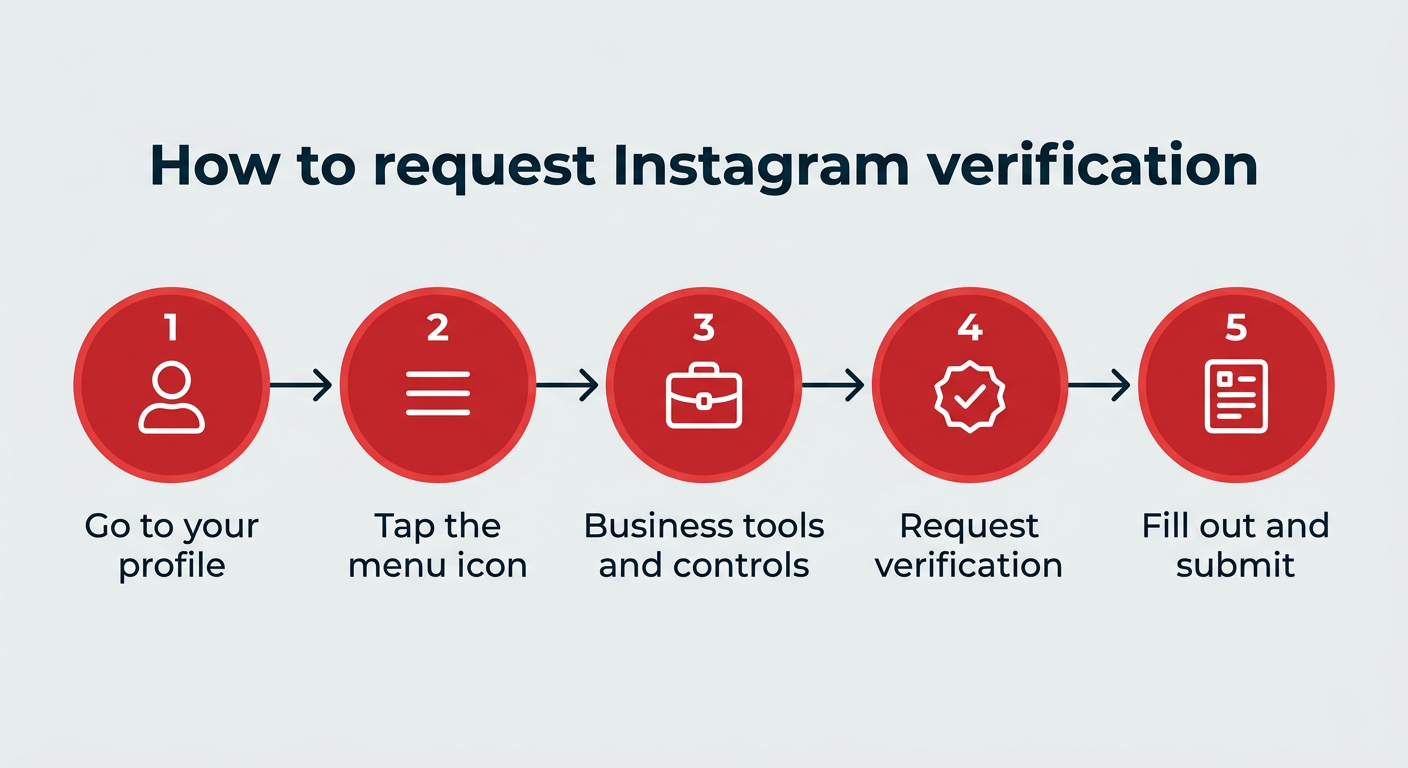
- Navigate to Your Profile: Open Instagram and tap your profile picture in the bottom right corner.
- Access the Menu: Tap the hamburger menu icon (three parallel lines) in the top right corner.
- Open Business Tools: Scroll down to the For professionals section and select Business tools and controls.
- Request Verification: Tap the Request verification link at the bottom of the menu.
- Complete the Form: Fill out all required fields confirming your authenticity and notability, attaching supporting documentation and links to press articles or social accounts. Tap Submit.
How to Subscribe to Meta Verified
If you don’t meet traditional notability requirements or prefer a faster turnaround, you can subscribe:

- Go to Verification Settings: Follow the same steps above to open your profile, access the menu, select business tools, and tap Request verification.
- Select Meta Verified: At the top of the form, look for the prompt to sign up for Meta Verified.
- Review Benefits and Pricing: Tap through the screens to view the local pricing and perks available for your account type.
- Complete Payment and ID Check: Confirm your subscription through your app store (iOS/Android) or web browser, and follow the prompts to verify your identity with a government-issued ID.
6 Strategic Tips to Improve Your Verification Chances
Whether you are applying for free traditional verification or optimizing your profile for Meta Verified, follow these best practices to maximize your success:

- Optimize Your Instagram Profile: Fill out your bio completely, use a clear high-resolution profile picture, link your official website, and ensure your contact information is up to date.
- Post Consistently: Instagram favors active accounts. Maintain a steady publishing cadence—ideally daily—using scheduling tools like Hootsuite to streamline your workflow.
- Leverage Collaborations: Partnering with other credible, notable creators through Instagram’s collaboration feature builds mutual authority and expands your organic reach.
- Embrace Authenticity: Share behind-the-scenes content, highlight real team members, and keep your brand messaging aligned across all digital platforms.
- Build an Off-Platform Footprint: Because traditional verification weighs external notability heavily, ensure your name or brand is searchable across news outlets, Wikipedia, podcasts, and other verified social channels.
- Avoid Scams: Never share your password or sensitive documents with third parties promising guaranteed verification. Stick strictly to native app channels.
What to Do If Your Request Is Denied
A rejection from traditional verification is not permanent. If your application is denied, Instagram rarely provides specific feedback, but rejections usually stem from insufficient press coverage, incomplete documentation, or mismatched identification data.

If you are denied, take these steps:

- Audit Your Profile: Ensure your bio, website links, and profile photos are fully optimized.
- Strengthen Your PR: Spend the next few months securing legitimate press mentions, interviews, or features in reputable publications to boost your off-platform notability score.
- Reapply or Switch Routes: Wait until you receive a formal decision before submitting a new traditional request, or consider pivoting to a Meta Verified subscription if you want immediate results backed by an ID check.
By understanding the mechanics of both pathways, maintaining a robust digital footprint, and prioritizing genuine audience engagement, you can successfully secure your place on Instagram with or without the traditional roadblocks of the past.
 Neng Nana
  Ammar Sabilarrohman
  Jia Lissa