
 By Nana Muazin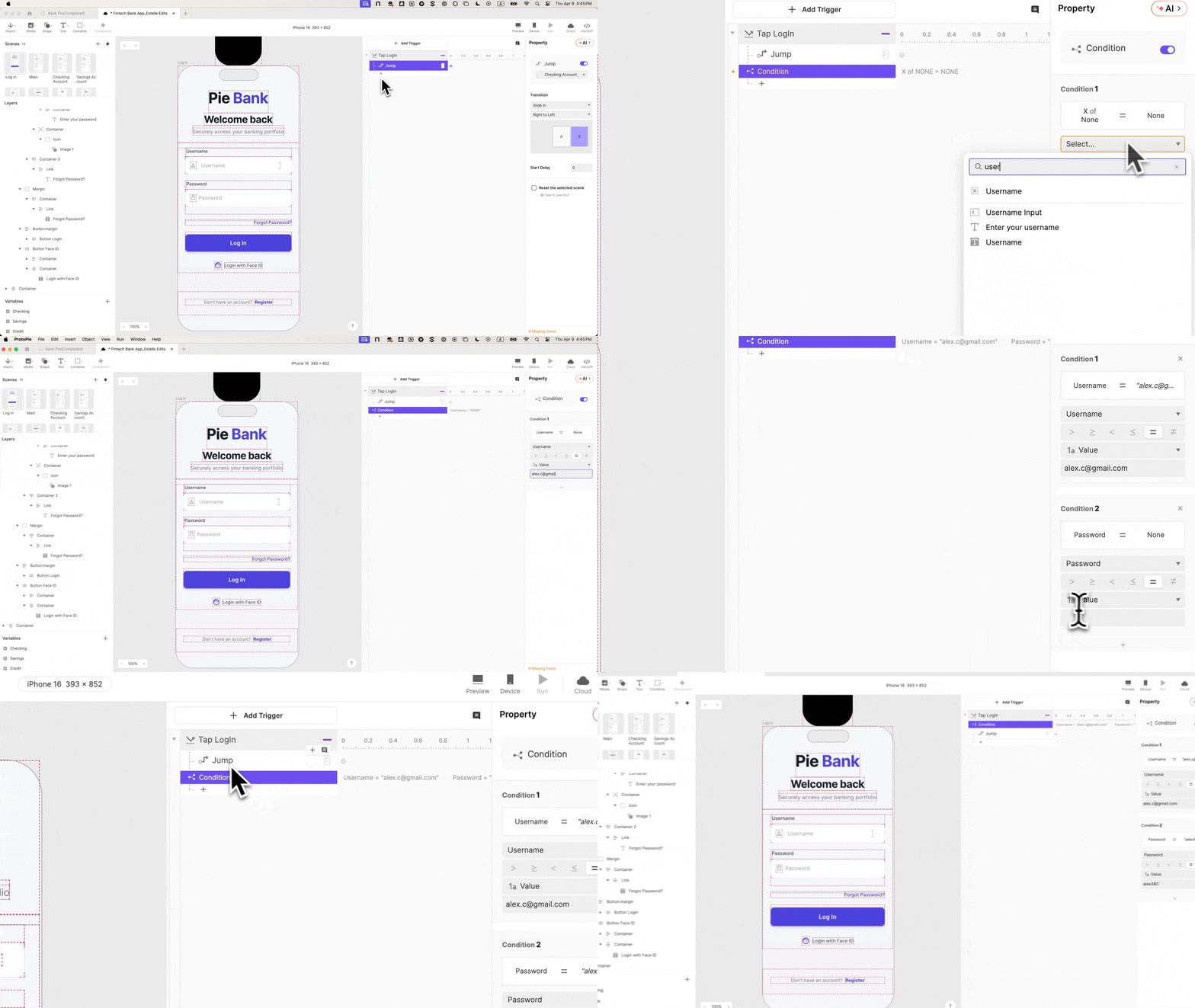
In the sterile environment of a usability lab, there is a recurring moment that haunts UX researchers. A participant sits before a mobile device, reaches the login screen, and pauses. They type a few characters, then glance up at the moderator with a tentative smile, asking, “Am I doing this right?”
This seemingly minor hesitation is, in fact, a catastrophic failure of the prototype. It is the moment the "suspension of disbelief" shatters. The participant has realized they are not using a financial tool; they are performing for a camera. From that second onward, every tap, swipe, and verbalized thought is filtered through the awareness that the system is a facade. In the high-stakes world of Financial Technology (FinTech), where user trust is the primary currency, these "theatrical" prototypes are no longer sufficient.
To solve this, designers are turning to advanced tools like ProtoPie to build prototypes that don’t just look like apps, but behave like shipped products. By focusing on the "trust gateway"—the login experience—teams can secure the psychological buy-in necessary for genuine research.
Main Facts: The "Uncanny Valley" of UX Testing
The fundamental problem with traditional prototyping is the "Uncanny Valley" of interactivity. When a prototype looks 100% like a real banking app but behaves with only 10% of the logic, the discrepancy creates cognitive dissonance. In FinTech, this issue is amplified because users are conditioned to be hyper-vigilant. They notice when a balance doesn’t update, when a password field doesn’t mask their input, or when a "Submit" button works regardless of what they type.
The core facts of high-fidelity prototyping in the current market include:
- Trust-Based Engagement: Users interact with financial data differently when they believe the system is "live."
- Logic-Driven Design: Modern tools now allow for conditional logic, variables, and formula-based inputs without requiring a background in software engineering.
- The Error State Necessity: Most prototypes only show the "happy path." However, how a user handles a login error is often more insightful than how they handle a success.
- Biometric Realism: Features like Face ID are no longer "extra" polish; they are the standard expectation for mobile banking users.
Chronology: Building the "Pie Bank" Authentication Flow
To demonstrate how to bridge this gap, we look at the development of "Pie Bank," a mobile banking prototype designed to withstand the scrutiny of a live usability session. This ten-step chronology outlines the transition from a static design to a functional logic-driven system.
Phase I: Foundation and Input Realism
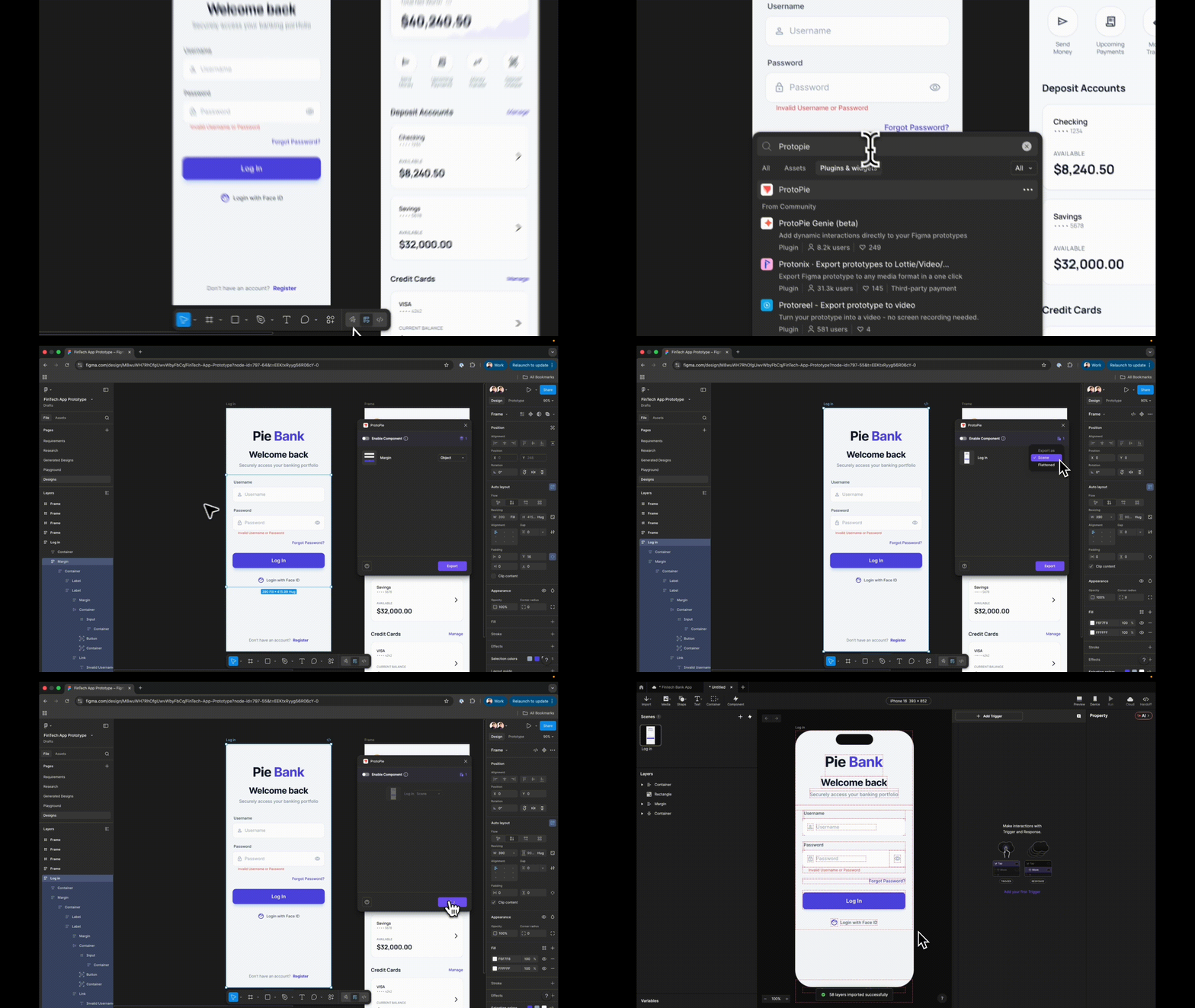
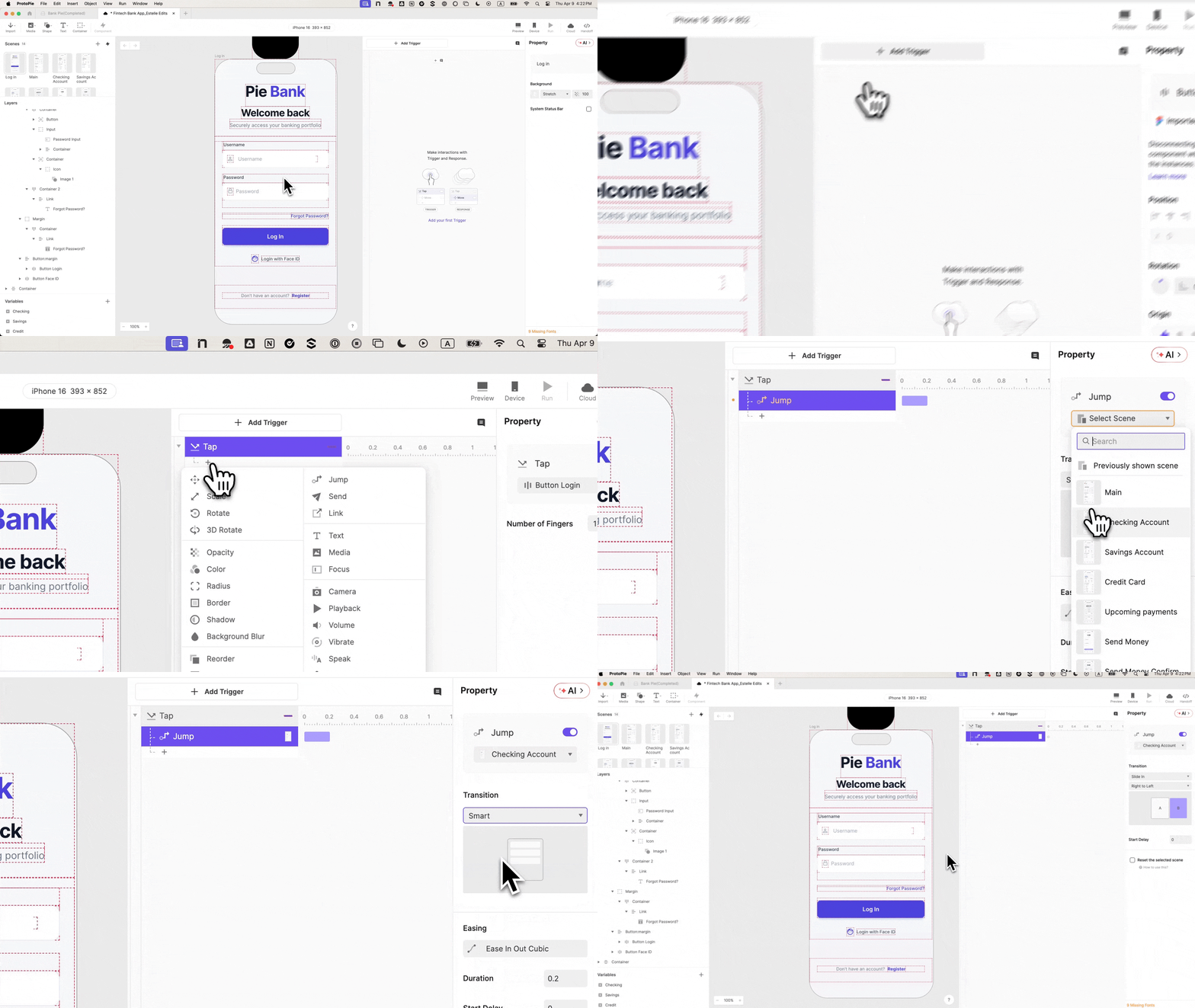
Step 1: The Intelligent Import. The process begins in Figma, but the transition to ProtoPie is critical. Designers must choose to import as a "Scene" rather than a flattened image. This preserves the layer hierarchy, allowing every element—from the "Login" button to the "Username" text—to be independently targetable. Proper naming conventions (e.g., "Input_Username" instead of "Rectangle_104") are established here to prevent logic errors later.
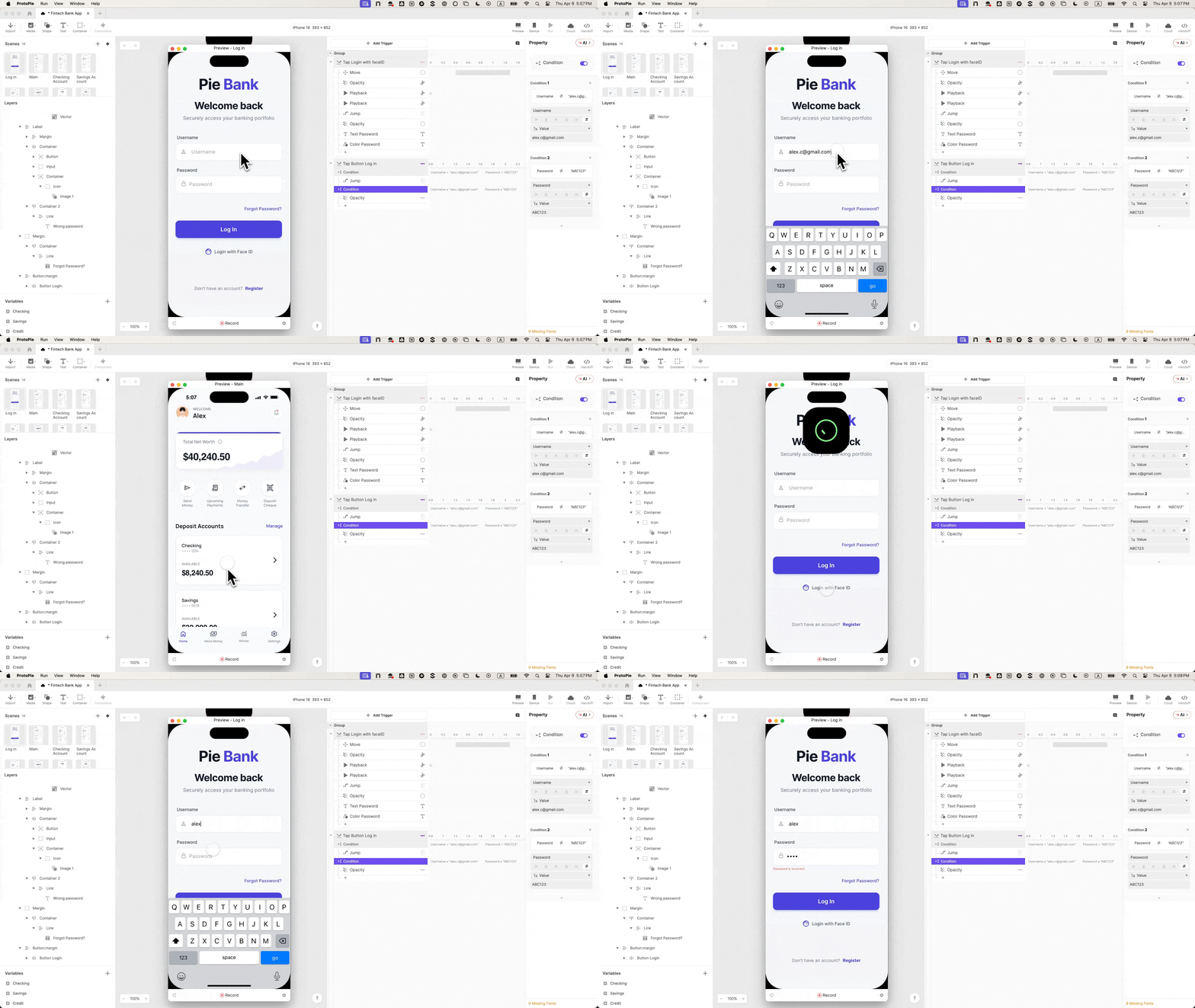
Step 2: Native Keyboard Integration. Static rectangles are replaced with ProtoPie’s native Input layers. This is the first "realism" milestone. When a participant taps the field, the actual iOS or Android keyboard rises. They type their actual name. The prototype responds to their touch, not a pre-recorded animation.
Step 3: Security Masking. Security is a psychological requirement. By setting the password field’s type to "Text Password," the system automatically masks the input with dots. This small detail reinforces the "banking" nature of the app, signaling to the user that their data is being handled securely.
Phase II: The Logic "Brain"
Step 4 & 5: Mapping the Destination. Before the logic can be wired, the destination (the Dashboard) must exist. A "Jump" response is created, but in this stage, it remains a "dumb" interaction—any tap leads to the next screen. The following steps fix this.
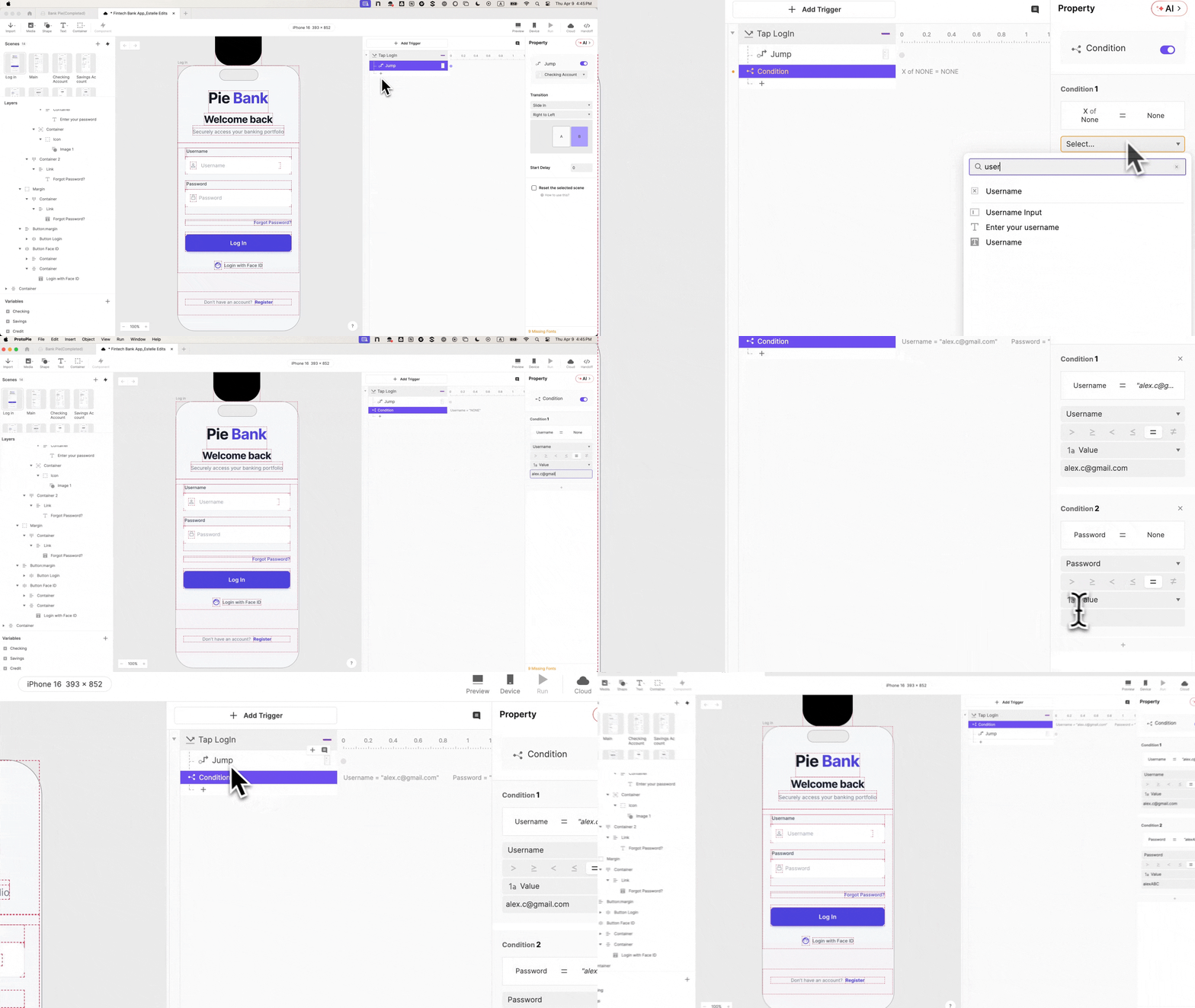
Step 6: Variable Binding. This is where the prototype gains a memory. By creating Text Variables for username and password, the prototype "listens" to what the user types. Using formulas like input("Input Username").text, the system stores the user’s keystrokes in real-time.
Step 7: Conditional Validation. The "Happy Path" is now guarded. A Condition is added to the Login button: the "Jump" to the dashboard only triggers if the username and password match a specific set of credentials. If the fields are empty or the data is wrong, nothing happens. This forces the participant to engage with the interface as a functional system.

Phase III: The Polish of Truth
Step 8: Engineering the Failure. To ensure the user isn’t confused by a non-responsive button, an Error State is built. An "Invalid Credentials" text layer is set to 0% opacity and triggered to 100% only when the negative condition is met. This allows researchers to observe how users recover from mistakes.
Step 9 & 10: Biometric Simulation. Finally, Face ID is integrated using Lottie animations. This involves a sophisticated sequence: moving the Face ID icon into the frame, playing the "scanning" animation, and then triggering a timed "Jump" to the dashboard. By staggering the timing (0.5s for the animation, 1.0s for the transition), the interaction becomes indistinguishable from a native Apple or Google experience.
Supporting Data: Why Fidelity Matters in Research
Why invest hours into a login screen when the test is actually about a new "Money Transfer" feature? The data suggests that user behavior is context-dependent.
- The "Demonstration" Bias: In low-fidelity tests, participants often enter a "reviewer mode," commenting on the design rather than using the product. High-fidelity prototypes shift them into "user mode."
- Reduced Moderator Interference: When a prototype handles errors and inputs realistically, the moderator doesn’t have to intervene with "Imagine you just typed your password." Every intervention by a moderator is a potential data pollutant.
- Engineering Handoff Accuracy: According to industry feedback, 30% of design intent is lost during the handoff to engineering. A ProtoPie prototype serves as a living specification. Engineers can see exactly how the Face ID should stagger and how the conditional logic should flow, reducing "interpretation" bugs.
Official Responses: Perspectives from the Design Frontline
Stakeholders and lead designers at major FinTech firms have increasingly advocated for this "Logic-First" approach.
The Researcher’s Perspective:
"The moment a user sees a generic ‘Welcome User’ instead of the name they just typed, the illusion is gone," says one senior UX researcher in the banking sector. "By using variables to carry the user’s name from the login to the dashboard, we maintain the personal connection that is vital for testing emotional responses to financial data."
The Stakeholder’s Perspective:
Product Owners often find that high-fidelity prototypes are more effective for securing "buy-in" during executive reviews. Seeing a prototype that validates credentials and simulates biometrics provides a level of confidence that a static slide deck or a simple click-through cannot match. It demonstrates that the design team has considered the technical constraints and the "edge cases" of the user journey.

Implications: The Future of FinTech UX
The shift toward high-fidelity prototyping using tools like ProtoPie has profound implications for the future of digital banking.
1. The Death of the "Happy Path"
As prototyping tools become more accessible, the industry is moving away from testing only the "ideal" journey. Designers are now expected to prototype "The Messy Middle"—network timeouts, incorrect passwords, and biometric failures. This leads to more robust, resilient apps that feel "human" even when things go wrong.
2. Signal vs. Noise in Research
When the prototype behaves like the real thing, the "noise" of technical confusion is removed. Researchers can focus on the "signal"—the actual usability of the features. Does the user understand the dashboard? Do they know how to initiate a transfer? These questions can only be answered accurately if the user isn’t distracted by a glitchy login screen.
3. Integrated Design and Development
We are seeing a convergence where the "prototype" and the "product" begin to share the same logical DNA. While ProtoPie doesn’t export production code, it exports intent. The detailed interaction panels, variable logic, and timing sequences provide a blueprint that allows developers to build faster and with fewer revisions.
Conclusion
In FinTech, the login screen is more than a security gate; it is a psychological handshake between the user and the institution. By utilizing advanced prototyping techniques to make this interaction real, design teams can unlock deeper insights, foster greater stakeholder confidence, and ultimately build financial products that earn the trust they require to succeed. The "Pie Bank" tutorial isn’t just about learning a tool—it’s about mastering the art of digital realism.
 Nana Wu
  Nana
Nana 