
 By Ali Ikhwan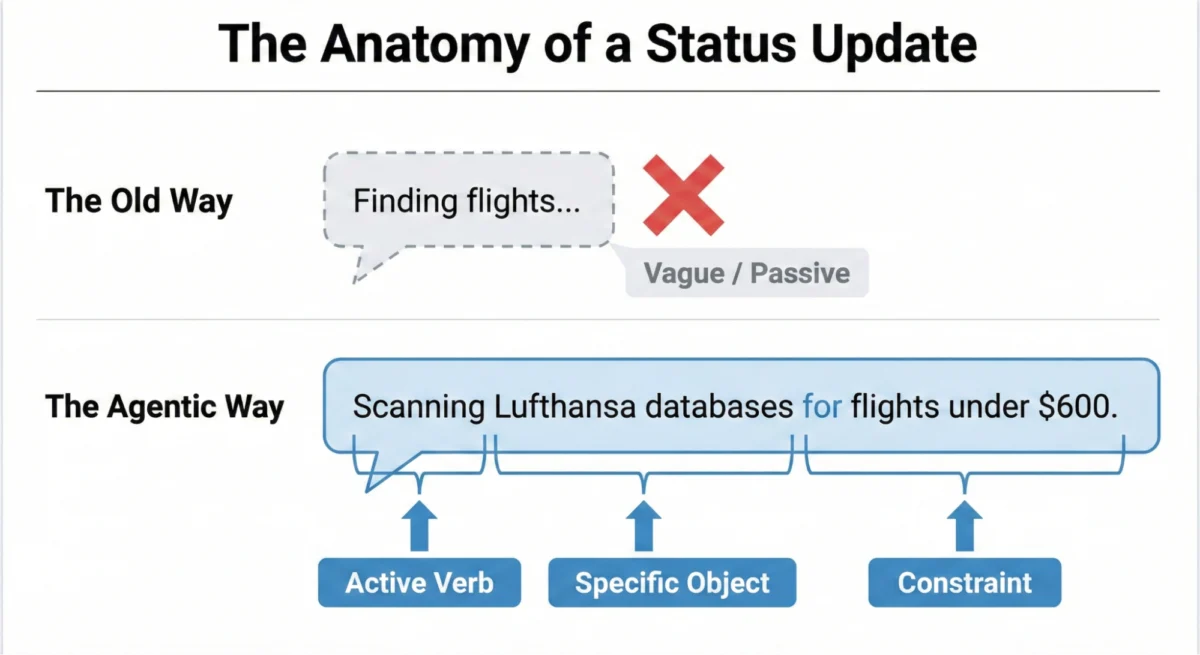
In the rapidly evolving landscape of artificial intelligence, a fundamental shift is occurring in how humans interact with software. We are moving away from traditional tools—deterministic systems that respond to clicks with immediate, predictable outputs—toward "agentic" AI experiences. These agents are capable of reasoning, planning, and executing multi-step tasks over extended periods. However, this new capability introduces a significant psychological hurdle: the "black box" of AI cognition. As AI agents take over complex workflows, the traditional "loading spinner" has become not just inadequate, but a primary driver of user anxiety and system abandonment.
Main Facts: The Death of the Loading Spinner
The core challenge of agentic AI design lies in managing "thinking time." Unlike legacy software, where latency is typically a byproduct of bandwidth or server processing, an AI agent’s delay is often a sign of active reasoning. When an agent pauses for 30 seconds, it may be weighing probabilities, searching for external data, or refining its internal plan.
Industry experts now argue that transparency is the only viable bridge for user trust. The main facts regarding this transition include:
- The Inadequacy of Legacy Patterns: Spinners and progress bars communicate that a system is retrieving data. They fail to communicate that a system is deciding.
- The Psychological Gap: Silence during a 20-second AI operation leads users to believe the system has crashed, stalled, or hallucinated.
- The Transparency Matrix: Designing for AI requires a "Decision Node Audit," identifying every moment the system makes a probabilistic choice and determining if that choice needs to be visible to the user.
- Microcopy as Infrastructure: The words used during "thinking time" are as critical as the code. Vague terms like "Working…" are being replaced by specific, agentic formulas that describe action, object, and constraints.
The Chronology of Latency: From Hourglasses to Reasoning Indicators
To understand why agentic AI requires a new visual language, one must look at the history of how software has communicated its "busy" state.

- The Hourglass Era (1990s): Early graphical user interfaces used static icons like the hourglass or the watch. These were binary indicators: the computer is busy, please wait.
- The Progress Bar Revolution (2000s): As file sizes grew, the linear progress bar (0% to 100%) provided a sense of duration. It was effective for predictable tasks like installing software or downloading a file.
- The Spinner Dominance (2010s): With the rise of the cloud and asynchronous API calls, the "throbber" or infinite spinner became the industry standard. It acknowledged that something was happening, even if the system didn’t know exactly how long it would take.
- The Reasoning Indicator (2024–Present): Agentic AI has broken the spinner. Because AI tasks are non-deterministic, a looping animation provides no reassurance. The current era demands "reasoning indicators"—real-time logs or status updates that prove the AI is making progress through a logical workflow.
Supporting Data: The Formula for Agentic Transparency
Building trust isn’t a matter of "vibes"; it is a structural design requirement. Research into user behavior suggests that transparency must be calibrated based on a Risk/Impact Matrix.
The Agentic Update Formula
To move beyond vague placeholders, designers are adopting a three-part linguistic structure for status updates:
[Action Word] + [Specific Item] + [Limit/Boundary]

- Poor Update: "Searching for flights…"
- Agentic Update: "Filtering 150 flight options based on your preference for no layovers under two hours."
This formula provides "grounding," connecting the technical process to the user’s specific life or business constraints.
The Risk/Impact Matrix
The tone and depth of transparency should match the stakes of the task:

- Low Stakes (e.g., summarizing an email): A friendly, conversational tone is appropriate. ("I’m tidying up your inbox.")
- High Stakes (e.g., a $10,000 wire transfer): A clinical, precise, and mechanical tone is required. ("Verifying recipient bank routing number against international fraud databases.")
Supporting data from user research indicates that "playful" AI in high-stakes environments causes panic, whereas "mechanical" AI in low-stakes environments feels cold and robotic.
Official Responses: Case Studies in Industry Implementation
Leading AI companies have already begun implementing these transparency patterns, providing a blueprint for the rest of the industry.

Perplexity AI: Real-Time Verification
Perplexity AI has set a high bar for search transparency. Rather than a blank screen, the interface displays a live list of the search terms it is using and the sources it is currently "reading." This allows the user to verify the AI’s direction before the final answer is even generated. If the AI is heading down the wrong path, the user sees it immediately.
Devin: The Dynamic Checklist
Devin, an autonomous AI software engineer, utilizes a Dynamic Checklist pattern. Because software engineering involves hundreds of small steps, Devin displays its entire plan upfront. As it works, it checks off completed tasks, highlights the current line of code it is writing, and lists pending steps. This manages "unpredictable time"—if a specific step takes longer than expected, the user doesn’t worry because they can see exactly which hurdle the agent is currently clearing.

ChatGPT: The "Memory" Transparency Failure
Conversely, industry analysts point to OpenAI’s "Memory" feature as a cautionary tale. In early 2025, reports surfaced of ChatGPT using information from past conversations (such as a user’s location) to influence new outputs without disclosure. For instance, an image prompt for a dog might include a "Half Moon Bay" sign because the AI "remembered" the user lived there. Because there was no audit trail or "memory log" visible to the user, this felt like a violation of privacy rather than a helpful feature. It highlighted the "Transparency Gap": personalization without an audit trail feels like surveillance.
Implications: The Future of Human-AI Collaboration
The transition to transparent, agentic interfaces has profound implications for the future of work and enterprise adoption.

The "Rework" Barrier
In professional settings—such as insurance underwriting or legal research—experts often ignore the UI while the AI works, switching tabs to handle other tasks. When they return, they judge the AI solely on the output. If the output doesn’t match their expectations (e.g., a quote is $900 when they expected $500), and there is no Audit Trail, the expert will simply discard the AI’s work and do it manually.
This "complete rework" is the death knell for AI ROI. If a tool takes 10 minutes to investigate because it lacks transparency, the user will stop using it. Therefore, an Audit Trail—a persistent "receipt" of every decision, tool call, and logic step—is not just a feature; it is the mechanism that prevents the AI from creating more work for the human.

The Pattern Library for Trust
To standardize this new world, designers are converging on four core patterns:
- The Living Breadcrumb: For low-stakes background tasks, a small, pulsing text indicator that updates as the AI moves through its workflow without interrupting the user.
- The Dynamic Checklist: For high-stakes, multi-step tasks, providing a full roadmap of planned, current, and future actions.
- The Thinking Toggle: For expert users, a progressive disclosure button (like "View Logs") that reveals the raw, sanitized logic of the AI.
- The Audit Trail: A persistent history that allows users to "Show Work" after a task is completed, ensuring that transparency survives even after the real-time animations have ended.
Conclusion: Building Colleagues, Not Magic Tricks
The ultimate goal of these interface patterns is to move AI out of the realm of "magic tricks." Magic relies on hidden mechanics and misdirection. Professional tools, however, rely on predictability and reliability.

By treating the AI agent as a "colleague" that keeps the user in the loop, designers can build systems that users feel comfortable managing rather than just monitoring. Transparency in agentic AI is about more than just showing data; it is about showing the intent and integrity of the system. As AI continues to handle more of our cognitive load, the interfaces that win will be those that aren’t afraid to show their work.
 Nana Wu
  Nana
Nana 