
 By Nana Muazin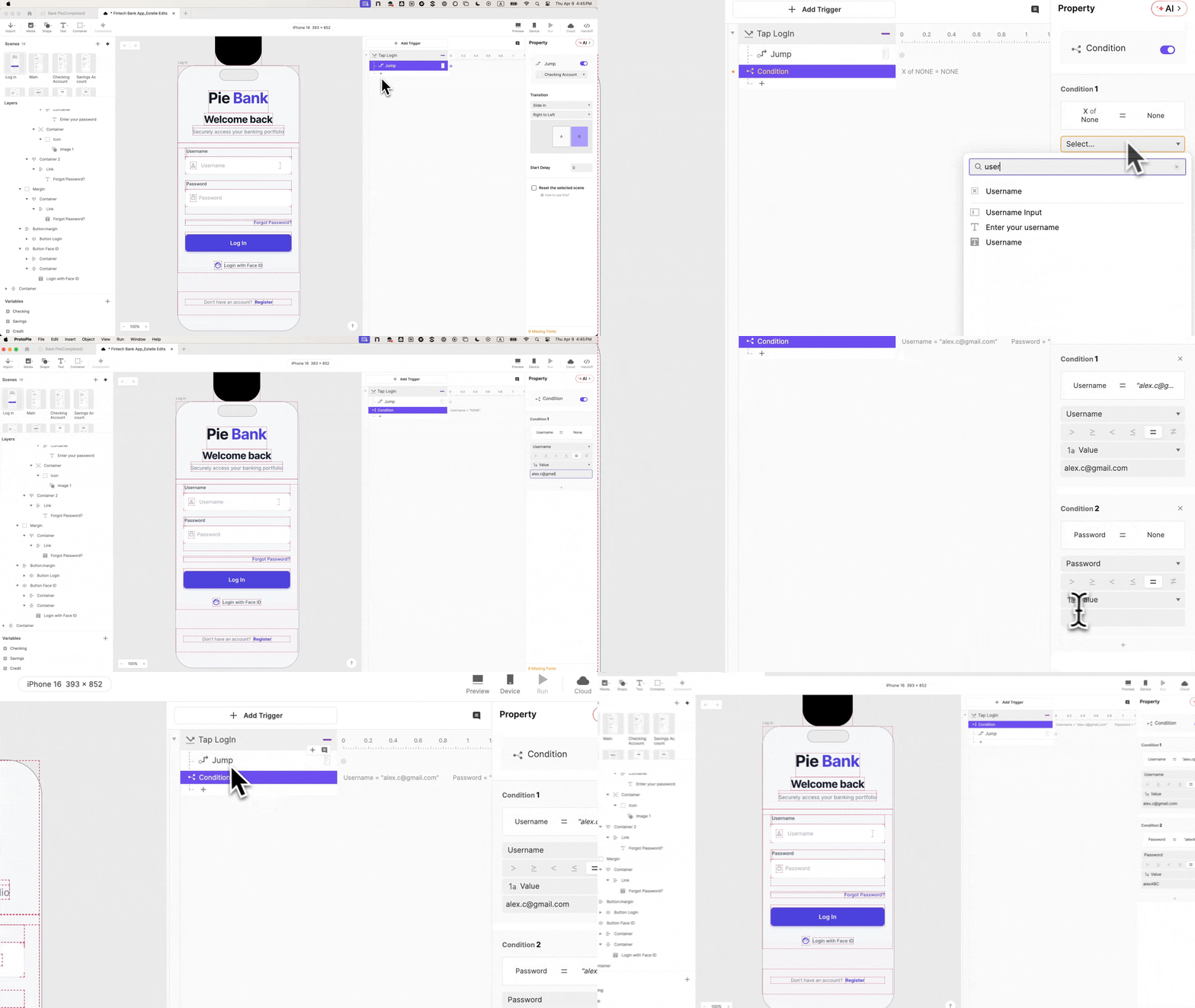
In the controlled environment of a usability testing lab, there is a recurring phenomenon that UX researchers have come to dread. A participant sits before a mobile device, navigates to the login screen, and then—for a fraction of a second—they freeze. They look at the researcher, then back at the screen, and ask, "Do I use my real password?" or "Should I just type anything?"
This pause is more than a momentary lapse in flow; it is the sound of the "fourth wall" breaking. In that instant, the participant has consciously acknowledged that the product is a facade. From that point forward, every interaction is filtered through the lens of performance rather than natural behavior. In the high-stakes world of Financial Technology (FinTech), where trust is the primary currency, this "prototype awareness" can render an entire session’s worth of data obsolete.
As digital banking becomes increasingly sophisticated, the tools used to test these experiences must evolve. The following report explores the transition from static demonstrations to high-fidelity, logic-based prototyping, specifically focusing on the login experience—the critical gatekeeper of user trust.
1. Main Facts: The Crisis of Prototype Disengagement
The fundamental problem with traditional prototyping tools is their reliance on "hotspots" and linear paths. When a user taps a username field and the keyboard simply slides up without them actually typing, the illusion of a "shipped" product vanishes.
In FinTech, the stakes are uniquely high for three reasons:
- Security Conditioning: Finance users are trained to be suspicious. A banking app that accepts an empty password field doesn’t just feel like a prototype; it feels "broken" or "unsafe," triggering a different psychological state than a real banking experience.
- Data Sensitivity: Users expect balances to calculate and inputs to validate. When a prototype fails to reflect the logic of a real ledger, users stop testing the experience and start testing the prototype.
- The Biometric Expectation: With the ubiquity of Face ID and Touch ID, users no longer view biometric login as a "feature"—it is the default. Omitting it, or faking it with a simple screen jump, removes a key emotional touchpoint of the mobile banking journey.
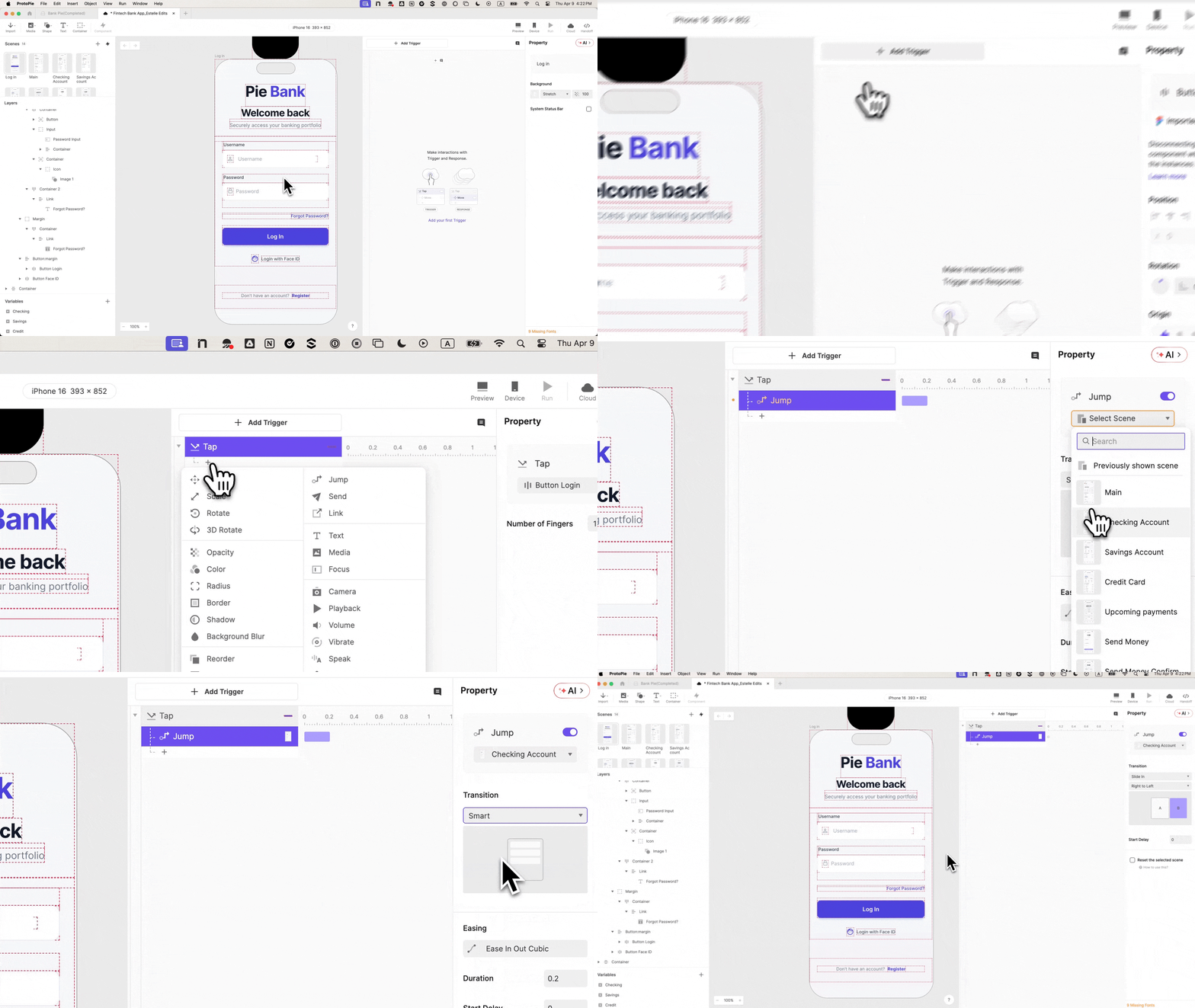
To combat this, design teams are turning to ProtoPie, a high-fidelity prototyping tool that allows for "no-code" logic, variable binding, and native sensor integration. By building a login flow that validates credentials and utilizes authentic biometric animations, teams can capture behavioral data that mirrors real-world usage.
2. Chronology: A Masterclass in Building the "Real" Login
Creating a prototype that survives the scrutiny of a skeptical user requires a systematic approach. Below is the technical progression required to move from a static Figma design to a logic-driven ProtoPie experience.
Phase I: The Foundation of Fidelity
The process begins with the transition from design to interaction.
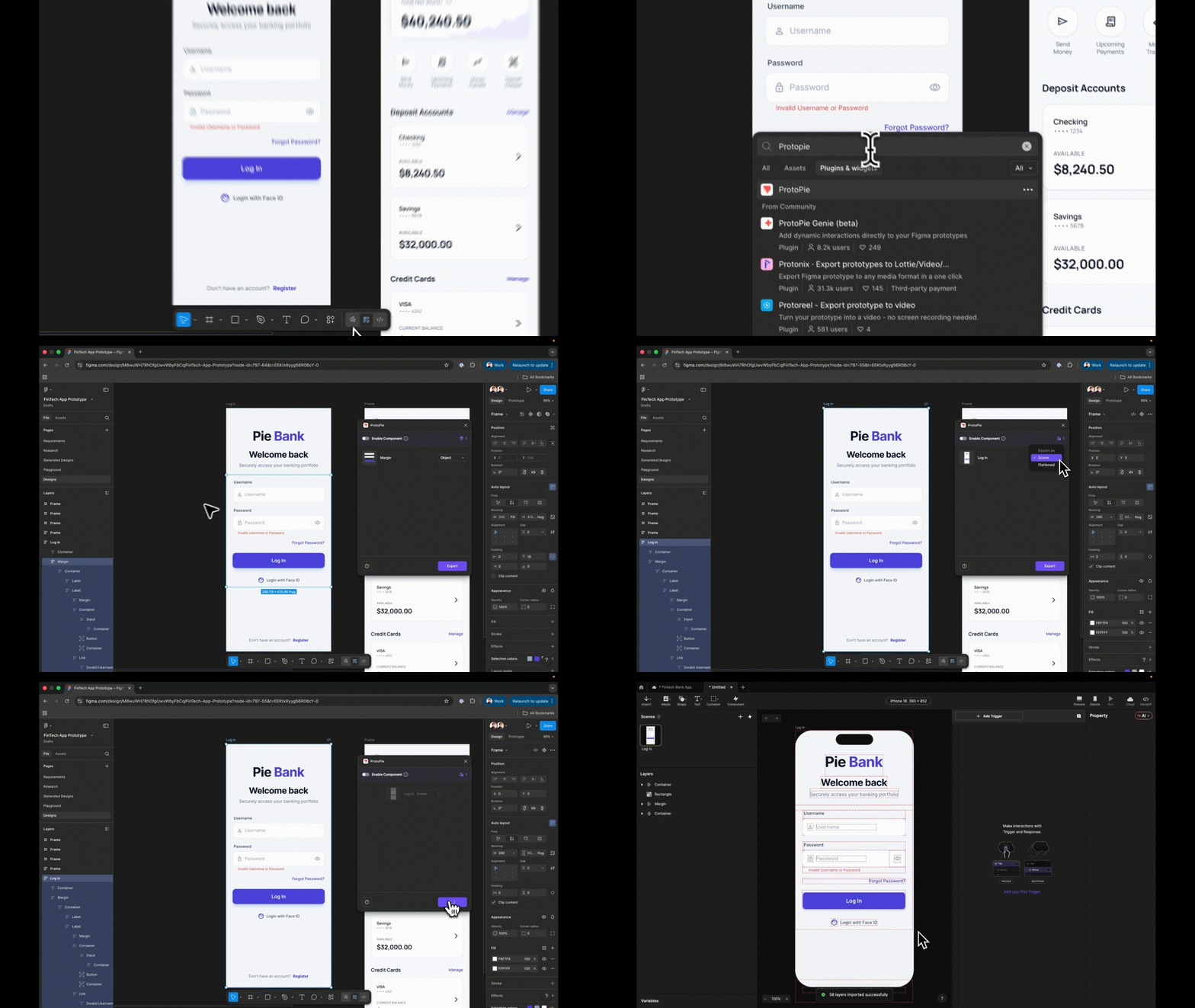
- Importing via "Scene": When moving assets from Figma to ProtoPie, the "Scene" export is vital. Unlike "Flattened" exports, which collapse layers into a single image, the Scene export preserves the hierarchy. This allows every element—the "Log In" button, the error text, the input fields—to be individually targeted with logic.
- Semantic Naming: A common pitfall in high-fidelity work is disorganized layer naming. For formulas to function, layers must be renamed from "Rectangle 104" to "Input_Username." This documentation-first approach prevents "logic debt" later in the process.
Phase II: Functional Inputs and Masking
Static rectangles are replaced with Input Layers.
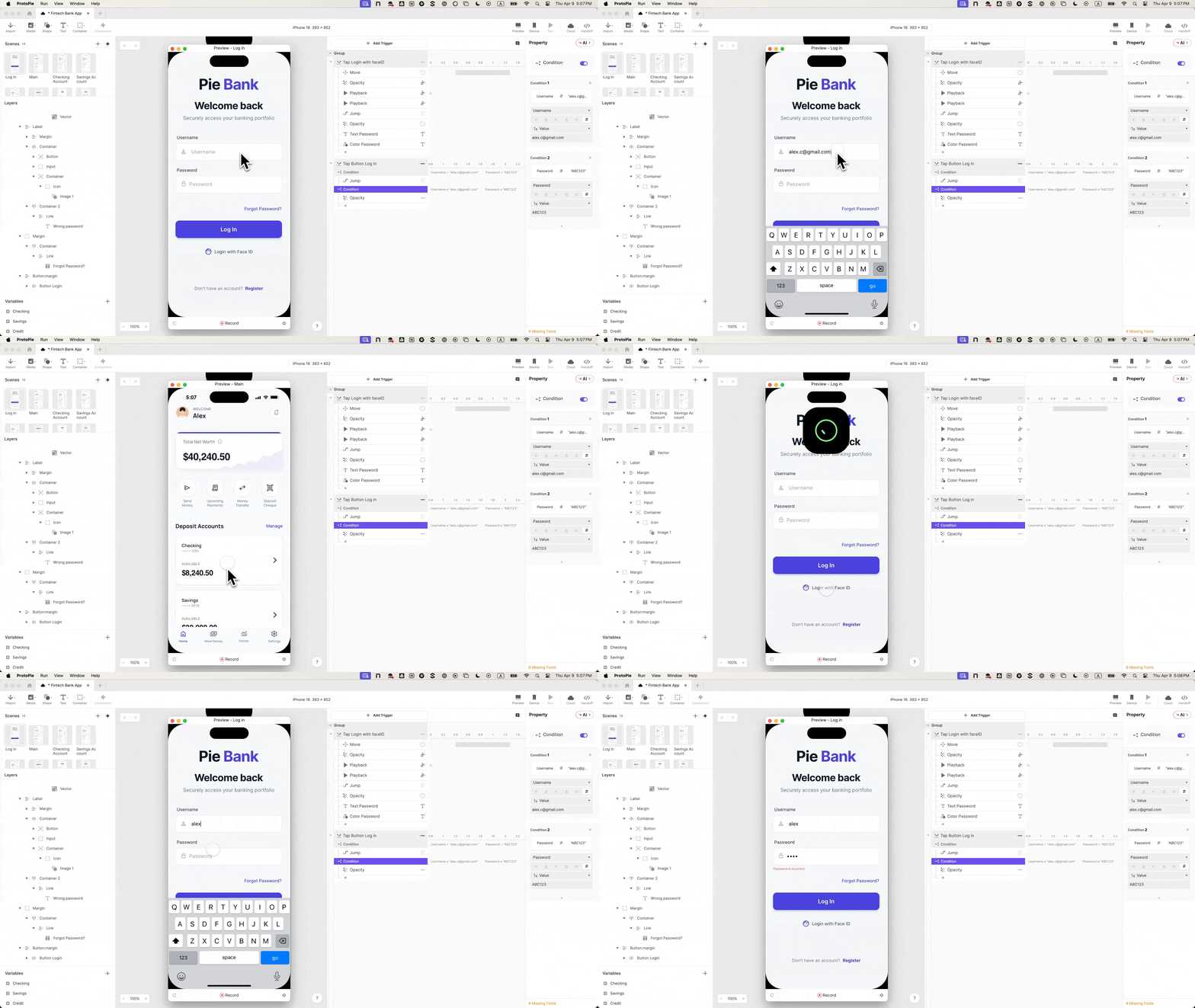
- Real Keyboard Entry: By using ProtoPie’s native Input layer, participants can use the system keyboard to type their actual (or a test) username.
- Security Simulation: The password field is set to the "Text Password" type. This automatically masks the input with dots, simulating the privacy of a real banking app without requiring the designer to build custom masking logic.
Phase III: The "Brain" of the Prototype (Variables & Conditions)
This is where the prototype stops being a movie and starts being software.
- Variable Binding: Two text variables—
usernameandpassword—are created. Using formulas likeinput("Input Username").text, the prototype "remembers" what the user typed. - Conditional Logic: The "Log In" button is no longer a simple link. It is assigned a Tap Trigger with a Condition. The transition to the dashboard only occurs if the username and password match a specific string (e.g., "[email protected]" and "12345").
- The Error State: Most prototypes only show the "happy path." By adding a secondary condition (the "inverse" of the correct credentials), designers can trigger an error message. This allows researchers to observe how users react to failure—a critical but often ignored part of the UX.
Phase IV: The Biometric Polish
To finalize the illusion, a Lottie animation of the iOS Face ID sequence is integrated.
- Staggered Timing: To feel native, the animation must be precisely timed. A Move response brings the Face ID icon onto the screen, followed by a Play response for the Lottie file. A 0.5-second delay is added before the final Jump to the dashboard, mimicking the processing time of a real device.
3. Supporting Data: Why Fidelity Matters for the Bottom Line
The push for higher fidelity isn’t merely an aesthetic preference; it is supported by the principles of Behavioral Economics and UX Research Metrics.

- The "Uncanny Valley" of UI: Research suggests that when a prototype is 90% realistic but fails at a basic interaction (like a keyboard not appearing), the user’s brain focuses disproportionately on that failure. This is known as the "isolation effect," where the flaw becomes the only thing the participant remembers.
- Signal vs. Noise: In a study of FinTech usability sessions, teams using high-fidelity prototypes reported a 40% reduction in "technical questions" from participants, allowing for 40% more time spent on core feature testing.
- Engineering Handoff Efficiency: High-fidelity prototypes act as living documentation. When an engineer can see the exact timing (e.g., a 0.2s ease-in) and the exact logic (if/then statements) within the ProtoPie interaction panel, the "interpretation gap" between design and code is narrowed, reducing front-end rework by an estimated 15-20%.
4. Official Context: The Industry Perspective
Experts in the field of financial design emphasize that the login is more than a utility; it is a psychological handshake.
"In FinTech, the login is the moment of truth," says a lead designer involved in the Pie Bank project. "If the login feels flimsy, the user subconsciously assumes the bank’s security is flimsy. By making the Face ID animation and the credential validation feel ‘heavy’ and real, we’re not just testing a flow; we’re testing the user’s sense of safety."
Furthermore, ProtoPie advocates argue that the "no-code" aspect of these high-fidelity tools is what democratizes advanced research. Designers no longer need to wait for a developer to build a "sandbox" app just to test a theory. They can build a logic-complete version in an afternoon, leading to a faster iterative cycle.
5. Implications: The Future of Prototyping
The shift toward logic-based prototyping has profound implications for the future of product development:
From "Demonstration" to "Simulation"
We are moving away from the era of "click-through mocks." Future prototypes will increasingly use real data via APIs, allowing users to see their own names or simulated real-time market data. The "Pie Bank" tutorial is the first step in this journey, proving that complex interactions like biometric authentication and conditional branching are now within the reach of the average designer.
Better Data, Better Products
When a participant forgets they are using a prototype, they stop "helping" the researcher and start "using" the product. They might struggle with a password reset, or they might express relief when Face ID works. This emotional data is the "gold" of UX research, and it only appears when the prototype is indistinguishable from reality.

Bridging the Design-Development Divide
As tools like ProtoPie become standard, the role of the UI/UX designer is expanding. They are no longer just "drawing" screens; they are defining system behaviors. This shift forces designers to think like programmers—considering edge cases, error states, and system feedback—long before a single line of production code is written.
Conclusion
The "moment of hesitation" at the login screen is a symptom of a design process that has, for too long, relied on static representations of dynamic systems. By investing the time to build functional, logic-driven logins, FinTech teams can eliminate the "prototype awareness" that plagues usability testing. In doing so, they ensure that the insights they gather are not just reflections of a demo, but genuine blueprints for a successful, trustworthy product. The path to better banking experiences starts not with a grand vision, but with a login screen that actually works.
 Nana Wu
  Nana
Nana 