
 By rifanmuazin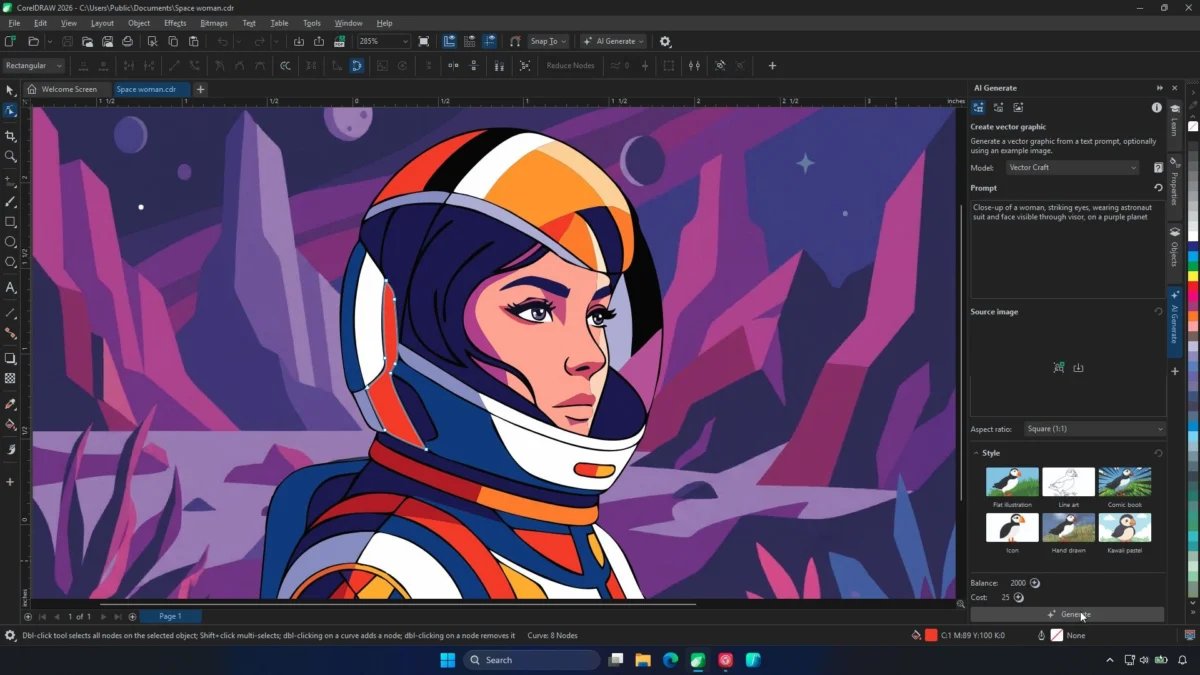
The landscape of professional design software has shifted dramatically over the past two years, moving from simple digital canvases to collaborative, AI-assisted ecosystems. For years, the integration of generative AI into creative suites felt like a novelty—a parlor trick that produced impressive static images but failed to deliver the granular control that professional graphic designers require. Corel, however, seems to have finally turned a corner with the release of the September 2026 update to the CorelDRAW Graphics Suite.
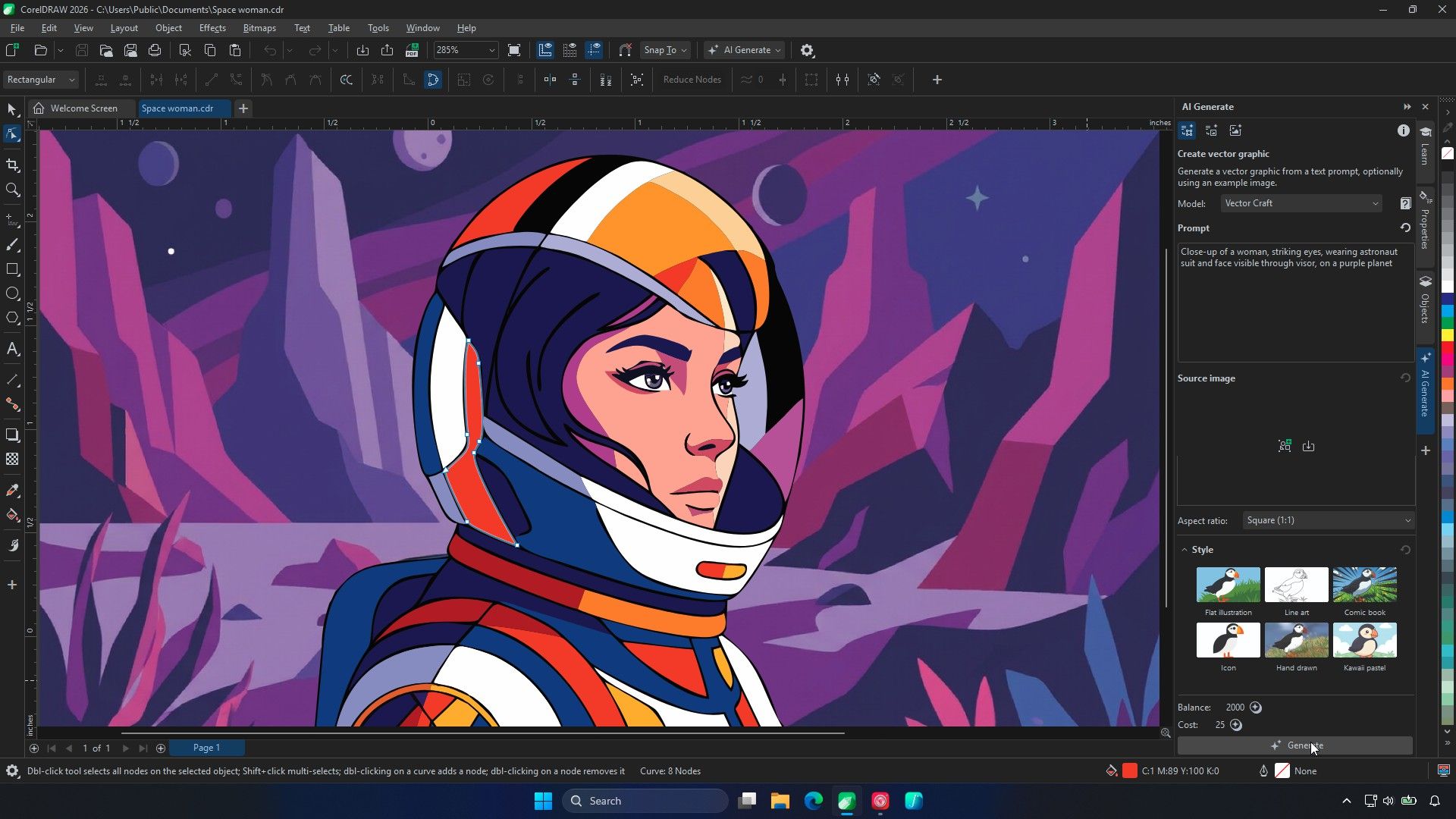
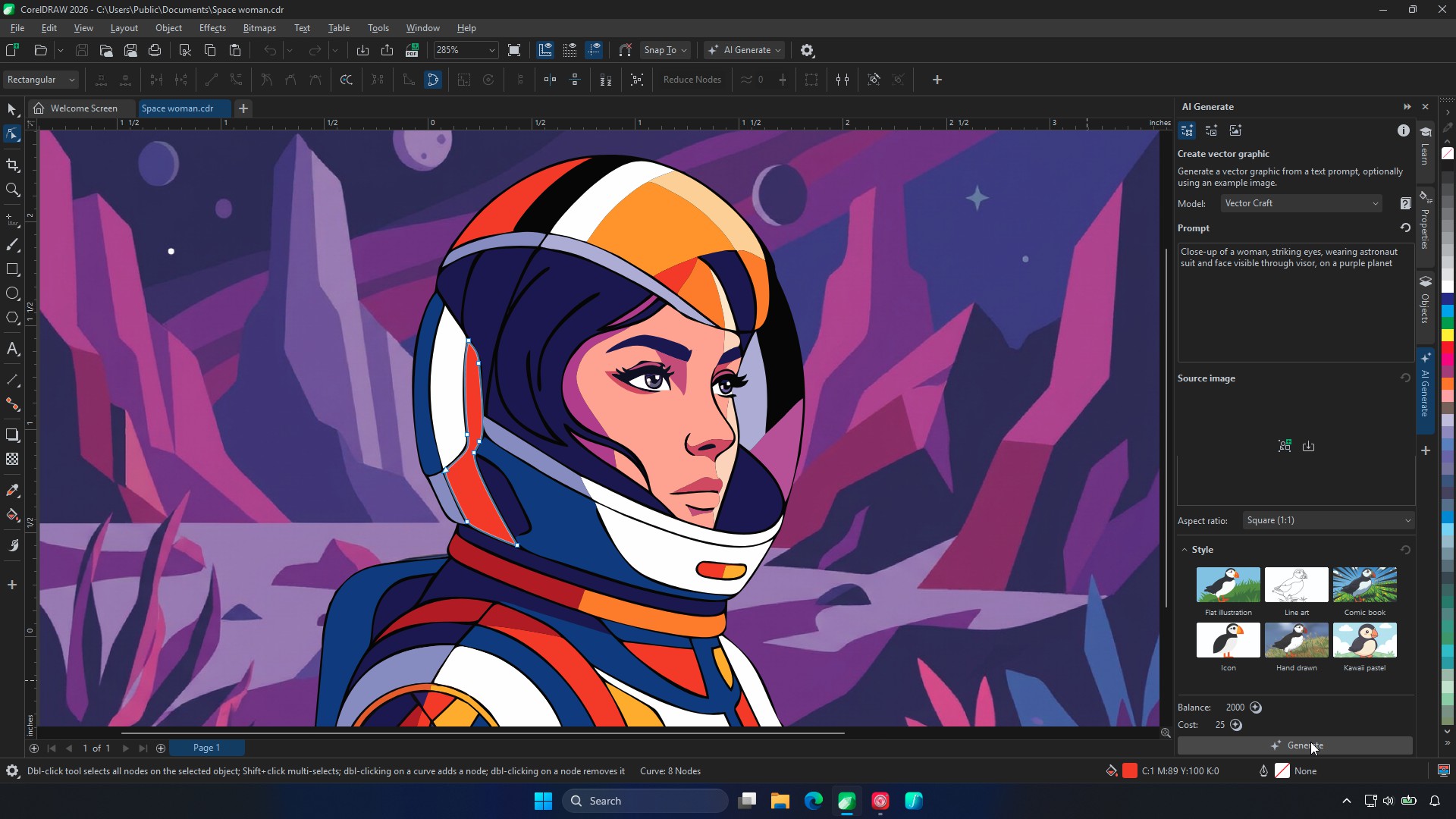
By moving beyond simple raster-based image generation, Corel’s new "Text-to-Vector" tool promises something that has eluded most competitors: true, node-based, editable vector artwork. This development marks a significant pivot in the company’s strategy, focusing on workflow integration rather than mere image creation.
The Core Problem: Why "Vector-Native" Is the Holy Grail
Earlier this year, when Corel first introduced AI tools to its suite, many designers met the news with skepticism. The prevailing question was simple: Do we really need this? The initial iterations were largely decorative, failing to provide the mathematical precision required for professional branding, logo design, or technical illustration. A vector file is not just a picture; it is a complex map of Bézier curves, nodes, and path data.
If an AI generates a beautiful image that cannot be deconstructed into its constituent parts, it is essentially useless for a professional designer who needs to adjust a path or modify a specific color profile. The new Text-to-Vector feature addresses this by handing the user actual objects, curves, and nodes. By generating assets that are natively editable, Corel is positioning its AI not as a replacement for the artist, but as a high-speed draftsperson.
Chronology of the Update
The journey to this point has been a calculated progression for Corel:
- Early 2026: Corel introduces initial AI-assisted features to the Graphics Suite, primarily focused on raster enhancements and general image styling. User feedback highlights a critical lack of vector-native output, leading to internal shifts in R&D priorities.
- Summer 2026: Beta testing begins for the new generative vector models. Early feedback from designers confirms that the primary value is not in "creating from scratch," but in "ideation and modification."
- September 2026: The official launch of the September 2026 update. The suite introduces three distinct AI models—Vector Spark, Vector Craft, and Vector Master—designed to handle varying levels of complexity.
- Post-Launch: The focus shifts to optimizing cloud-based processing, as Corel makes the strategic decision to prioritize accessibility over local GPU requirements.
Supporting Data and Technical Architecture
The power behind these new tools lies in three specialized models, each tailored to a different design intent. This segmentation is a sophisticated approach to generative AI:
- Vector Spark: This model is optimized for high-speed, simple jobs. It is the go-to for icon creation, basic clip art, and rapid asset generation where complexity is low but efficiency is paramount.
- Vector Craft: Positioned as the "all-rounder," this model balances speed with detail, serving as the primary engine for most standard design tasks.
- Vector Master: The flagship model designed for complex designs and variations derived from reference content. This is where the most significant labor-saving occurs, as it can interpret intricate existing designs and produce new, stylistically consistent assets.
Corel’s choice to keep these models in the cloud rather than tethering them to local GPU performance is a calculated business move. Jenny John, Product Management for CorelDRAW, notes that the typical professional vector artist does not necessarily possess the high-end, monster-spec GPUs required by 3D animators or video editors. By offloading the compute-heavy AI tasks to the cloud, Corel ensures that the suite remains accessible on standard-issue professional laptops, thereby lowering the barrier to entry for the software.
The "Reference Workflow" Philosophy
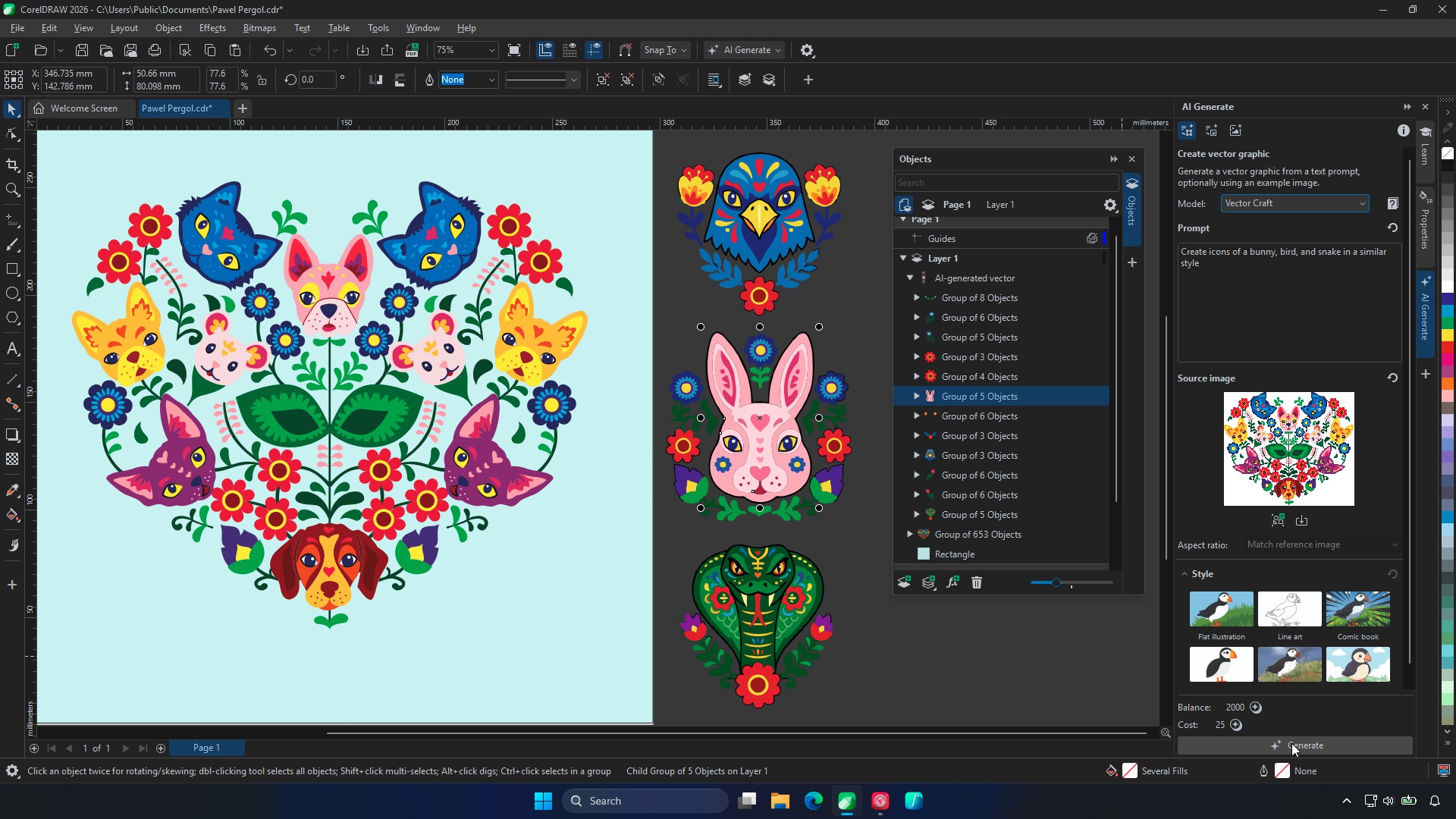
Perhaps the most significant aspect of the September update is the emphasis on the "reference workflow." During demonstrations, Corel highlighted how an artist could take an existing illustration—containing hundreds of individual objects—and prompt the AI to generate complementary assets (such as new icons or supporting characters) that match the original style perfectly.
This approach acknowledges a fundamental truth about the creative process: artists rarely want an AI to do their work from start to finish. They want to maintain their unique visual language. When the AI is used to fill in the gaps or handle the tedious, repetitive tasks—such as generating a suite of 50 icons based on a single master design—it becomes a force multiplier for the designer’s time.
"That’s really where the artist’s work begins," Jenny John remarked during the demonstration. By providing a base that is already partially structured into layers and objects, the AI allows the designer to spend their time on the "interesting bits" of creative refinement rather than the "dull bit" of manual tracing or object creation.
Official Responses and Industry Reception
The reaction from the beta-tester community has been largely positive, particularly regarding the "PowerTRACE" improvements. PowerTRACE, a longstanding component of the CorelDRAW suite, has received a significant under-the-hood overhaul. Tracing tasks that once took half an hour—forcing designers to step away for a coffee break—are now reportedly up to four times faster.
With AI-assisted background removal and improved object structure, the software is handling large, complex files with fewer hiccups. Designers who were previously frustrated by the "tracing" process are finding that the AI-augmented version provides a much cleaner starting point, significantly reducing the amount of manual cleanup required.
However, the company remains humble about the current limitations. When asked about the common frustration of wanting to change a single element of an image without altering the entire composition—such as shifting a night scene to a day scene—John admitted that this remains an area for growth. "That’s where we want to get to with AI," she noted. "The more customisable it is, the better."
Implications for the Future of Design
The introduction of these tools brings several implications for the future of the graphic design industry:
1. The Death of the "Blank Page" Anxiety
For many, the most difficult part of a project is the initial ideation. By allowing designers to feed their own work into the AI, Corel is providing a way to generate variations, sketches, and concepts instantly. This shifts the designer’s role from "creator" to "curator" and "refiner," allowing them to iterate through dozens of ideas in the time it used to take to draw one.
2. Democratization vs. Professionalization
While these tools make high-level design more accessible, they also raise the bar for what is expected of a professional. If a designer can generate 50 high-quality vector assets in an hour, the industry expectation for turnaround times will inevitably increase. This will likely push the market toward a model where the value is placed less on the "production" of an asset and more on the creative strategy and final polish.
3. Sustainability of the Cloud Model
By eschewing local GPU requirements, Corel is making a gamble on its server infrastructure. If the user base expands significantly, maintaining the speed and reliability of these cloud-based models will be the next major challenge for the company. Should latency increase or costs rise, the company may eventually need to reconsider local, hardware-accelerated processing.
Conclusion: A New Baseline for Creativity
The novelty of typing a prompt and waiting for an AI to spit out a pixelated image is officially over. The current market standard is now about utility, precision, and integration into existing workflows. CorelDRAW’s move to make its AI output "vector-native" is a direct response to the demands of a professional audience that refuses to sacrifice quality for the sake of speed.
Whether this tool saves significant time in real-world client scenarios remains to be seen, but the trajectory is clear. By allowing artists to retain control over the nodes and paths, Corel is ensuring that the human hand remains the final arbiter of design. For the professional designer, this isn’t just another update—it’s a necessary evolution in a world where speed is a requirement, but control remains an obsession.
As CorelDRAW continues to bridge the gap between AI generation and human craft, the question for designers is no longer "do we need AI?" but rather "how will we use it to refine our own voice?" For now, at least, the software provides a sturdy, editable foundation from which to answer that question.
 Iffa Jayyana
  Reynand Wu
  Nila Kartika Wati