
 By Neng Nana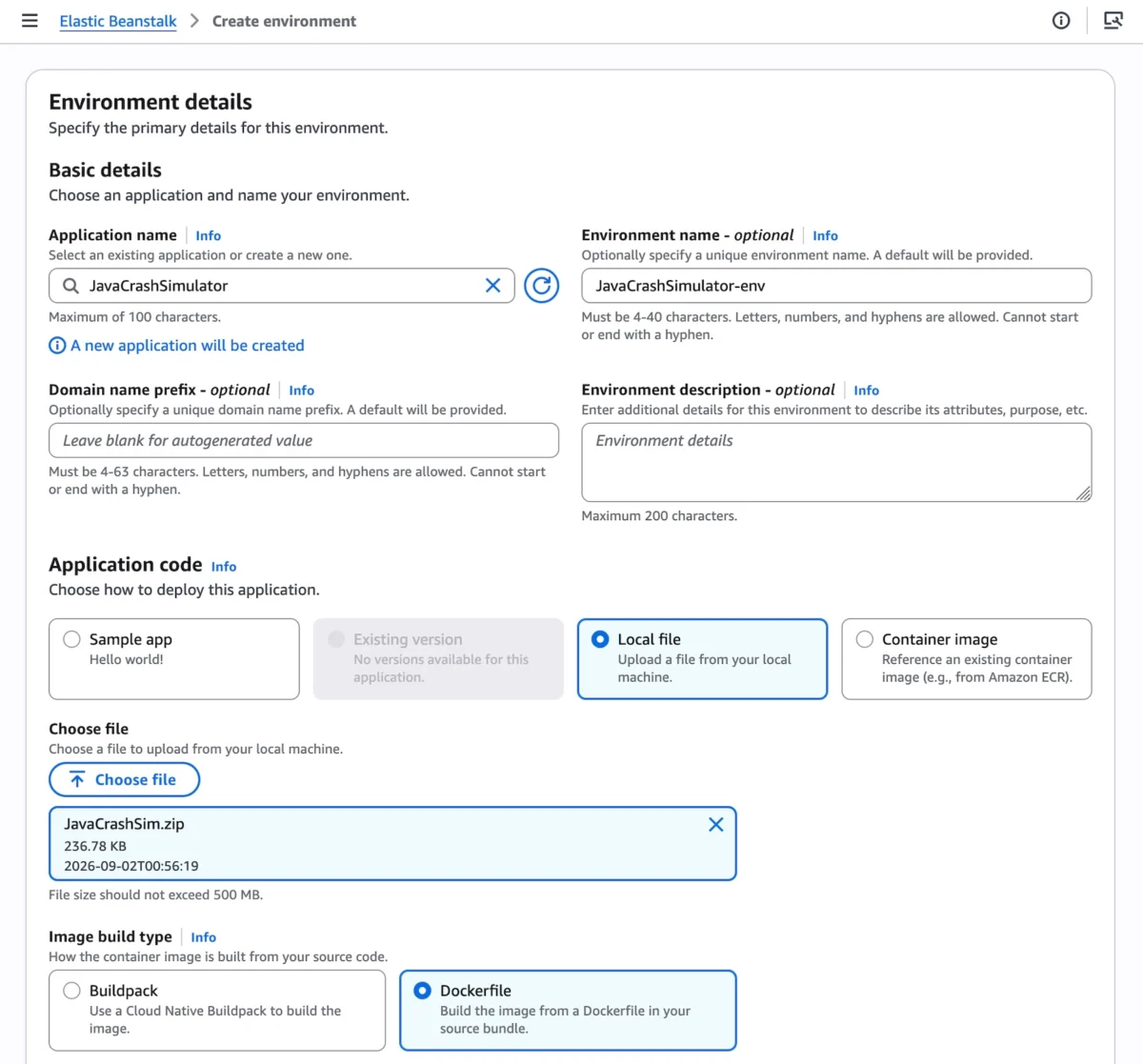
Fifteen years after its initial debut in 2011, Amazon Web Services (AWS) has radically reimagined one of its most enduring developer tools. AWS Elastic Beanstalk—long trusted by startups and enterprises alike to handle the heavy lifting of infrastructure provisioning, application deployment, and scaling for full-stack applications in Java, .NET, Python, Node.js, PHP, Ruby, and Go—is stepping into its next generation.
In a major announcement, AWS has unveiled a fully managed Cluster Mode for Elastic Beanstalk. This new capability takes the simplicity that developers have loved for a decade and a half and marries it with the industrial-strength orchestration of Amazon Elastic Kubernetes Service (Amazon EKS). The result is a paradigm shift in how engineering teams manage portfolios of microservices, cutting operational complexity and infrastructure costs while maintaining AWS’s ironclad promise: you bring the application code, and AWS manages everything else for the life of the workload.
Main Facts: What is Elastic Beanstalk Cluster Mode?
At its core, Elastic Beanstalk Cluster Mode is designed to eliminate the operational overhead of running microservices at scale. Rather than provisioning and managing isolated infrastructure for every single application or microservice, engineering teams can now deploy multiple applications that share a unified infrastructure baseline powered by Amazon EKS.
Key elements of this launch include:
- True Shared Infrastructure: Multiple applications and services share resources cleanly, dramatically lowering per-application costs as an enterprise’s software portfolio scales.
- Unified Control Plane: Whether an organization operates ten microservices or a hundred, developers can manage them through a single cohesive interface with consistent operational guarantees across every stack.
- Flexible Packaging: Teams are not locked into a single ingestion format. Beanstalk accepts raw source code, Dockerfiles, or pre-built container images.
- Full Lifecycle Management: AWS assumes permanent operational responsibility—continuously handling deployment, automated scaling, regular security patches, performance monitoring, and system upgrades.
- Side-by-Side Coexistence: Elastic Beanstalk Standard Mode (powered by Amazon EC2) remains fully supported. Standard and Cluster Mode environments can run concurrently within the same Beanstalk application, allowing teams to migrate at their own pace with built-in compatibility validation checks.
Chronology: The Evolution of Elastic Beanstalk
To understand the magnitude of this release, it helps to trace the historical arc of AWS Elastic Beanstalk and the modern tooling updates that paved the way for Cluster Mode:
- 2011: AWS launches Elastic Beanstalk, providing developers with a Platform-as-a-Service (PaaS) abstraction layer to quickly deploy web applications without wrestling with raw EC2 instances or Elastic Load Balancers.
- Early 2026 (February): AWS releases an official GitHub Action for Elastic Beanstalk, enabling engineering teams to trigger production deployments directly from existing CI/CD workflows using simple YAML configurations.
- Spring 2026 (April): AWS introduces AI-powered environment analysis, allowing Beanstalk to automatically diagnose underlying health anomalies and recommend or apply targeted fixes.
- Late 2026 (Current Announcement): AWS officially rolls out Cluster Mode. Alongside this architecture shift, the platform is modernized with OpenTelemetry-based observability, zero-downtime traffic-splitting deployments with automatic rollbacks, event-driven autoscaling, native secrets management via AWS Secrets Manager, and HTTPS enabled by default through AWS Certificate Manager.
Supporting Data & Technical Architecture
Elastic Beanstalk Cluster Mode is engineered to bridge the gap between simple developer workflows and complex, enterprise-grade container orchestration.
Getting Started via the Console
Deploying an application via Cluster Mode requires minimal configuration. Developers navigate to the AWS Elastic Beanstalk console, create a new environment, and select Cluster under the Deployment type menu.
Users can upload source code via local files, provide configuration scripts, or link container images. Behind the scenes, the initial deployment triggers the creation of an underlying EKS cluster—a process that typically takes around ten minutes. Subsequent deployments execute significantly faster because they safely leverage the pre-existing EKS cluster foundation.

Command-Line and SDK Automation
For teams utilizing automated pipelines, the process is easily scripted using the AWS CLI, EB CLI, or standard AWS SDKs. For example, registering multi-service microservice architectures involves creating an application, registering versions against Amazon Elastic Container Registry (ECR), and mapping configuration options.
Consider a multi-container e-commerce setup featuring frontend, cart, payment, and shipping microservices. Registering images programmatically via the CLI looks like this:
#!/bin/bash
APP_NAME="my-microservice"

IMAGES=(
    "frontend-v1|public.ecr.aws/my-microservices/frontend:v1"
    "cartservice-v1|public.ecr.aws/my-microservices/cart:v1"
    "paymentservice-v1|public.ecr.aws/my-microservices/payment:v1"
    "shippingservice-v1|public.ecr.aws/my-microservices/shippping:v1"
)

for entry in "$IMAGES[@]"; do
    IFS='|' read -r label uri <<< "$entry"
    aws elasticbeanstalk create-application-version
        --application-name "$APP_NAME"
        --version-label "$label"
        --image-configuration Source="Uri=$uri"
        --region "us-west-2"
    echo "Successfully Registered: $label"
done
Once images are registered, teams define infrastructure and networking parameters—such as specifying public Application Load Balancers (ALBs), internal health check paths, memory limits, and CPU allocations—via configuration JSON files before triggering the environment creation command:
aws elasticbeanstalk create-environment
    --application-name my-microservice
    --environment-name frontend
    --version-label frontend-v1
    --tier Name=Cluster,Type=EKS
    --option-settings file:///tmp/frontend-options.json
Pricing Model
AWS has structured Cluster Mode pricing for maximum transparency:

- There is no additional charge or markup for using Elastic Beanstalk Cluster Mode itself.
- Customers pay exclusively for the underlying AWS resources consumed by their workloads. This includes the standard EKS control plane fee, EKS Auto Mode compute resources, Amazon ECR storage, and Amazon CloudWatch telemetry logs.
- Note: Elastic Beanstalk Cluster Mode is not eligible for the AWS Free Tier.
Official Responses and Strategic Guidance
According to AWS leadership, the motivation behind Cluster Mode stems from listening to organizations grappling with "fleet sprawl"—the hidden operational tax of managing hundreds of isolated server instances or disjointed Kubernetes manifests across distinct teams.
"We have spent the last several years completely re-architecting the operational engine beneath Elastic Beanstalk," notes Channy Yun, principal developer advocate at AWS. "With Cluster Mode, we are delivering the raw power, flexibility, and elasticity of Amazon EKS, but wrapping it in the frictionless, fully-managed deployment model that our customers have relied on for fifteen years."
AWS recommends Cluster Mode for teams operating microservice portfolios, modernizing legacy web apps into containerized architectures, or seeking the cost efficiencies of shared cluster compute without wanting to manually curate Kubernetes control planes, ingress controllers, and service meshes. Conversely, Elastic Beanstalk Standard Mode (EC2) remains fully supported and continues to be the ideal target for monolithic single-instance applications, workloads requiring direct OS-level tuning, or apps with hyper-specific file-system persistence demands.
Implications for Developers and Enterprise IT
The introduction of Elastic Beanstalk Cluster Mode carries profound implications for the software development lifecycle:

- Democratizing Kubernetes: Many small-to-midsize engineering teams have avoided Kubernetes due to its notoriously steep learning curve and high day-two operational burdens (such as managing node upgrades, RBAC, and CNI plugins). Cluster Mode absorbs these complexities entirely, allowing backend developers to leverage Kubernetes-backed infrastructure without writing a single line of raw YAML configuration.
- Accelerated Time-to-Market: By blending native GitHub Actions, AI-assisted health analysis, automatic traffic-splitting, and instant rollbacks, engineering organizations can ship updates faster and with significantly lower risk profiles.
- Streamlined Governance and Compliance: Enterprise platform teams can establish robust baseline governance, security patching schedules, and observability standards centrally through Beanstalk, ensuring that individual development squads remain compliant out of the box.
Availability and Getting Started
AWS Elastic Beanstalk Cluster Mode is generally available today across all AWS Regions where Elastic Beanstalk is currently supported.
Developers looking to explore regional roadmaps, query APIs, or troubleshoot implementations can also leverage the AWS MCP Server and associated plugins within their preferred AI-assisted development environments.
To test drive the new architecture, developers can log into the AWS Elastic Beanstalk Console, spin up a cluster-type environment, and share feedback via the AWS re:Post Elastic Beanstalk Community Forum.
 Siti Muinah
  Reynand Wu
  Jia Lissa