
 By Layla Zulfa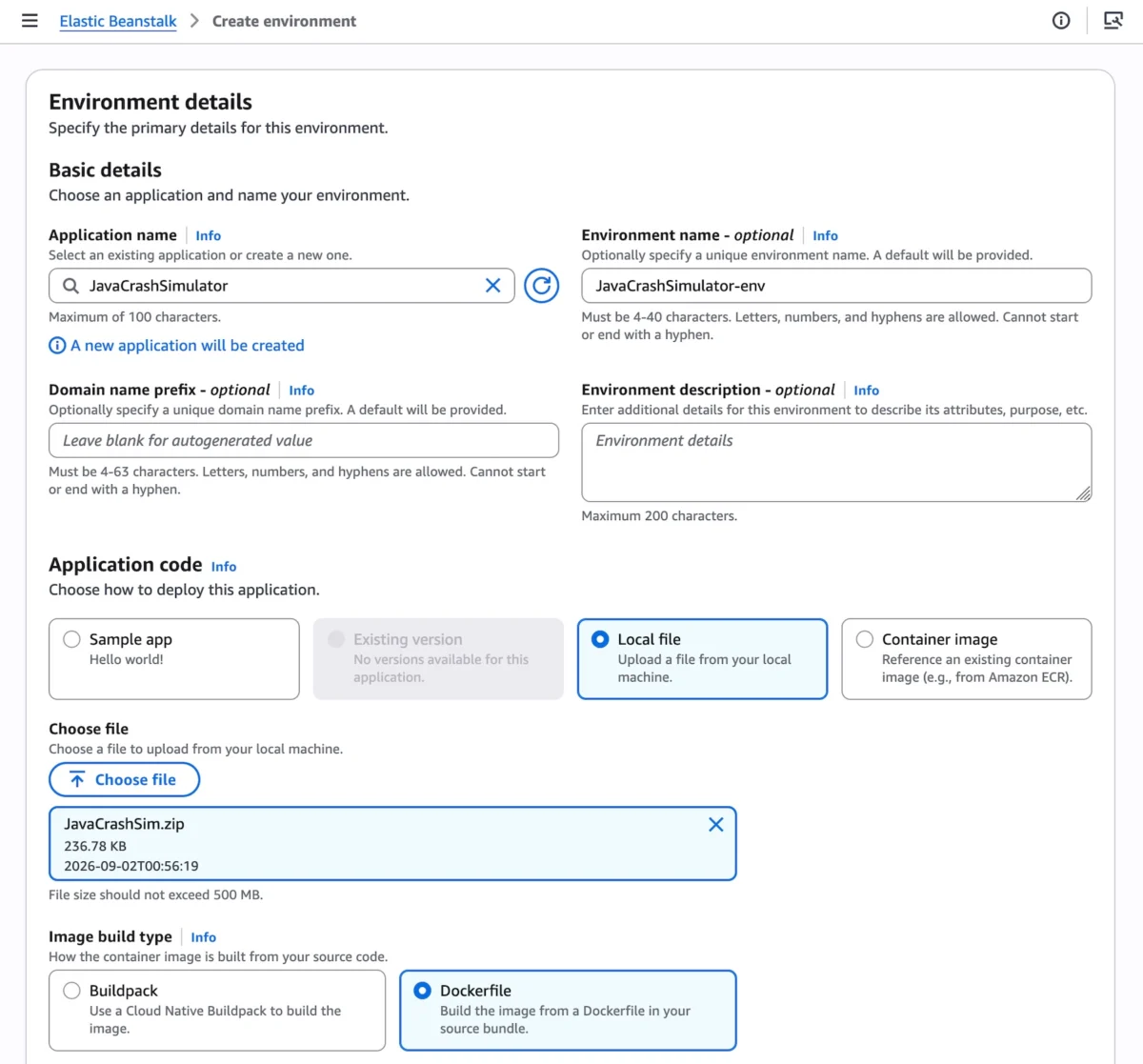
Fifteen years after its initial market debut in 2011, AWS Elastic Beanstalk has transformed from a straightforward provisioning utility into a cornerstone of modern cloud architecture. Trusted by developers across the globe to handle the heavy lifting of full-stack applications written in Java, .NET, Python, Node.js, PHP, Ruby, and Go, the service has consistently allowed engineering teams to direct their energy toward business logic rather than infrastructure operations.
Today, Amazon Web Services (AWS) is announcing the next major chapter in the evolution of this foundational service: a fully-managed Cluster Mode for AWS Elastic Beanstalk. Designed specifically for engineering organizations operating sophisticated portfolios of applications, this new paradigm shifts the underlying operational architecture toward Amazon Elastic Kubernetes Service (Amazon EKS). By combining the frictionless developer experience of Elastic Beanstalk with the raw power and scalability of Kubernetes, AWS is offering a unified operational baseline that promises to reduce per-application costs while dramatically simplifying portfolio-wide management.
Main Facts
The introduction of Cluster Mode marks a structural maturation of AWS Elastic Beanstalk. Rather than forcing development teams to manage each application in isolated silos, Cluster Mode allows multiple applications and microservices to share a unified infrastructure powered by Amazon EKS, governed by a single operational baseline.
- Bring Your Own Application: Developers can deploy applications in whichever format suits their current workflow—whether raw source code, Dockerfiles, or pre-built container images.
- Unified Management: Organizations running anywhere from ten to a hundred microservices can oversee their entire portfolio through a single control experience, ensuring identical operational guarantees across every stack.
- Shared Cost Efficiency: Because multiple applications share underlying cluster resources, per-application infrastructure costs decrease organically as the portfolio expands, avoiding the linear cost scaling historically associated with isolated application environments.
- Comprehensive Modern Foundation: The modernized Elastic Beanstalk core introduces AI-powered environment analysis for automated health diagnostics, an official GitHub Action for native CI/CD workflows, OpenTelemetry-based observability, traffic-splitting deployments with automatic rollback, event-driven autoscaling, secret management via AWS Secrets Manager, and default HTTPS through AWS Certificate Manager.
- Pricing Structure: Elastic Beanstalk Cluster Mode is offered with no additional platform service charges. Customers pay strictly for the underlying AWS consumption resources, which include the EKS control plane fee, EKS Auto Mode compute, Amazon ECR storage, and Amazon CloudWatch monitoring. (Note: Cluster Mode is excluded from the AWS Free Tier).
Chronology: Fifteen Years of Continuous Evolution
To understand the magnitude of the Cluster Mode release, it is instructive to examine how Elastic Beanstalk has evolved over its decade-and-a-half lifecycle to meet changing enterprise demands.
2011: The Inception
AWS launches Elastic Beanstalk as an easy-to-use service for deploying and scaling web applications and services developed with Java, .NET, PHP, Node.js, Python, Ruby, and Go on familiar servers such as Apache, Nginx, Passenger, and IIS. The core value proposition is immediate: developers write code, and Beanstalk handles the deployment, capacity provisioning, load balancing, and automated scaling.
2011–2025: Maturation and Containerization
Over the ensuing years, Beanstalk expands its capabilities to support Docker containers, offering developers the ability to run containerized web apps without needing to manually configure cluster management systems. However, as cloud-native microservices architectures gain dominance, engineering teams increasingly adopt Kubernetes (Amazon EKS) to orchestrate complex, multi-service applications, occasionally creating a divide between traditional Beanstalk users and modern container orchestration practitioners.
Early 2026: The Operational Engine Overhaul
AWS embarks on a comprehensive modernization of Elastic Beanstalk’s underlying operational engine.
- February 2026: AWS introduces an official GitHub Action, enabling development teams to deploy straight from their existing CI/CD pipelines via a single YAML configuration file.
- April 2026: AWS rolls out AI-powered environment analysis, bringing intelligent diagnostic capabilities that automatically analyze runtime health issues and recommend targeted fixes.
- Concurrently, AWS re-architects the underlying infrastructure to natively incorporate OpenTelemetry-based observability, traffic-splitting capabilities with automated rollback safety nets, event-driven autoscaling frameworks, and seamless secrets integration via AWS Secrets Manager and AWS Certificate Manager.
September 2026: The Launch of Cluster Mode
AWS officially announces the general availability of Elastic Beanstalk Cluster Mode across all commercial regions where Elastic Beanstalk is currently supported. This release bridges the gap between classic application management and enterprise-grade Kubernetes orchestration, giving teams a fully managed path to EKS without requiring deep native Kubernetes expertise.
Supporting Data and Technical Implementation
Transitioning to Cluster Mode does not require a complete architectural rewrite. AWS has designed the workflow to be intuitive whether executed through the graphical AWS Management Console or programmatically via the AWS Command Line Interface (CLI), the EB CLI, or standard AWS SDKs.
Getting Started via the Console
To deploy a workload using Cluster Mode in the AWS Management Console:

- Navigate to the Elastic Beanstalk console.
- Click to create a new environment.
- Under the Deployment type section, select Cluster.
- Provide your application code—either by selecting Local file and configuring container image build options, or by referencing existing images stored in Amazon Elastic Container Registry (Amazon ECR).
- Click Create.
Note: The initial deployment for a given set of subnets triggers the provisioning of an underlying EKS cluster, which typically requires approximately ten minutes. Subsequent application deployments execute substantially faster as they leverage the pre-existing cluster infrastructure.
Programmatic Deployment of Microservices via AWS CLI
For organizations utilizing Infrastructure-as-Code or automated CI/CD pipelines, deploying a multi-service microservices application to Kubernetes via the AWS CLI follows a structured sequence.
First, create the parent application container:
aws elasticbeanstalk create-application
    --application-name "my-microservice"
    --description "Multi-services demo"
Next, register pre-built application versions using container images stored in Amazon ECR:
APP_NAME="my-microservice"
IMAGES=(
    "frontend-v1|public.ecr.aws/my-microservices/frontend:v1"
    "cartservice-v1|public.ecr.aws/my-microservices/cart:v1"
    "paymentservice-v1|public.ecr.aws/my-microservices/payment:v1"
    "shippingservice-v1|public.ecr.aws/my-microservices/shipping:v1"
)

for entry in "$IMAGES[@]"; do
    IFS='|' read -r label uri <<< "$entry"
    aws elasticbeanstalk create-application-version
        --application-name "$APP_NAME"
        --version-label "$label"
        --image-configuration Source="Uri=$uri"
        --region "us-west-2"
    echo "Registered: $label"
done
Configure service-specific parameters using a configuration options file (e.g., frontend-options.json). For instance, public-facing services like the frontend require an Application Load Balancer (ALB) and an explicit health-check path:

[
    "Namespace": "aws:elasticbeanstalk:eks", "OptionName": "cluster-role", "Value": "arn:aws:iam::0123456789012:role/EksClusterRole",
    "Namespace": "aws:elasticbeanstalk:eks", "OptionName": "node-role", "Value": "arn:aws:iam::0123456789012:role/EksNodeRole",
    "Namespace": "aws:elasticbeanstalk:eks:environment", "OptionName": "observability-role", "Value": "arn:aws:iam::0123456789012:role/ObservabilityRole",
    "Namespace": "aws:elasticbeanstalk:eks:environment", "OptionName": "subnets", "Value": "subnet-1,subnet-2,subnet-3",
    "Namespace": "aws:elasticbeanstalk:eks:environment:autoscaling", "OptionName": "min-replica", "Value": "1",
    "Namespace": "aws:elasticbeanstalk:eks:environment:autoscaling", "OptionName": "max-replica", "Value": "2",
    "Namespace": "aws:elasticbeanstalk:eks:environment", "OptionName": "cpu", "Value": "0.5",
    "Namespace": "aws:elasticbeanstalk:eks:environment", "OptionName": "memory", "Value": "256Mi",
    "Namespace": "aws:elasticbeanstalk:eks:environment", "OptionName": "memory-limit", "Value": "512Mi",
    "Namespace": "aws:elasticbeanstalk:eks:environment", "OptionName": "service-port", "Value": "8080",
    "Namespace": "aws:elasticbeanstalk:eks:alb", "OptionName": "scheme", "Value": "internet-facing",
    "Namespace": "aws:elasticbeanstalk:eks:alb", "OptionName": "healthcheck-path", "Value": "/_healthz"
]
Finally, instantiate the frontend environment utilizing the new cluster tier:
aws elasticbeanstalk create-environment
    --application-name my-microservice
    --environment-name frontend
    --version-label frontend-v1
    --tier Name=Cluster,Type=EKS
    --option-settings file:///tmp/frontend-options.json
    --region "us-west-2"
Official Responses and Strategic Positioning
AWS leadership emphasizes that the release of Cluster Mode does not signal the deprecation of traditional deployment models. Standard Elastic Beanstalk environments powered by Amazon Elastic Compute Cloud (Amazon EC2) remain fully supported and receive active engineering attention.
Crucially, Standard and Cluster Mode environments can run side-by-side within the exact same Elastic Beanstalk application construct. This co-existence model is designed to facilitate smooth, risk-mitigated migrations. Engineering teams can migrate workloads one environment at a time at their own operational pace. Rigorous validation checks run prior to executing changes, ensuring total compatibility and removing any mandatory migration deadlines or forced disruptions.
Furthermore, AWS is enhancing discoverability and developer support for this release by integrating directly with modern AI tooling. Developers can leverage the AWS MCP Server and associated plugins within their preferred AI coding assistants to query APIs, search documentation, verify regional availability, and troubleshoot Cluster Mode configurations interactively.
Implications for Enterprise Architecture
The introduction of Elastic Beanstalk Cluster Mode has far-reaching implications for software development lifecycle (SDLC) management, platform engineering teams, and cloud cost optimization strategies.

1. Democratization of Kubernetes
Managing raw Kubernetes clusters typically requires specialized platform engineering talent proficient in Helm charts, ingress controllers, custom resource definitions (CRDs), and complex RBAC configurations. Cluster Mode abstracts this complexity entirely. Development teams can harness the high availability, self-healing, and density benefits of Amazon EKS without ever writing a line of Kubernetes YAML manifest code.
2. Streamlined Multi-Tenant Portfolio Operations
For software-as-a-service (SaaS) providers and enterprises maintaining large portfolios of microservices, infrastructure sprawl has historically driven up both AWS bills and cognitive overhead. By pooling multiple application workloads onto shared EKS foundations managed through a singular Beanstalk dashboard, organizations achieve higher resource utilization ratios while preserving logical workload isolation.
3. Accelerated AI and CI/CD Integration
The convergence of AI-powered environment diagnostics, native GitHub Actions integration, and robust OpenTelemetry observability transforms Elastic Beanstalk from a passive deployment tool into an active operational partner. Teams can detect anomalies before they impact end-users, automate rollbacks upon metric degradation, and resolve runtime bottlenecks with minimal manual intervention.
Conclusion
AWS Elastic Beanstalk Cluster Mode represents a mature synthesis of developer simplicity and containerized power. By marrying fifteen years of application management expertise with the scalable foundation of Amazon EKS, AWS has delivered a robust solution for teams seeking the agility of Kubernetes without the operational friction.
Existing and new users can begin experimenting with Cluster Mode immediately via the AWS Elastic Beanstalk Console. Comprehensive guides, API references, and migration strategies are available through the official Elastic Beanstalk Cluster Mode Documentation. Feedback and community discussions can be directed to the AWS re:Post for Elastic Beanstalk.
 Sagoh
Sagoh  Siti Muinah
  Reynand Wu