
 By Ali Ikhwan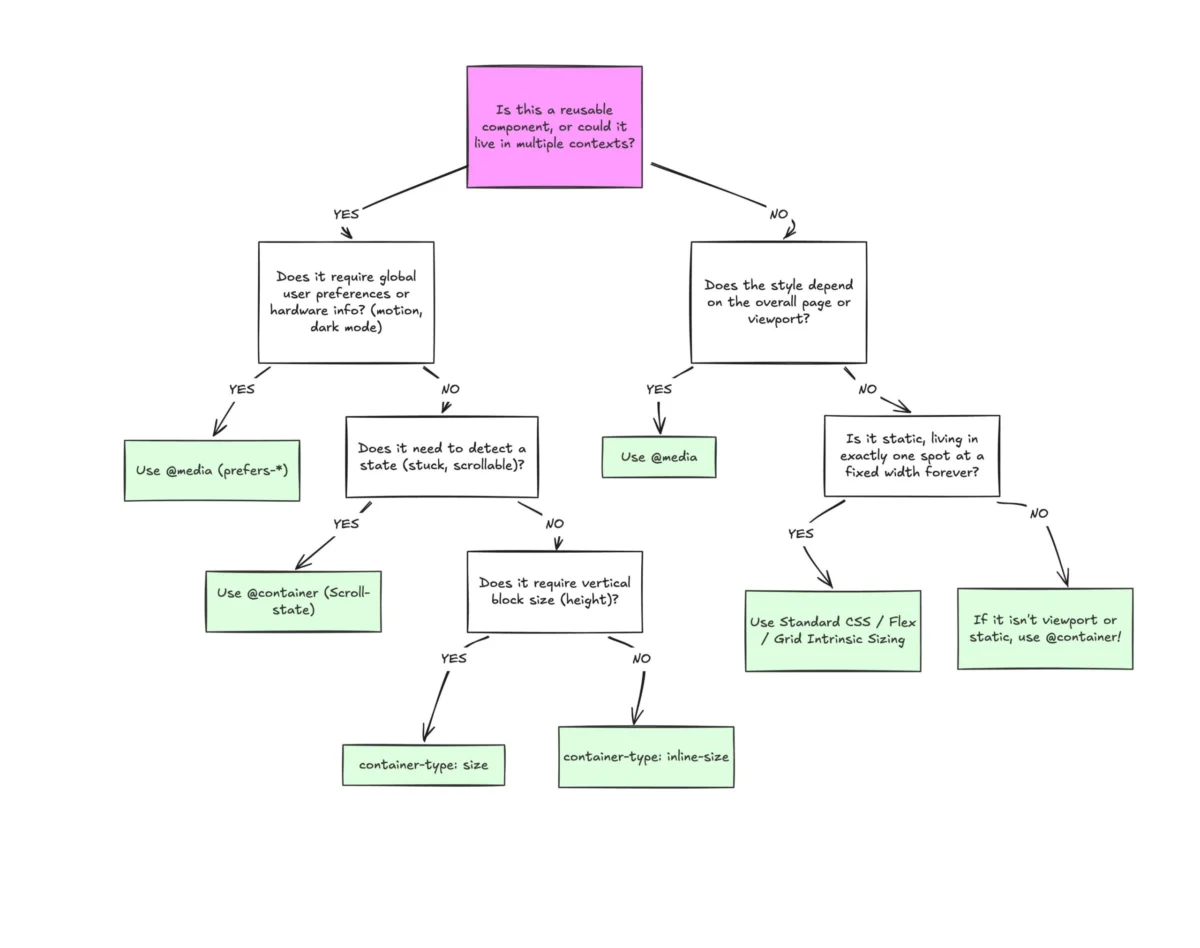
Abstract & Quick Summary: Despite broad browser support, container queries remain surprisingly underused and frequently misunderstood across the front-end engineering landscape. While developers often default to traditional media queries, treating them interchangeably leads to broken layouts and fragile components. This comprehensive technical report explores how container queries differ fundamentally from media queries, when developers should reach for each tool, and how container queries allow modern reusable components to respond naturally to the specific contexts in which they appear.
Main Facts: The Adoption Paradox
To be completely transparent, many seasoned developers missed the immediate news cycle when CSS Container Queries first reached general availability. Upon first encountering them, a common initial thought echoed across forums and Slack channels alike: "Why exactly do I need this when media queries already exist?"
It is a humbling realization for many engineers that this resistance was widespread. What remains baffling to front-end architects, however, is that container queries are no longer an experimental cutting-edge feature. At the time of this writing, they enjoy roughly 94% global browser support according to tracking metrics like Can I Use.
Yet, despite this near-universal ecosystem readiness, adoption has lagged drastically. According to the State of CSS survey data, while an overwhelming 86% of developers are aware of container queries, a mere 41.4% actively use them in production environments. While developer surveys always carry a degree of sampling bias, this metric represents the clearest indicator of a massive industry-wide gap between capability and implementation.
During SmashingConf Amsterdam, noted CSS educator Kevin Powell pulled no punches, bluntly stating that container query adoption has been "terrible." This sluggish uptake is ironic, given that the ability for isolated components to adapt dynamically to the size of their outer container sat atop official CSS wishlists for years.
The core issue is not necessarily how many developers are using container queries, but how they are using them. Many early adopters—and those making their first attempts—are fundamentally misapplying them. The root cause of this misuse stems from a visual illusion: container queries look almost identical to media queries at first glance. Because the syntax mirrors what developers have used for decades, it is easy to assume they serve identical purposes. They do not.
Chronology: From Viewport Dependence to Component-Driven Design
The Era of the Viewport Proxy
For the entire history of modern responsive web design, the viewport has served as a proxy for layout logic. Media queries gave developers the illusion that screen width alone dictates how web applications must adapt to their environment.
When writing a traditional media query, an engineer asks the browser a singular question: “How wide is the screen right now?”
@media (min-width: 1024px)
  .card
    display: flex;
This works brilliantly for macro-level adjustments. However, complications arise when that .card component is dropped into a narrow grid cell—measuring a mere 300px wide—on a high-resolution 1920px desktop monitor.
The media query remains blissfully unaware of this spatial constraint. Because the overall viewport width is 1920px, the condition min-width: 1024px evaluates to true, applying horizontal flex styles to a card that only has three hundred pixels of horizontal breathing room. Consequently, the internal contents cramp, overflow, or completely distort.
As Kevin Powell famously noted:
"Media queries are dumb. Not dumb in terms of the concept, but dumb in that they don’t know very much. In fact, most people assume that they know more than they do."
The Shift Toward Inward-Looking Layouts
Container queries fundamentally rewrite this paradigm by looking inward. Instead of querying the exterior browser window, a container query asks: “How much space is available for me in this specific spot, right now?”
.card-wrapper
  container-name: card;
  container-type: inline-size;


@container card (min-width: 450px)
  .card
    display: flex;
    flex-direction: row;
By decoupling layout logic from the global viewport, the component no longer cares what device the user is holding. Its only concern is whether its immediate parent wrapper provides at least 450px of inline space. If true, the layout shifts horizontally; otherwise, it gracefully degrades to its default block display.

Supporting Data: Macro vs. Micro Layouts and Fragmented Viewports
To master modern responsive design, developers must categorize styling logic into two distinct buckets: Macro Layouts and Micro Layouts.
Macro Layouts vs. Micro Layouts
- Macro Layouts (Media Queries): These govern the overarching page structure, system preferences (
prefers-color-scheme), and device capabilities (such as touch interactions). They look outward and answer questions about the entire application window. - Micro Layouts (Container Queries): These manage components living inside the macro layout—cards, widgets, navigation menus, and form controls. They look inward and ensure elements respond gracefully to their assigned bounding boxes.
Think of it simply as Page Layout versus Component Layout. Elements should not magically transform into "tablet-sized" structures simply because a window passes an arbitrary threshold like 768px. Instead, a component should adapt when it has enough space, whether that occurs on a narrow mobile screen or tucked away inside a dense desktop sidebar.
The Fragmented Viewport Reality
If anyone doubts the necessity of this shift, consider the modern device landscape. Data from viewports.fyi reveals that across more than 120,000 analyzed data points, developers must contend with over 2,300 unique viewport sizes. Accounting for every single permutation via rigid media query breakpoints is mathematically and practically impossible.
Component-driven architecture solves this fragmentation. As a community slogan puts it:
"In this era of responsiveness and component re-use, layout logic is closer to the container than the viewport. When we think in terms of containers and components, we’re effectively relying on the content to determine layout, not the viewport."
Practical Applications and Advanced Techniques
Fluid Typography Within Components
Historically, fluid typography relied heavily on viewport-relative units (vw, vh) paired with CSS clamp() functions:
.card-title
  font-size: clamp(100%, 1rem + 2vw, 24px);
While effective at the page level, moving this component into a constrained sidebar causes the typography to break, as the viewport remains irrelevant to the sidebar’s actual dimensions.

Container queries introduce dedicated relative units—such as cqi (container query inline-size) and cqb (container query block-size). By coupling these with clamp(), typography scales relative to the component itself:
.card-title
  font-size: clamp(1rem, .5rem + 3cqi, 2rem);
Flexbox Wrap Detection Without JavaScript
One of the most powerful hidden benefits of container queries is their ability to react to internal layout state changes—something media queries cannot do because they are blind to internal DOM events like flex items wrapping onto a new line.
Ordinarily, detecting when a flex item wraps required heavy JavaScript solutions utilizing a ResizeObserver. However, by nesting container queries inside flex items, developers can achieve native wrap detection entirely in CSS:
/* The flex parent */
.flex-layout
  display: flex;
  flex-wrap: wrap;


/* Register a flex item as a container */
.flex-item
  container-type: inline-size;
  flex: 1 1 390px; /* Grow to fill space, wrap at 390px */


/* Default Card Styles */
.card
  display: flex;
  flex-direction: column;
  background: #f4f4f4;


/* Fired when the flex item expands after wrapping */
@container (min-width: 600px)
  .card
    flex-direction: row;
    align-items: center;
    background: #e2f0d9;
Implications, Side Effects, and Caveats
Despite their immense power, container queries introduce specific architectural caveats that developers must navigate carefully.
- Self-Querying Limitations: An element cannot query itself. If a
.cardelement is designated as a container, its own direct child styles can be adjusted, but the.cardcannot modify its own display property based on its own size. Doing so creates an impossible infinite calculation loop. Developers must introduce a distinct parent wrapper element. - Layout Collapse via
sizeQueries: Querying a container’s block (vertical) size usingcontainer-type: sizeforces the browser to calculate dimensions independently of its children. Without an explicit height,min-height, oraspect-ratio, the container will instantly collapse to0px. Best practice dictates defaulting tocontainer-type: inline-sizeunless block-axis queries are strictly required. - Custom Property Isolation: Container queries currently cannot evaluate custom CSS properties (variables) directly within their conditions (e.g.,
@container (min-width: var(--breakpoint-lg))). This limitation prevents cascading bugs where a query’s applied styles might mutate the very variable it depends on.
Official Recommendations and Conclusion
Container queries are not meant to eradicate media queries entirely. Front-end architecture requires a harmonious division of labor:
- Reach for Container Queries when: A component is deployed across multiple layout contexts (e.g., a card living inside a full-width grid versus a tight sidebar). Let the component’s internal space dictate its presentation.
- Reach for Media Queries when: Dealing with macro-level page structures, global application navigation bars tied strictly to screen edges, or system-level user preferences.
Ultimately, container queries appear deceptively similar to media queries simply due to developer familiarity. By understanding their inward-looking mechanics, engineers can finally build truly resilient, portable components capable of thriving anywhere on the modern web.
 Iffa Jayyana
  Azzam Bilal Chamdy
  Nila Kartika Wati