
 By Lina Hope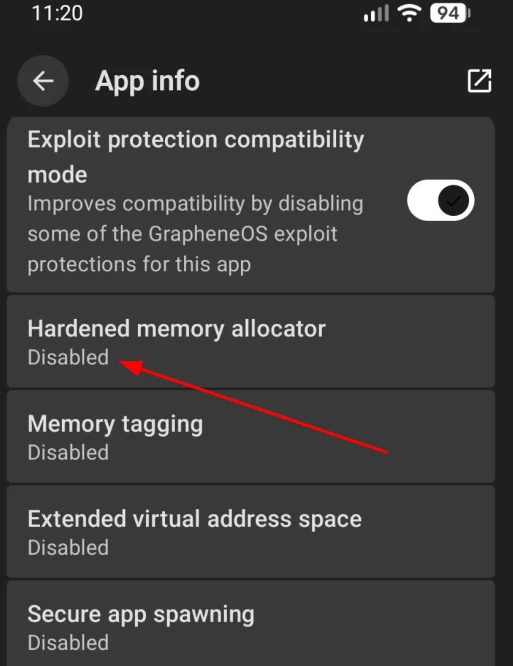
For privacy-conscious mobile users, GrapheneOS has emerged as the gold standard in Android-based security. By stripping away Google’s telemetry-heavy services and implementing rigorous kernel-level protections, it offers a digital fortress for the modern smartphone user. However, this commitment to security often comes with a performance tax. Recently, users—particularly those utilizing the privacy-focused map application OsmAnd—have reported significant performance degradation on GrapheneOS-equipped devices.
After a year of rigorous testing on the Google Pixel 8, it has become clear that while GrapheneOS provides unparalleled security, its "hardened memory allocator" creates a noticeable bottleneck for resource-intensive, data-heavy applications. This article explores the intersection of high-security architecture and application performance, offering a technical roadmap for users looking to balance the two.
Main Facts: The Security-Performance Trade-off
GrapheneOS is designed with a "security-first" philosophy. One of its most powerful features is the hardened memory allocator (based on scudo). This allocator is designed to prevent common memory corruption vulnerabilities—such as heap overflows and use-after-free exploits—by introducing metadata checks and randomization into how the operating system assigns memory to applications.
The challenge arises with applications like OsmAnd (OpenStreetMap for Android). OsmAnd is a feature-rich, offline-capable mapping tool. Unlike streaming map services that fetch small, cached tiles, OsmAnd often processes massive datasets and renders complex vector maps on the fly. This requires rapid, repetitive cycles of allocating and deallocating memory. On a standard Android build, this is handled with optimized, albeit less secure, memory management. On GrapheneOS, the security overhead inherent in the hardened allocator adds a layer of latency to every single memory request. While this is invisible in static apps, it manifests as stuttering, UI lag, and sluggish responsiveness in map-rendering engines.
Chronology: The Journey to Optimization
The discovery of this performance bottleneck followed a logical progression of troubleshooting for power users:
- Initial Adoption: Following a migration to GrapheneOS, the user experience was largely positive, save for the marked degradation in OsmAnd’s fluidity compared to stock Android benchmarks.
- Exploratory Alternatives: Due to the performance issues, the initial reaction was to seek alternatives. Applications like CoMaps were identified as viable, high-performance replacements that met the specific functional requirements of a privacy-focused user.
- Root Cause Analysis: Through iterative testing and community engagement, the culprit was isolated: the GrapheneOS "hardened memory allocator." The intense, high-frequency memory churn of the map-rendering process was clashing with the security metadata checks.
- The "Fix": It was determined that GrapheneOS allows for the granular, per-app configuration of exploit protection. By selectively disabling the hardened memory allocator for OsmAnd, the performance was restored to near-native levels without compromising the device’s global security posture.
Supporting Data: Why Memory Hardening Matters
To understand why this happens, one must understand how modern operating systems manage heap memory. Standard allocators prioritize speed. They attempt to reuse memory blocks as quickly as possible to minimize latency.
GrapheneOS, however, utilizes a hardened allocator that adds "guards" or "canaries" around memory blocks. When the OS grants an application memory, it also writes hidden metadata to ensure that the memory hasn’t been tampered with or overwritten by a malicious process. When an application like OsmAnd scrolls across a map, it performs thousands of these operations per second.
- The Latency Cost: In our observations on the Pixel 8, the hardened allocator increased the time required for memory operations by several milliseconds per cycle. While negligible for a messaging app, this compounds into a massive frame-rate drop when calculating hundreds of path segments and map tiles simultaneously.
- The Security Gain: Under normal circumstances, this hardening prevents attackers from exploiting buffer overflows to inject malicious code into the memory space of an application.
The Security Implications of Selective Disabling
The decision to disable a security feature, even on a per-app basis, should never be taken lightly. By opting out of the hardened memory allocator for OsmAnd, the user is technically removing a layer of defense-in-depth for that specific application.
However, we must evaluate the "Threat Model." OsmAnd is an offline-first application. Its primary attack surface—the ingestion of external data—is limited. It does not browse the web, it does not process untrusted JavaScript, and its map data updates are typically infrequent and from trusted sources.
When the risk of exploitation is weighed against the daily utility of the application, the "security vs. speed" equation tilts in favor of optimization for this specific use case. The user maintains a hardened OS for their browser, email client, and messenger, while granting a performance exception to a mapping tool that carries a relatively low risk of malicious payload delivery.
Technical Implementation: How to Optimize Your Apps
For users facing similar issues on GrapheneOS, the process of tuning application performance is straightforward but requires careful consideration.
Step-by-Step Guide:
- Locate the Application: On your GrapheneOS device, navigate to your app drawer and locate the icon for the affected application (in this case, OsmAnd).
- Access App Info: Long-press the application icon. A menu will appear; select the "App info" (often denoted by an ‘i’ in a circle) option.
- Navigate to Exploit Protection: Scroll down the application information page until you reach the "Exploit protection" section. This is a GrapheneOS-specific menu that is absent in standard Android versions.
- Tweak the Allocator: Within this menu, you will see a list of toggles for various security features, such as "Hardened malloc," "Map shared memory," and others. Toggle the "Hardened memory allocator" to the OFF position.
- Re-initialize: To ensure the changes take effect, force-stop the application and restart it. The system will now allocate memory for this app using the standard, faster Android allocator, while leaving the rest of the system protected by the hardened allocator.
Implications for the Future of Secure Mobile Computing
The friction between high-security kernels and user-experience fluidity represents the next great challenge in mobile OS development. As privacy-focused platforms like GrapheneOS grow in popularity, developers must find ways to offer "security profiles" that are intelligent enough to distinguish between a low-risk mapping app and a high-risk web browser.
The current implementation—allowing users to manually override security settings—is a powerful tool for power users, but it creates a "fragmented security" environment. The ideal future state would be an OS that can profile an application’s behavior. If an application is verified to be a pure data-processor without web-browsing capabilities, the OS could automatically suggest or implement a "Performance Mode" that lowers the hardening threshold just enough to regain speed without leaving the system vulnerable.
Until such intelligent automation exists, users must remain the final arbiter of their device’s configuration. The ability to "fix" the performance of OsmAnd on GrapheneOS is a testament to the platform’s flexibility. It empowers the user to be the architect of their own security, balancing the theoretical risk of memory exploitation against the practical requirement of a smooth, usable map interface.
In conclusion, while GrapheneOS is a masterpiece of security engineering, it is not a "set and forget" system. By understanding the underlying architecture—specifically the hardened memory allocator—users can fine-tune their devices to ensure that privacy does not come at the cost of productivity. Whether you are navigating a new city or securing your digital identity, the key lies in understanding the tools at your disposal and making informed decisions about where to apply the highest levels of digital armor.
 Sagoh
Sagoh  Pevita Pearce
  Layla Zulfa