
 By Ammar Sabilarrohman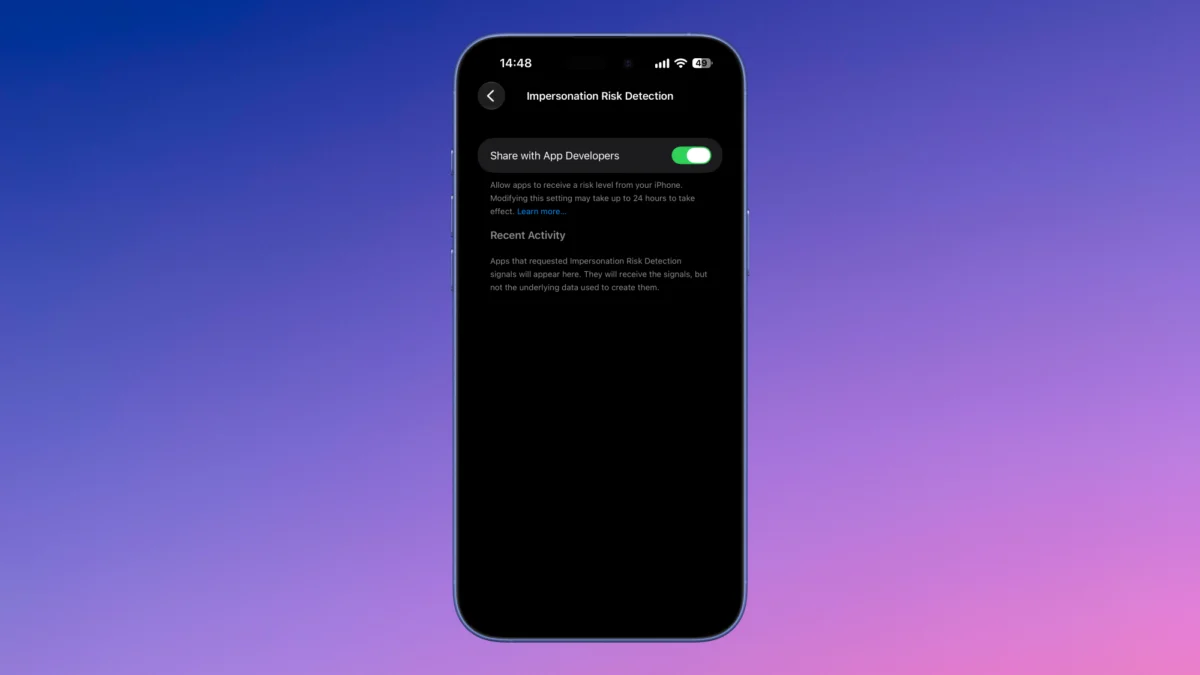
By Pranay Parab
Published: September 18, 2026
In the modern digital landscape, the most potent cyberattacks rarely require sophisticated malware, zero-day exploits, or complex network intrusions. Instead, contemporary cybercriminals increasingly rely on the art of human manipulation. Social engineering—tactics built around coercion, manufactured urgency, and psychological pressure—remains the single most effective vector for bypassing robust technological defenses. Fraudsters routinely pose as trusted entities, ranging from bank officials and government tax collectors to support representatives from major technology giants like Apple, Google, or Microsoft.
To combat this escalating crisis, Apple has introduced a groundbreaking native security feature in iOS 27 and iPadOS 27: Impersonation Risk Detection. Designed to act as a systemic circuit breaker against high-pressure manipulation tactics, this tool evaluates device behavior and account metrics to warn users before they fall victim to sophisticated scams.
This deep dive explores how Impersonation Risk Detection functions, its underlying mechanics, privacy safeguards, current limitations, and what its deployment means for the future of mobile cybersecurity.
1. Main Facts: Understanding iOS 27’s Anti-Scam Safeguard
At its core, Impersonation Risk Detection is an on-device intelligence feature designed to identify the telltale behavioral patterns associated with active social engineering attacks.
The Mechanics of Social Engineering
Scammers often manipulate victims into performing actions that compromise their own security. By fabricating critical crises—such as claims that a bank account has been entirely compromised, a tax audit is underway, or an unauthorized purchase has been executed—bad actors exploit panic and fear. Under this psychological duress, victims are frequently convinced to:
- Disable multi-factor authentication (MFA).
- Reset account master passwords.
- Grant remote desktop or screen-sharing access.
- Execute high-value financial transfers or wire payments.
How Apple’s System Intervenes
According to Apple’s technical documentation, Impersonation Risk Detection continuously monitors localized indicators across your iPhone or iPad and your Apple Account for signs of active coercion. When a user attempts a sensitive action within a participating third-party application—such as initiating a large transfer or modifying foundational security settings—that application can query the operating system for a security assessment.
Crucially, Apple designed this architecture with user privacy at the forefront. When the operating system calculates a risk level, it shares only that abstract metric with the requesting application. The app does not receive raw device data, historical logs, or personal identifiers associated with the assessment.

Once the application receives the risk tier from iOS 27, it dictates the defense strategy. Depending on how the developer implements the API, an app might:
- Inject deliberate temporal delays into high-risk actions to give the user time to cool down and reflect.
- Display dynamic, context-aware warning banners.
- Trigger secondary identity verification checks or out-of-band authentications.
2. Chronology: The Evolution of Mobile Coercion Defenses
Understanding the necessity of iOS 27 requires looking back at how mobile security has evolved to meet human-centric threats.
- Pre-2020: The Perimeter Defense Era. Cybersecurity mobile architecture historically focused on keeping malicious code out. Sandboxing, app review guidelines, and encryption protected user data from automated malware. However, these defenses left a massive blind spot: the user holding the device could still be tricked into handing over the keys.
- 2021–2024: The Rise of Screen-Sharing Exploits. Financial institutions globally noted a sharp spike in fraudulent losses where victims were coached over phone calls to download rogue remote-access applications. Banks responded independently by developing rudimentary heuristics, such as blocking transactions if active screen-sharing software or accessibility permissions were detected.
- 2025: The Push for Operating System Integration. As scams grew more sophisticated—leveraging artificial intelligence for voice cloning and hyper-personalized phishing—fragmented app-level defenses proved insufficient. Security researchers increasingly urged operating system vendors to bridge the gap between telemetry data and application-layer actions.
- September 2026: The Release of iOS 27. Apple officially debuts Impersonation Risk Detection, shifting the paradigm from isolated app warnings to an integrated, operating system-wide defense mechanism capable of evaluating coercion risk across the entire software ecosystem.
3. Supporting Data & Technical Implementation
Implementing and interacting with Impersonation Risk Detection requires navigating specific settings paths within iOS 27 and iPadOS 27.
How to Enable Impersonation Risk Detection
Because of the sensitive nature of privacy controls, the feature is not active by default. Users must manually opt in:
- Open the Settings app on your iPhone or iPad.
- Navigate to Privacy & Security and scroll to the bottom of the menu.
- Tap on Impersonation Risk Detection.
- Toggle the switch next to "Share with App Developers" to the On position.
- Confirm your choice via the system pop-up prompt.
Anti-Tampering Safeguards
A critical engineering challenge in building anti-scam features is ensuring that the scammer cannot simply turn the protection off. Fraudsters actively coach victims through device menus to disable barriers.
To counter this, Apple has built a mandatory 24-hour cooling period. When a user attempts to disable Impersonation Risk Detection—or revoke access for an individual application listed under the "Recent Activity" tab—the deactivation does not take effect immediately. Instead, a 24-hour delay is enforced, rendering real-time coercion by phone ineffective, as the protection remains active during the crucial window of the scam call.
Transparency and Logging
The Impersonation Risk Detection dashboard includes a Recent Activity section. Here, users can audit precisely which applications have requested access to their risk assessment profiles, when those queries occurred, and what contextual factors triggered the evaluation.
4. Official Responses and Industry Perspectives
The introduction of iOS 27’s anti-impersonation tools has sparked widespread discussion across the cybersecurity sector, drawing praise for its innovative architecture alongside valid critiques regarding rollout challenges.

Apple’s Privacy Stance
Apple has repeatedly emphasized that on-device processing is the bedrock of this feature. In public statements accompanying the release of iOS 27, company representatives clarified that the operating system does not analyze the contents of private communications—such as emails, photos, or text messages—to calculate risk tiers. The assessment relies strictly on device metadata, contextual system actions, and behavioral patterns within the immediate transaction window.
Developer Adoption Hurdles
Industry analysts have pointed out that the success of Impersonation Risk Detection hinges entirely on third-party adoption. Unlike built-in system features like Face ID or iCloud Keychain, which are natively integrated, Impersonation Risk Detection requires developers to integrate specific APIs into their applications.
- Big Tech and Financial Institutions: Major fintech firms, digital wallet providers, and banking apps are expected to adopt the API rapidly due to the high financial stakes of fraudulent transactions.
- Independent and Smaller Developers: Indie app developers may lack the resources or immediate incentive to implement the framework, leading to a fragmented security landscape where protection varies wildly depending on the app being used.
- Existing Proprietary Systems: Many financial institutions have already spent years building robust, proprietary anti-fraud engines. For instance, in regions like India, leading payment applications already enforce aggressive full-screen warnings and block transactions entirely if phone calls or screen-sharing tools are active. Developers of such apps must weigh whether Apple’s new API offers a meaningful upgrade over their existing custom infrastructure.
5. Implications: The Future of Consumer Security
The launch of iOS 27’s Impersonation Risk Detection marks a vital milestone in consumer protection, yet it also highlights the persistent arms race between platform security and social engineering.
Shifting the Burden of Proof
Historically, cybersecurity placed an immense burden of responsibility on the end-user. If a person was tricked into handing over their credentials, the narrative often blamed user error. By introducing system-level friction—such as deliberate delays, dynamic warnings, and behavioral analysis—Apple is shifting part of that burden back onto the hardware and software ecosystem. The operating system now actively steps in to protect users from their own manipulated compliance.
The Human Element Remains the Ultimate Variable
Despite these technological advancements, security professionals universally agree that no software feature can achieve absolute immunity against social engineering. Impersonation Risk Detection relies on the user keeping the feature enabled, developers writing compliant code, and the system correctly interpreting anomalous behavior.
Ultimately, technology can introduce friction, hesitation, and warning labels, but the final line of defense against social engineering remains human skepticism. As scammers adapt their tactics to circumvent new operating system safeguards, consumer education must evolve in tandem with hardware innovations.
Summary Checklist for iOS 27 Users
- Update Your Device: Ensure your iPhone or iPad is running iOS 27 or iPadOS 27.
- Enable the Feature: Navigate to Settings > Privacy & Security > Impersonation Risk Detection and turn on data sharing with app developers.
- Monitor Activity: Routinely check the Recent Activity tab to audit which apps are assessing your risk profile.
- Understand the Delay: Be aware of the 24-hour security delay designed to prevent bad actors from forcing you to turn off protections in real time.
 Nana Muazin
  rifanmuazin