
 By Layla Zulfa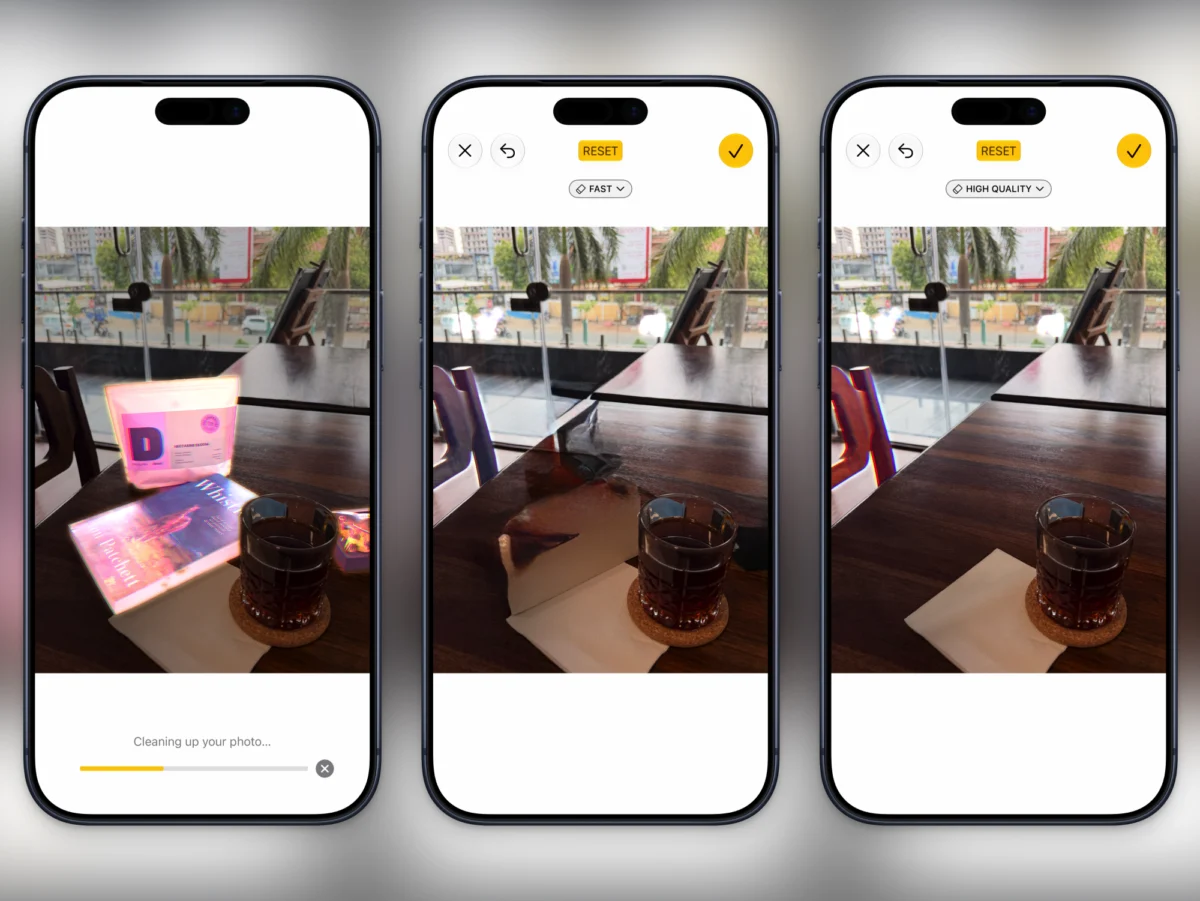
For over a decade and a half, Apple’s digital assistant occupied a peculiar space in consumer technology. Debuting in October 2011 alongside the iPhone 4S, Siri captured the public imagination as a futuristic leap forward. Yet, for millions of users worldwide, that initial wonder quickly devolved into frustration. Siri became little more than a glorified kitchen timer, a voice-activated calculator, or a rudimentary tool for placing hands-free phone calls while driving. The grand vision of a deeply contextual, proactive, and "always-on" digital partner felt perpetually out of reach—a promise forever deferred while competitors sprinted ahead in the artificial intelligence race.
That narrative is now undergoing a radical rewrite. With the rollout of the next-generation Siri AI, integrated across the latest iterations of iOS and macOS, Apple has fundamentally overhauled its foundational architecture. Fifteen years after its initial rollout and four years after the generative AI explosion catalyzed by tools like ChatGPT, Apple has delivered an assistant that is fast, context-aware, contextually brilliant, and deeply embedded into the fabric of the operating system.
By leveraging its own proprietary Apple Foundation Models—operating seamlessly between local on-device hardware and secure cloud infrastructure via Private Cloud Compute—Apple has bridged the gap between raw AI power and everyday utility. Beyond simple conversational prompts, Siri AI reimagines how users interact with screens, manage email, clean up photos, and automate complex workflows.

Here is a comprehensive breakdown of the core facts, architectural timeline, performance data, official framework, and long-term implications of Apple’s most consequential software evolution in years.
1. Main Facts: What is Siri AI and How Does It Work?
The newly redesigned Siri AI is not merely a cosmetic update or a skin layered over a third-party chat interface. It represents a ground-up reconstruction of Apple’s software ecosystem, designed to parse natural language, analyze active screen data, and execute multi-step cross-app commands with unprecedented precision.
Dual-Architecture Foundation
At the heart of Siri AI are the Apple Foundation Models. Apple has engineered these lightweight yet powerful large language models to run efficiently on-device for routine, privacy-sensitive tasks. For heavier computational queries, the system safely offloads processing to Private Cloud Compute, ensuring that user data remains encrypted and ephemeral, never stored or used to train third-party models.

Ecosystem-Wide Integration
Unlike standalone chatbot applications that require users to switch contexts, copy-paste text, and manually manage outputs, Siri AI is woven directly into iOS and macOS. Whether you are highlighting text in a document, scanning an incoming email thread, or viewing a live camera feed, Siri AI acts as an omnipresent layer of contextual intelligence.
2. Chronology: The Road from iPhone 4S to Next-Gen AI
Understanding the significance of Siri AI requires looking back at the evolutionary timeline that brought Apple to this juncture:
- October 2011: Apple introduces Siri on the iPhone 4S, positioning it as a revolutionary voice-controlled assistant.
- 2014–2020: Siri gradually expands to the Apple Watch, Mac, Apple TV, and HomePod. However, architectural limitations and strict rule-based processing leave it lagging behind emerging conversational competitors.
- Late 2022: OpenAI launches ChatGPT, sparking a generative AI revolution that exposes the limitations of legacy digital assistants across the entire consumer tech industry.
- WWDC 2024: Apple announces "Apple Intelligence," laying the groundwork for on-device generative features, including early versions of image cleanup and writing tools.
- The Present (iOS/macOS Ecosystem Update): Apple deploys Siri AI, moving past early iteration hurdles by integrating proprietary Apple Foundation Models, deep visual intelligence, server-backed processing, and a seamless fallback option to ChatGPT.
3. Supporting Data & Key Features: How to Maximize Siri AI
Siri AI’s true power lies in its hidden settings, advanced visual tools, and cross-application capabilities. To help users transition from ignoring Siri to leveraging it as a daily productivity engine, Apple has embedded several nuanced features across the operating system.

1. Streamlining Communication with Silent Responses
While Siri AI is naturally tuned for brevity—outperforming competitors like Gemini and Claude in getting straight to the point—voice queries still trigger vocal responses by default. Users who prefer silent, text-based readouts can bypass audio output entirely.
- How to enable: Navigate to Settings > Siri > Responses and select the Silent Response option. This ensures all queries, whether typed or spoken, are answered silently.
2. Upgrading to Expressive Voices
For users who prefer auditory feedback, Apple has introduced advanced vocal dynamics for modern hardware. Devices powered by an M3 processor or higher (with at least 12GB of RAM) or an iPhone 17 Pro and newer / iPhone Air support the Expressive Voice feature.
- How to enable: Go to Settings > Siri > Voice. Here, users can adjust the Pace slider and use the Expressivity slider to give Siri a brighter, more enthusiastic tone rather than a flat, synthetic delivery.
3. Harnessing Visual Intelligence for Screen Actions
Visual Intelligence transforms any active element on an iPhone or Mac screen into an actionable data source.

- On iOS: Highlight text, tap and hold, and select Ask Siri.
- On macOS: Right-click any file or selected text to initiate Ask Siri directly from the context menu.
- Contextual Queries: Users can invoke Siri while looking at an Instagram post of a cafe, asking the assistant to identify its location and immediately plot directions in Apple Maps.
4. Advanced Cloud Photos Clean Up
Early iterations of Apple’s Clean Up tool relied solely on local device processing, often yielding smudged or unreliable results. Powered by Apple Foundation Models running in Private Cloud Compute, the updated High Quality Clean Up feature securely processes images on Apple servers, flawlessly removing background objects while accurately rendering shadows and lighting.
- How to enable: Open a photo, tap Edit > Tools > Clean Up, switch from Auto to High Quality, brush over the target object, and save.
5. Automated Calendar Ingestion from Schedules
Manual data entry for complex, recurring events—such as academic syllabi or sports league schedules—is notoriously tedious. With Visual Intelligence, users can point their camera at a printed schedule or capture a screenshot, tap Add to Calendar, and let Siri parse and populate multiple events simultaneously.
6. Intelligent Mail Triage and Message Automation
Indexing local data from the Mail app allows Siri AI to understand conversational context. Users can issue natural commands like: "Find all emails about my flights from last week and send them to my accountant," or "Archive all emails from [Vendor] from last month."

- Pro-Tip: To remove unnecessary confirmation steps when sending quick texts, go to Settings > Siri > Responses and enable Automatically Send Messages.
7. Hardware Shortcuts via Camera Control
On supported iPhone models, pressing and holding the Camera Control button instantly launches the camera’s Siri mode. Pointing the lens at objects or environments brings up real-time AI responses and contextual shortcuts at the top of the display.
8. Natural Language Shortcut Generation
Apple’s Shortcuts app has traditionally suffered from a steep learning curve requiring precise variable mapping. The new Describe a shortcut feature lets users type or speak natural-language requests—such as building a morning dashboard routine—allowing Siri AI to construct the underlying automation logic automatically.
9. Seamless ChatGPT Fallback Routing
While Apple’s native models handle the vast majority of tasks, complex queries can be seamlessly routed to ChatGPT directly within the Siri interface. By tapping the text field in the Siri app, choosing Ask, and switching services, users tap into external AI depth without ever leaving the Apple ecosystem.

4. Official Responses and Industry Positioning
Apple’s executive team has emphasized that the rollout of Siri AI represents a deliberate philosophy: ambient, private intelligence rather than flashy, standalone novelty.
During architectural briefings, Apple engineers highlighted the critical role of Private Cloud Compute. In an era where consumer data privacy is heavily scrutinized, Apple has staked its reputation on ensuring that cloud-based AI processing adheres to zero-retention standards. By keeping user data encrypted and inaccessible even to Apple itself, the company aims to bridge the convenience of cloud LLMs with the absolute security of local processing.
Industry analysts have noted that while competitors like Google and Microsoft rushed to flood the market with conversational chatbots, Apple’s methodical, ecosystem-deep integration strategy allows Siri AI to act as a genuine operating system glue rather than a separate app window.

5. Implications for the Future of Personal Computing
The debut of a truly functional Siri AI carries profound implications for consumer technology, productivity workflows, and software development:
Redefining User Interfaces
For decades, graphical user interfaces (GUIs) have relied on manual navigation, tapping, clicking, and file management. Siri AI signals a shift toward intent-driven computing. Users no longer need to know where a setting is buried or how to construct a multi-step macro; they simply state their intent, and the operating system orchestrates the background tasks.
The Standard for On-Device Privacy
By proving that high-performance AI models can operate efficiently while splitting workloads between secure hardware and zero-knowledge cloud servers, Apple has set a new benchmark for enterprise and consumer data privacy. This architecture will likely pressure competitors to adopt more transparent, privacy-first infrastructure designs.

Closing Thoughts
Fifteen years after its inception, Siri has finally graduated from a novelty voice toy into the intelligent backbone of Apple’s ecosystem. For users who abandoned the assistant years ago, Siri AI warrants a fresh look. With smarter conversational depth, visual awareness, automated workflows, and robust privacy controls, Apple has finally delivered on the assistant it promised all those years ago.
 Nila Kartika Wati
  Nana
Nana  Basiran