
 By Nana Muazin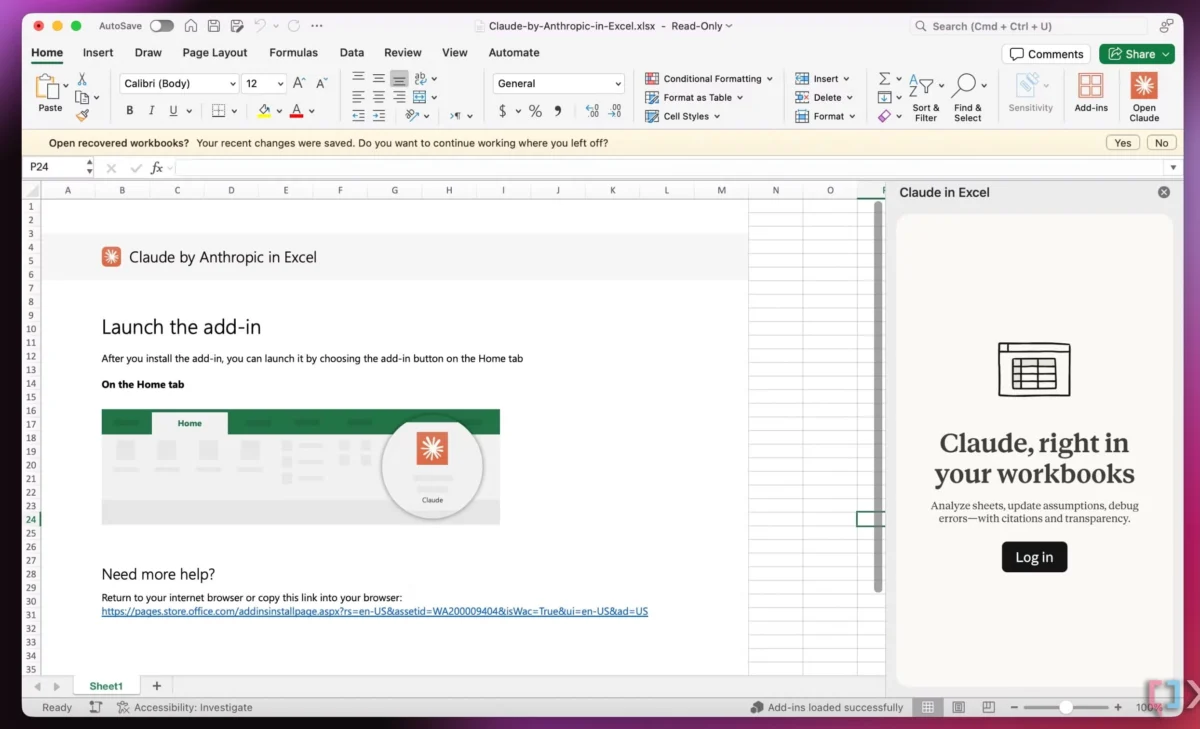
In the modern technology landscape, the mantra of the software industry has long been "more is more." Every quarter brings a fresh wave of standalone applications, flashy dashboards, and disruptive tools promising to reinvent productivity. Yet, behind the polished marketing campaigns and VC funding announcements lies a different reality felt by millions of daily users: digital fatigue.
The average knowledge worker is drowning in browser tabs, context-switching every few minutes, and juggling an ever-expanding stack of subscriptions. The core realization gaining traction among UX designers, product architects, and software engineers is profound: users do not want more tools in their daily lives. What they urgently need are seamless integrations of useful features that match already existing, established mental models.
This paradigm shift moves away from loud, intrusive "AI-first" ecosystems and toward "Quiet AI"—intelligent capabilities woven directly into the fabrics of the software we already know, trust, and use every day.
1. Main Facts: The Shift from Feature Overload to Contextual Integration
The contemporary software crisis stems from a fundamental mismatch between how tech companies build products and how humans actually think and work.
- The Fatigue of Context-Switching: Users do not get excited about navigating complex Terminal commands, deciphering "smart" workflows that require entirely new behavioral patterns, or jumping between endless back-and-forth chat interfaces with standalone chatbots.
- The High-Severity Problem Threshold: High-value software addresses problems marked by high severity, high frequency, and high user frustration. These issues are best solved not by forcing the user into a new environment, but by resolving friction right where they work.
- The Rise of Quiet AI: Instead of demanding the user’s constant attention, "Quiet AI" tools sit invisibly in the background. They execute repetitive, mundane tasks autonomously or semi-autonomously, acting as invisible helpers rather than demanding protagonists. Prime examples include native integrations like Claude embedded directly inside Microsoft Excel, PowerPoint, and Word, allowing data analysis and drafting to happen in-context.
2. Chronology: How We Got Here and Where UX Design is Heading
To understand why "Quiet AI" and contextual integration are dominating current design discussions, it is helpful to trace the evolution of software interaction over the past decade.
Phase 1: The Era of Specialized Standalone Apps (2010s)
The explosion of cloud computing and mobile applications led to the unbundling of traditional software suites. Users were encouraged to download a specific app for note-taking, another for project management, a third for time-tracking, and a fourth for client communication. While modular, this created the initial cracks in user focus, birthing the modern phenomenon of digital fragmentation.

Phase 2: The "AI-First" Gold Rush (2022–2024)
Following the widespread public release of generative language models, the tech industry experienced a gold rush of "AI-first" products. Companies rushed to market with standalone wrappers, chat windows, and autonomous agents designed to handle entire workflows from scratch. While these tools demonstrated impressive technical capabilities, they frequently failed to account for years of established design expectations, muscle memory, and psychological mental models. Users found themselves spending more time managing prompts and learning new interfaces than saving actual time.
Phase 3: The Turn Toward System-Level and Native Integration (Present)
Recognizing the limitations of chat-heavy wrappers, UX designers began looking closely at how AI can integrate directly into operating systems and file management structures. Concepts like Karthikeya GS’s "Folder Instructions for System-Level AI" began circulating across design communities in late 2024 and 2025, signaling a pivot toward ambient intelligence embedded into standard digital infrastructure.
3. Supporting Data & Architectural Concepts: Folder Instructions
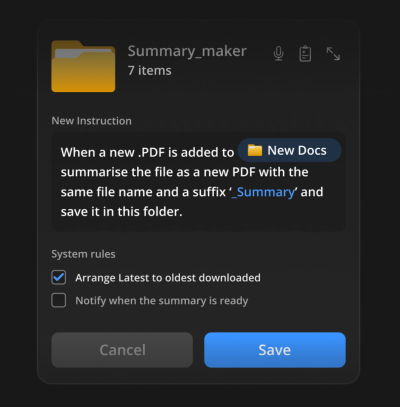
To visualize what seamless integration looks like in practice, consider the emerging architecture of Folder Instructions for System-Level AI.

Instead of opening a dedicated AI application to summarize PDFs, organize documents, or prepare filings, users can now imbue basic system elements—like a standard directory folder—with persistent logic and behavioral rules.
How Folder Instructions Work
- Defining Intent at Creation: When a user creates a new folder (e.g., "Passport Application" or "Q3 Financial Summaries"), they attach a brief set of natural language instructions.
- Automated Organization: The system reads the intent, establishing rules for how incoming files should be categorized, sub-folders structured, and actions performed.
- Local Scope and Privacy: These AI actions operate locally and contextually within the boundaries of that specific folder unless the user explicitly grants broader system permissions.
| Traditional AI Interaction ("AI-First") | Contextual Integration ("Quiet AI") |
|---|---|
| Open a separate web app or chat interface. | Stay inside the native file manager, spreadsheet, or document editor. |
| Copy, paste, and upload files manually. | Files automatically inherit actions based on folder intent. |
| Constant prompt engineering and back-and-forth dialogue. | Set-and-forget background execution mapped to established mental models. |
| High context-switching penalty and cognitive load. | Low friction, invisible assistance that reduces errors. |
As demonstrated by early prototypes and conceptual frameworks in document management interfaces, users no longer have to perform tedious sorting. The system handles the heavy lifting directly where the work occurs—generating summaries on the fly, verifying document compliance, and organizing assets automatically.
4. Official Perspectives and Industry Insights
Design leaders and educators are increasingly vocal about the need to rethink interface patterns for artificial intelligence.

Vitaly Friedman, a prominent UX consultant and educator behind Design Patterns For AI Interfaces, has continuously emphasized that user value does not emerge from forcing people to juggle multiple applications and fragmented views.
"User value doesn’t emerge from users having to juggle between multiple applications, views, and sources every few minutes. That’s when they are slowed down, and that’s when they make mistakes," Friedman notes. "It comes from helping users do the work they need to do—by reducing frustrations, slowdowns, and mistakes, and taking care of tasks that otherwise would take too much time and too much effort to complete well."
Industry consensus is hardening around the idea that the most successful AI features will be those that users barely notice as "AI." By respecting existing mental models—such as the folder hierarchy that has guided computing for decades—developers can eliminate the learning curve entirely.
5. Implications for the Future of Software Development
The transition from loud, standalone AI agents to quiet, integrated helpers carries profound implications for product designers, software developers, and enterprise buyers alike.
For Product Designers
- De-emphasize the Chatbot: Designers must move away from defaulting to a chat bubble interface for every problem. The best interaction design is often no interface at all—or an extension of an interface users already understand.
- Respect Mental Models: Before introducing a new workflow, designers must audit existing user habits. If a user is accustomed to dragging files into a folder, the AI should enhance that action rather than demanding they paste text into a proprietary prompt box.
For Enterprise Decision-Makers
- Evaluate Tool Fatigue: Organizations should look critically at software procurement. Adding another standalone AI tool often decreases net productivity if employees must spend hours learning how to integrate it into their daily routines.
- Prioritize Native Ecosystems: Investments should flow toward tools that integrate natively into existing enterprise software suites (such as office productivity suites, cloud storage providers, and project management hubs).
The Road Ahead
The next wave of technological innovation will not be defined by who builds the loudest, most autonomous AI agent. Instead, it will be defined by who can make intelligence feel most natural. By leaning into "Quiet AI" and contextual integrations, developers have the opportunity to build software that respects human attention, minimizes cognitive friction, and truly delivers on the promise of making our digital lives simpler.
For those looking to dive deeper into the intersection of user experience and machine intelligence, educational resources like Vitaly’s Design Patterns For AI Interfaces video course offer comprehensive guidelines and real-life examples designed to help creators build features that people actually want to use.
 Pevita Pearce
  Asep Darmawan
  Sagoh
Sagoh 