
 By Laily UPN
For years, the Kubernetes community has operated under a strict, unforgiving paradigm: upgrading the control plane is a "one-way door." Once a cluster is migrated to a newer minor version, there is no native mechanism in open-source Kubernetes to revert to the previous state. This architectural constraint has forced organizations—particularly those in highly regulated industries like finance, healthcare, and government—to implement elaborate, time-consuming safety measures. Today, Amazon Web Services (AWS) has fundamentally altered this landscape by announcing the general availability of version rollbacks for Amazon Elastic Kubernetes Service (Amazon EKS).
The Core Challenge: Why Kubernetes Upgrades Were High-Stakes Operations
The technical limitation of Kubernetes has long been a source of anxiety for platform engineers. Because upstream Kubernetes does not support control plane rollbacks, a failed upgrade often resulted in significant downtime, emergency troubleshooting, or the need to rebuild entire clusters from scratch.
To mitigate these risks, enterprises have historically relied on a "defense-in-depth" approach to upgrades. This includes:
- Extended Bake Periods: Keeping clusters on older versions long after new releases are available to ensure stability.
- Staggered Deployment Groups: Upgrading clusters in waves to minimize blast radius.
- Automated Sign-offs: Complex internal compliance checks that often stretch upgrade cycles to months.
With the Kubernetes community releasing three minor versions per year, these conservative strategies have created a "technical debt trap." Many teams, paralyzed by the fear of an irreversible upgrade failure, delay patching until they reach the edge of extended support timelines. This leads to clusters running outdated versions, increasing exposure to security vulnerabilities and compliance risks.
A New Safety Net: The Mechanics of EKS Version Rollback
The introduction of version rollbacks in Amazon EKS is designed to provide a "safety net" for cluster administrators. Within a seven-day window following an upgrade, users can initiate a rollback to the previous, fully validated version.
Moving Beyond Emulation
Unlike other industry efforts—such as KEP-4330, which explores emulated versions—AWS has opted for a more robust approach. EKS version rollback restores the cluster to the actual version that was previously running in production. This is not a simulation or a transitional state; it is a restoration of a known-good configuration. For a cluster upgraded from Kubernetes 1.34 to 1.35, a rollback ensures that the environment returns to the exact operational state of 1.34, removing the pressure to troubleshoot complex incompatibilities under the ticking clock of a production outage.
Automated Guardrails and Readiness Checks
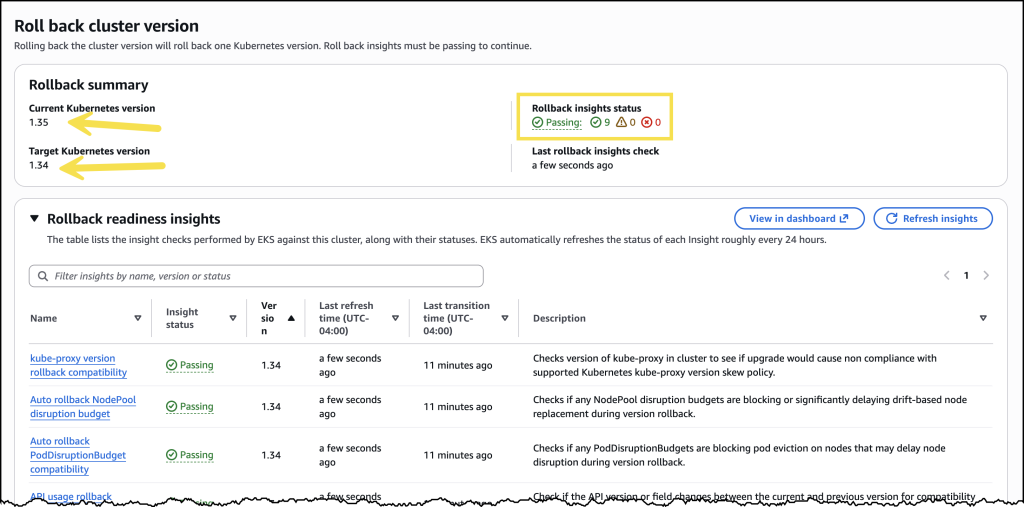
Safety is baked into the feature through integration with EKS Cluster Insights. Before a rollback begins, the system evaluates the cluster’s state. It checks for critical dependencies, such as:
- Node version compatibility: Ensuring the underlying infrastructure is prepared for the shift.
- Add-on dependencies: Verifying that critical plugins remain functional in the target version.
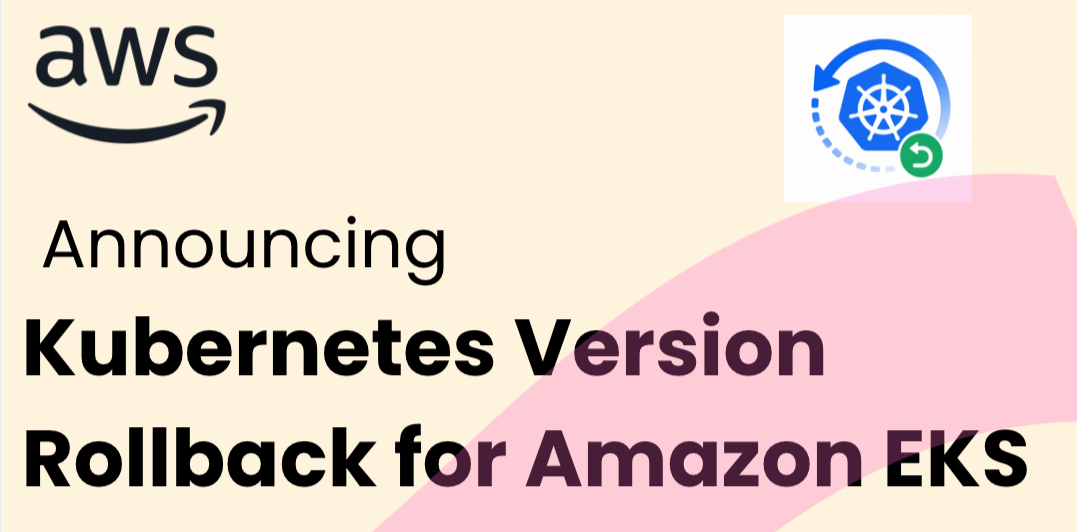
For users who have conducted their own rigorous testing and wish to move faster, the --force flag is available to bypass these automated checks. This flexibility allows both conservative teams and agile DevOps squads to utilize the tool according to their internal risk tolerance.

EKS Auto Mode: Managing Managed Infrastructure
The rollback feature becomes even more sophisticated for users of EKS Auto Mode, which automates the provisioning of compute, networking, and storage. In this environment, the control plane and managed nodes are tightly coupled. Consequently, rolling back a version requires a coordinated effort between both.
To ensure workload stability, EKS honors Pod Disruption Budgets (PDBs) throughout the rollback process. Because this can be time-intensive depending on the configuration, AWS has introduced a new Cancel API. This allows administrators to stop a node rollback at any point, providing the flexibility to adjust PDBs or pivot to a different recovery strategy if the process is not meeting performance expectations.
Chronology: From Upgrade to Reversion
The user experience for initiating a rollback is designed for simplicity. Based on recent demonstrations by AWS engineers, the workflow follows a clear, four-step path:
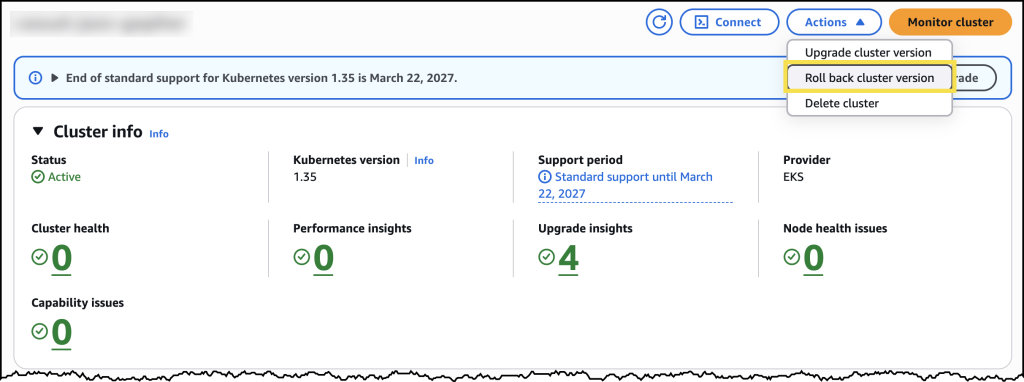
- Identification: After an upgrade, the EKS console highlights the new "Rollback" option and displays the remaining duration of the seven-day window.
- Insight Review: Before confirming, the administrator reviews "Rollback Insights." This dashboard provides a health check, flagging potential conflicts with existing nodes or add-ons.
- Execution: Upon confirmation, the control plane initiates the revert. This process typically takes approximately 20 minutes, mirroring the duration of a standard upgrade.
- Verification: For Auto Mode users, the system automatically manages node reconciliation, ensuring the cluster returns to the previous state without manual intervention.
Implications for Industry and Compliance
The introduction of this feature is expected to have a profound impact on how enterprises manage their cloud infrastructure.
Reducing Operational Friction
By removing the "one-way door" constraint, AWS is effectively lowering the barrier to entry for frequent upgrades. Organizations that were previously locked into long, manual upgrade cycles can now adopt a more proactive patching cadence. This is a critical development for security, as it allows teams to apply security patches faster without the existential dread of a permanent, failed upgrade.
Enhancing Resilience in Regulated Environments
For industries governed by strict uptime requirements (SLA-driven businesses), the rollback feature serves as an insurance policy. It allows for a "fail-fast" culture where administrators can perform upgrades during lower-traffic windows with the confidence that an "undo" button is always available.
The Financial Dimension
AWS has confirmed that the version rollback capability is available at no additional cost. Users pay only for the standard EKS control plane fees and the compute resources incurred during the rollback process. This accessibility ensures that even smaller teams can benefit from enterprise-grade cluster management tools.
Official Perspective and Future Outlook
While AWS has not yet indicated plans to extend the seven-day window, the introduction of this feature signals a shift in the cloud provider’s philosophy. By taking ownership of a problem that has historically plagued the open-source community, AWS is positioning EKS as the premier destination for mission-critical Kubernetes workloads.
"We wanted to give cluster administrators a safety net," noted an AWS spokesperson during the product launch. "Our goal is to remove the fear of the upgrade process, allowing our customers to stay current with Kubernetes versions while maintaining total control over their environment’s stability."
Conclusion
The ability to roll back Kubernetes versions is a milestone in the evolution of container orchestration. By addressing the fundamental rigidity of the Kubernetes control plane, Amazon EKS has provided a solution that balances the agility of modern CI/CD pipelines with the stability required for enterprise operations.
For platform engineers and SREs, the era of "upgrade anxiety" is effectively coming to an end. With automated readiness checks, support for EKS Auto Mode, and the flexibility to revert within a week of an upgrade, the infrastructure layer is becoming as resilient as the applications it hosts. As organizations continue to migrate their most sensitive workloads to Kubernetes, features like version rollback will likely become the standard requirement for any production-grade managed service.
For those looking to get started, the feature is available immediately across all commercial AWS Regions. Documentation and guides for implementing version rollbacks are accessible via the Amazon EKS user guide, and the functionality is fully integrated into the AWS Management Console.
 Neng Nana
  Suro Senen
  Lina Hope