
 By Ali Ikhwan
By Smashing Editorial
Published: September 2026
Quick Summary
The web is rapidly evolving beyond rigid menus, complex forms, and endless browser tabs toward fluid experiences shaped entirely around human intent. For UX designers, understanding this monumental shift means re-evaluating their core role: moving away from designing visible, static interfaces and shifting toward guiding transparent, intent-driven AI experiences.
Main Facts
For nearly half a century, digital software has relied on a singular paradigm: point-and-click interactions. Pioneered by systems like the Xerox Star and popularized by the original Apple Macintosh, the Graphical User Interface (GUI) established a rigid contract between human and machine. If a user wanted to book a flight, research medical symptoms, or buy a pair of shoes, they were forced to navigate a labyrinth of user interfaces.
Today, that contract is officially breaking down. Driven by explosive advances in artificial intelligence and large language models (LLMs), a new generation of web tools is pioneering a radical philosophy known as Intent-Driven Design. Instead of forcing users to learn complex navigation bars, click through multi-step sales funnels, and manage dozens of browser tabs, these platforms capture high-level human goals and execute the underlying grunt work invisibly in the background.
- The Core Shift: Moving from manual orchestration (the user doing the work via UI components) to autonomous execution (the system handling execution via AI agents).
- The New Metrics: Rejecting legacy engagement metrics like "time spent in app" or "click-through rate" in favor of efficiency, goal completion, and time saved.
- The Designer’s Dilemma: Shifting focus from static visual layouts to generative UI components, transparent feedback loops, and dynamic human-AI collaboration.
Chronology: From the Command Line to the Invisible Web
To understand where web design is heading in 2026 and beyond, it is essential to trace the historical evolution of human-computer interaction (HCI).

1. The Text-Based Era (1960s–1970s)
Early computing required users to communicate via text-based command-line interfaces. While powerful for specialists, it suffered from a massive cognitive load; users had to memorize exact syntax and commands to get anything done.
2. The GUI Revolution (1980s–2010s)
The introduction of the Xerox Star and Apple Macintosh democratized computing through visual metaphors—desktops, folders, windows, and clickable buttons. Point-and-click became the undisputed gold standard. Software was treated as a passive container of data, and the human acted as the manual orchestrator, executing every single micro-step.
3. The Hyper-Interactive Era (2010s–2020s)
As the web expanded into mobile apps and SaaS platforms, interfaces became hyper-interactive. Digital products were designed to maximize user engagement. Booking a simple flight required navigating dynamic pricing models, toggling baggage add-ons, adjusting range sliders, dismissing cookie pop-ups, and filling out multi-stage forms across multiple tabs. Users spent more time managing software than achieving their goals.
4. The Intent-Driven Era (Mid-2020s and Beyond)
We have entered an era where software no longer waits for manual clicks. Building on seminal HCI theories—such as Golden Krishna’s “The Best Interface Is No Interface” and Don Norman’s human-centered design principles—modern web platforms utilize natural language understanding and background AI agents to collapse multi-step workflows into single, frictionless intent outcomes.
Supporting Data: The Death of the “10-Click” Process
To visualize this transition, consider the traditional workflow of purchasing an airline ticket online. The process is intentionally engineered for maximum user friction:
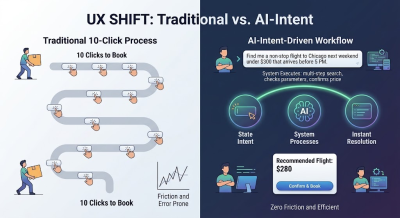
- Open a browser and navigate to a travel aggregator.
- Type departure and arrival cities into fixed input fields.
- Select dates using a drop-down calendar widget.
- Adjust filters for stops, airlines, and departure times using range sliders.
- Review a list of dozens of options, manually opening tabs to cross-reference baggage fees.
- Select a flight, decline or accept insurance upsells, and fill out traveler detail forms.
- Enter payment credentials and solve verification prompts.
This is the classic point-and-click UI paradigm. The computer remains passive while the human does the heavy lifting.
Intent-driven design flips this dynamic entirely. Instead of forcing you to navigate the mechanical steps of how to find a flight, the interface asks a direct, human-centric question: “What are you trying to accomplish?”
When a user states: "Find me a non-stop flight to Chicago next weekend under $300 that arrives before 5 PM," the software interprets the intent, executes the multi-step search queries behind the scenes, cross-references restrictions, and presents a single actionable resolution. Ten distinct clicks dissolve into one clear intent outcome.
Three Web Platform Examples Replacing Buttons with Intent
This shift is no longer a theoretical vision of the distant future. Several pioneering platforms already allow users to experience intent-capturing systems in real-time.
1. Perplexity AI: Search Without the Open Tabs
Traditional search engines were built as digital directories. You typed a keyword, and the interface rewarded you with ten blue links. The actual work of opening five different tabs, skimming long articles, dodging ads, and manually synthesizing an answer was left entirely to the user.
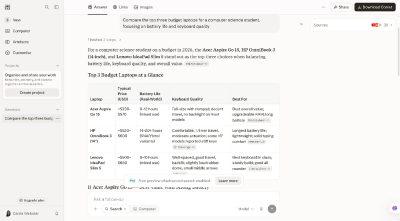
Platforms like Perplexity AI allow users to perform instant intent-based searches. Instead of forcing users to click through multiple tabs, the interface dynamically synthesizes the perfect answer tailored to the user’s specific context, complete with verified citations.
2. Vercel v0: Web Design Without Dragging and Dropping
For years, creating a website meant using visual builders like Figma or complex drag-and-drop editors. Designers spent countless hours manually drawing rectangles, picking hexadecimal color codes, adjusting padding values, and writing CSS code.
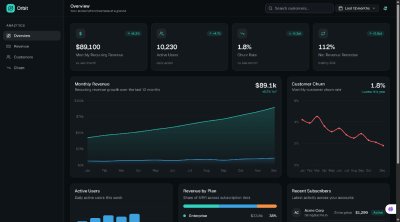
Vercel v0 allows anyone to build complex user interfaces using natural language prompts. By simply describing an intent—such as "Build a dark-mode SaaS analytics dashboard with a live revenue chart"—the system instantly generates functional, production-ready code and renders a dynamic UI preview on the fly.
3. Goblin.tools: Breaking Down Overwhelming Tasks
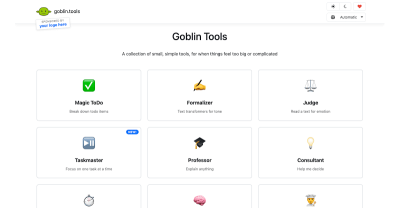
Traditional productivity tools require users to manually construct task lists, drag items across Kanban boards, and assign micro-deadlines. Goblin.tools is a free, single-page suite of AI-powered tools designed to help users (particularly neurodivergent individuals or those experiencing burnout) break overwhelming tasks down into manageable steps with zero configuration or sign-ups required.
Core Pillars of Intent-Driven Web Design
When traditional menus, sidebars, and forms are stripped away, how do designers keep digital products usable? The pioneers of this space rely on three core pillars:
| Pillar | Traditional UX Approach | Intent-Driven UX Approach |
|---|---|---|
| 1. User Input | Micro-actions (Clicks, dropdowns, toggles) | High-level goals (Natural language, context, habits) |
| 2. Interface State | Static layouts (Every user sees the exact same page) | Generative UI (Layouts created dynamically on the fly) |
| 3. Task Execution | Manual execution step-by-step by the user | Autonomous execution by background AI agents |
High-Level Goals and Ambient Context
An invisible interface doesn’t always wait for a typed command; it leverages environmental context to anticipate human needs. Guided by standards like Apple’s Human Interface Guidelines on Contextual & Ambient Design, modern systems read device states, location metadata, and past behavioral patterns to trigger proactive solutions.
Generative UI
In traditional web design, every visitor sees the exact same static layout. An e-commerce store shows the same navigation bar whether a user is looking for basic customer support or tracking an active delivery.
As highlighted in Nielsen Norman Group’s analyses on AI as a new UX paradigm, computing is shifting from command-based interaction to outcome-specification. This enables Generative UI, where interface components are rendered dynamically on the fly. If a user expresses a need to compare three different financial loan structures, the interface generates a dynamic calculator widget on demand, which then recedes once the goal is accomplished.
Autonomous Execution by AI Agents
Traditional interfaces are obsessed with friction-heavy prevention, constantly peppering users with confirmation pop-ups (“Are you sure you want to delete this file?”). Intent-driven interfaces adapt Jakob Nielsen’s usability heuristics by shifting the safety net from prevention to easy reversibility. Because autonomous agents take actions on behalf of the user, products prioritize frictionless rollback mechanisms—such as prominent "Undo" buttons, simple revision prompts (“Make this summary shorter”), and transparent audit logs—over intrusive warning modals.
Official Responses and Industry Guidelines
As the design community grapples with the transition away from traditional UI, leading research institutions and design systems have published crucial frameworks to navigate the hidden risks of AI-driven automation.
The Illusion of Control and Ethical Boundaries
When software makes complex decisions for users, experiences can quickly feel invasive or patronizing. Research from the Stanford Human-Computer Interaction (HCI) Group emphasizes that automation must maintain strict boundaries to prevent user frustration. Furthermore, ethical frameworks from the Center for Humane Technology urge product designers to guard against manipulative defaults.
Designers must strike a delicate balance: automate routine execution, but explicitly prompt the user for high-stakes confirmations (such as financial transactions, publishing public content, or altering security settings).
Solving the "Black Box" Problem
In a traditional UI, if a user encounters an unexpected result, troubleshooting is straightforward—perhaps they checked the wrong filter box. With an intent-driven interface, diagnosis becomes harder due to the opaque nature of AI models.
To address this challenge, the Google PAIR (People + AI Research) Guidebook advocates for transparent feedback loops. The system must explicitly state its interpretation of the user’s intent (e.g., “Searching for non-stop flights to Chicago under $300…”) so users can calibrate trust and correct misinterpretations instantly.
Implications for UX Designers
As the digital landscape transitions, the role of the UX designer is undergoing a radical metamorphosis.
"Rather than designing static buttons and rigid forms, we need to learn to map and present dynamic, generative UI components that adapt on the fly to user intent."
Designers must master evolving interaction patterns, such as ambient feedback, inline prompts, and transparent AI status indicators. By embracing these patterns, professionals ensure that screenless, agent-driven tools remain intuitive, ethical, and deeply human-centered.
Conclusion: The Best Design Is No Design
For decades, the digital industry evaluated software success through engagement metrics like time spent in app, click-through rates, and page views per session. Websites were deliberately engineered to maximize visual engagement and interaction volume.
The philosophy behind Golden Krishna’s seminal book The Best Interface Is No Interface, aligned with the Center for Humane Technology’s Time Well Spent movement, turns these legacy metrics on their head. The ultimate test of a modern digital product is no longer how visually captivating its buttons are, but rather: How effectively did this software solve the problem and get out of the user’s way?
We are officially entering an era where web applications will no longer be measured by the beauty of their static interfaces, but by their ability to render those complex interfaces completely obsolete. The future of the web isn’t more interaction—it is seamless, invisible completion.
 Nana Wu
  Nana
Nana 