
 By Siti Muinah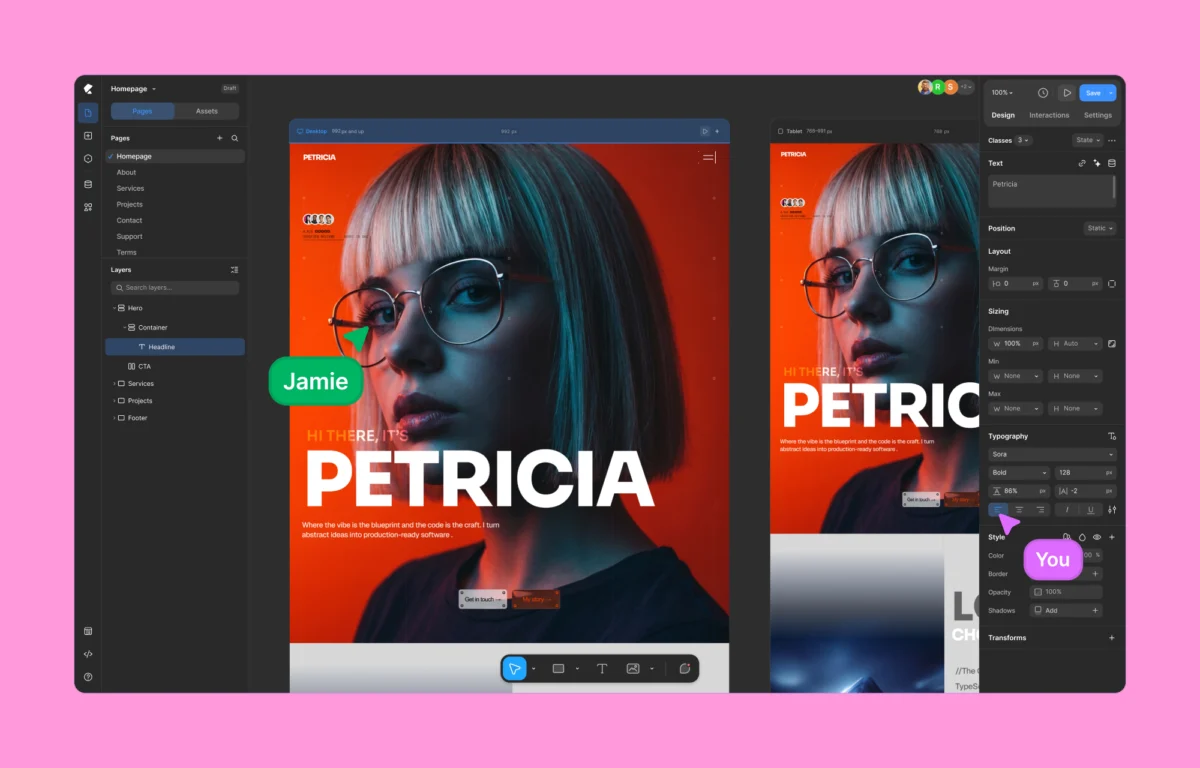
For over a decade, the WordPress ecosystem has been defined by a fundamental constraint: the box. From the early days of the Classic Editor to the rise of heavyweights like Elementor and Divi, web design within the world’s most popular CMS has largely been an exercise in stacking containers. While these tools democratized web creation, they often did so at the cost of performance, code cleanliness, and creative fluidity.
Enter Kirki, a new-age visual website builder that promises to dismantle the traditional "row-and-column" architecture in favor of a freeform, infinite canvas. By prioritizing zero plugin dependency and high-performance code output, Kirki is positioning itself not just as another page builder, but as a paradigm shift in how digital experiences are crafted within WordPress.
Main Facts: Redefining the Visual Building Experience
At its core, Kirki is a no-code visual website builder designed to bridge the gap between high-end design tools like Figma and the functional reality of WordPress. Unlike traditional builders that rely on a hierarchical structure of sections, rows, and columns, Kirki introduces an infinite canvas. This allows designers to place elements with pixel-perfect precision, overlapping layers and positioning assets without being tethered to a rigid grid.
The platform distinguishes itself through several key pillars:

- Infinite Canvas & Freeform Design: A workspace that mirrors professional design software, allowing for unrestricted movement and layering.
- Performance First: A focus on generating "lean" HTML and CSS, drastically reducing the Document Object Model (DOM) size compared to industry incumbents.
- The All-in-One Philosophy: Kirki integrates features that typically require separate premium plugins, such as dynamic content management (traditionally handled by ACF), interaction builders, and popup managers.
- Collaborative Workflow: It introduces real-time co-editing, a feature long enjoyed in SaaS design tools but historically absent or clunky in the WordPress environment.
Chronology: From Shortcodes to the Infinite Canvas
To understand Kirki’s significance, one must look at the evolution of WordPress design tools.
- The Era of Shortcodes (2010–2014): Early builders relied on complex shortcode strings. While they allowed for visual variety, they were a nightmare for SEO and left behind "code spaghetti" if the plugin was deactivated.
- The Rise of the Page Builder (2015–2020): Tools like Elementor and Beaver Builder revolutionized the UI, moving design to the front end. However, as features grew, so did "plugin bloat." Sites became dependent on a dozen different extensions to achieve modern functionality.
- The Gutenberg Transition (2018–Present): WordPress introduced the Block Editor to bring a native visual experience. While lighter, it remains structurally rigid, often frustrating designers who want the freedom of a blank slate.
- The Freeform Revolution (2024–Future): Kirki arrives at a time when designers are increasingly migrating to platforms like Webflow or Framer to escape the "boxy" feel of WordPress. Kirki’s mission is to bring that high-fidelity design freedom back into the WordPress ecosystem without sacrificing the platform’s robust CMS capabilities.
Supporting Data: Benchmarking Performance and Efficiency
The most significant criticism of modern WordPress builders is "bloat." When a page builder adds five nested <div> tags just to display a single heading, page speed suffers. In a head-to-head performance audit conducted under identical conditions (using the default Twenty Twenty-Five theme), the differences between Kirki and the current market leader, Elementor, were stark.

Code Output and DOM Depth
Technical audits reveal that Kirki generates significantly cleaner semantic HTML. In a sample hero section layout:
- Traditional Builders: Often produced 15–20 nested elements to render a background, headline, and button.
- Kirki: Rendered the same visual output using nearly 60% fewer DOM nodes.
This lean approach directly impacts Core Web Vitals. By reducing the amount of CSS and JavaScript that needs to be parsed, Kirki-built sites consistently achieve higher Lighthouse scores in "Performance" and "Cumulative Layout Shift" (CLS) metrics.

The Financial Data: The Cost of the "Plugin Stack"
For a professional agency, the cost of a website isn’t just the builder; it’s the stack.
- Traditional Stack: Builder Pro ($60) + Dynamic Content Plugin ($50) + Animation Plugin ($40) + Interaction Tool ($30) = $180+/year per site.
- Kirki Pro: Includes all these features for a flat $59/year for a single site, or a $499 lifetime option for unlimited sites.
The data suggests that for high-volume agencies, switching to an integrated builder can reduce software overhead by over 60% while simultaneously reducing the time spent on troubleshooting plugin conflicts.

Deep Dive: Features That Challenge the Status Quo
1. Figma-to-WordPress Handoff
One of the most significant bottlenecks in web development is the "translation" of a design from Figma into a live site. Kirki’s instant handoff feature allows designers to import Figma files directly. Unlike previous "import" tools that created static images or broken layouts, Kirki attempts to preserve the responsive logic of the original design, allowing for a much faster transition from concept to launch.
2. Concurrent Responsive Editing
Most builders require users to toggle between "Desktop," "Tablet," and "Mobile" views. Kirki utilizes its infinite canvas to display all breakpoints side-by-side. This allows a developer to see how a change on the desktop version affects the mobile layout in real-time, effectively eliminating the "back-and-forth" workflow that leads to responsive design errors.

3. Native Dynamic Content Manager
Historically, if you wanted to build a real estate site or a directory, you needed Advanced Custom Fields (ACF) or Meta Box. Kirki builds this functionality into the core. Users can create custom fields, post types, and relationships within the builder interface. This integration ensures that dynamic data renders as quickly as static content, as there is no "handshake" required between two different plugin architectures.
4. Visual Interaction and Timeline Builder
Animations in WordPress have traditionally been limited to simple "fade-ins" or required heavy libraries like GSAP. Kirki includes a visual timeline-based interaction builder. This allows users to create complex, scroll-triggered animations and hover effects visually, producing high-end, "award-winning" design aesthetics without writing a single line of JavaScript.

Official Responses and Market Positioning
While the developers of Kirki emphasize "design freedom," industry analysts view the tool as a direct response to the "SaaS-ification" of web design. By offering a lifetime deal and a powerful free version, Kirki is positioning itself as the "open-source alternative" to proprietary builders that are increasingly locking features behind expensive monthly subscriptions.
Industry experts from the WordPress community have noted that Kirki’s approach to "Class-Based Editing" is particularly savvy. By allowing users to save styles as CSS classes rather than inline styles, Kirki appeals to professional developers who demand scalability. If a client wants to change the "Primary Brand Color" across 50 pages, a developer can update a single Global Variable or CSS class, rather than manually editing every element.

Implications: The Future of WordPress Design
The emergence of Kirki has several long-term implications for the WordPress ecosystem and the broader no-code movement:
1. The "Clean Code" Mandate: As Google continues to prioritize Page Experience and speed, builders that produce bloated code will likely see a decline in market share. Kirki’s success may force established players to undergo painful architectural rewrites to stay competitive.

2. The Convergence of Design and Dev: By mimicking the UI of Figma, Kirki is narrowing the gap between the design phase and the development phase. We may see a rise in "Full-Stack Designers"—individuals who can take a project from a blank canvas to a high-performance live site without ever needing a separate developer.
3. The End of "Plugin Fatigue": If Kirki’s "all-in-one" model succeeds, it could signal a shift away from the modular "plugin for everything" philosophy of WordPress. While modularity is a strength, the stability and performance benefits of a tightly integrated core are becoming too significant for businesses to ignore.

Verdict: A New Standard for WordPress
Kirki represents a bold bet on the future of the web. It assumes that users are tired of the limitations of "boxes" and the performance penalties of "bloat." For the designer who wants pixel-perfect control, the developer who demands clean code, and the business owner who needs a fast, reliable site, Kirki offers a compelling path forward.
As the digital landscape becomes increasingly competitive, the tools we use must do more than just "build pages"—they must provide a competitive advantage. By combining the freedom of a design tool with the power of a modern CMS, Kirki isn’t just changing how we build websites; it’s changing what we expect a website builder to be.
 Nana Wu
  Nana
Nana 