
 By Layla Zulfa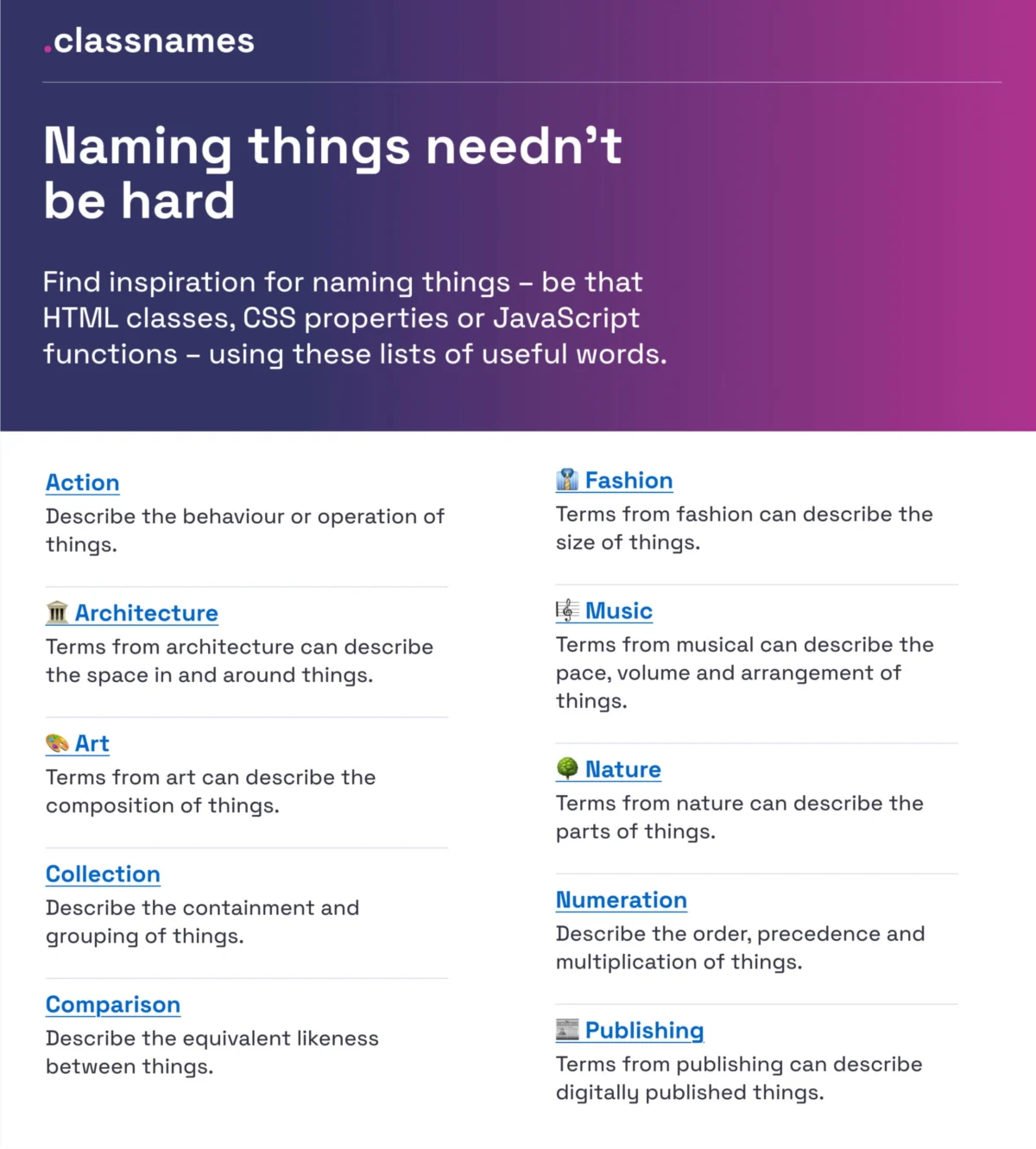
Introduction: The Weight of Words in Digital Products
"Naming is hard." It is a ubiquitous developer and designer adage, yet it encapsulates one of the most persistent hurdles in digital product creation. The language we employ does far more than simply label elements on a screen; it fundamentally shapes how we conceptualize problems, structures team dialogue, and dictates the cognitive load placed upon end-users.
When terminology becomes muddy, communication falters. Misunderstandings multiply regarding colors, icons, user interface (UI) components, and core features. This linguistic friction directly translates into downstream confusion when trying to establish robust design tokens, clean HTML classes, and predictable variables.
Often, teams fall into one of two traps. Names can be too generic, rendering them vague and obscure, or too specific, stripping away essential flexibility and reuse potential. Solving this challenge requires a delicate balance of taxonomy, psychology, and structural consistency. This deep-dive practical guide explores the methodologies, resources, conventions, and frameworks needed to master the art of naming things across the digital product lifecycle.

Main Facts: The Anatomy of Naming Challenges
The root of poor naming conventions rarely lies in a lack of technical skill; rather, it stems from a fragmentation of dialects within multidisciplinary teams. In a typical product cycle, designers, front-end developers, product managers, and users all speak distinct variations of professional jargon.
- The Designer’s Dialect: Focuses on visual properties, artboards, and spatial arrangements (e.g., "BlueBox-Copy").
- The Developer’s Dialect: Focuses on DOM structure, state management, and reusability (e.g.,
div.flex-col-spacing-lg). - The Product Manager’s Dialect: Focuses on business value, metrics, and feature metrics (e.g., "Onboarding-Step-Two-Revamp").
- The User’s Dialect: Focuses on mental models, jobs-to-be-done, and immediate functional expectations (e.g., "Sign up button").
When these four dialects fail to intersect, friction occurs. Low feature adoption rates, bloated style sheets, fragmented design systems, and prolonged onboarding times for new engineers are often symptoms of an underlying nomenclature crisis. To combat this, modern engineering and design teams are increasingly turning to systematic taxonomies, cross-industry style guides, and open-source categorization repositories.
Chronology: The Evolution of Digital Taxonomies
To understand where UI nomenclature is heading, it is helpful to trace how digital artifacts have been named over the decades:

- The Wild West Era (Early Web): Developers relied on ad-hoc naming. Classes like
.red-textor.big-buttonruled the DOM. These names were overly specific and tied layout strictly to visual styling, breaking instantly during redesigns. - The Methodology Boom (2010s): The industry recognized the need for scaled structure. Methodologies like BEM (Block, Element, Modifier), OOCSS, and SMACSS emerged, introducing strict structural hierarchies (
block__element--modifier) to tame CSS specificity wars. - The Design System Revolution (Late 2010s–Present): With the advent of tools like Figma and token-driven architectures, design systems bridged the gap between code and canvas. Teams began standardizing tokens (primitive, semantic, and component-level) to support multi-brand, multi-themed ecosystems across web and mobile platforms.
Supporting Data & Resources: Tools for Better Naming
Fortunately, the digital community has rallied to produce a wealth of open-source resources, repositories, and frameworks to lift the burden of naming. Whether you are naming a CSS class, an accessibility state, a brand color, or a multi-tiered design token, specialized references can guide your process.
1. Breaking Out of Code Boxes: Classnames
When seeking inspiration for HTML classes, CSS properties, or JavaScript utility functions, Classnames (curated by Paul Robert Lloyd) is an invaluable resource. It encourages developers to think outside the traditional tech lexicon by providing thematically grouped lists of words. Beyond functional terms describing behavior, order, or grouping, it offers curated vocabularies drawn from nature, art, theater, music, architecture, fashion, and publishing.
2. Taming the Spectrum: Color Nomenclature
Naming colors has historically been a subjective nightmare—often resulting in unhelpful hex codes or hyper-specific names like #336699 or light-ish-blue. David Aerne maintains a massive repository containing over 30,000 unique color names sourced from community contributions and varied references. Accompanied by tools like Color Parrot and interactive pickers, these repositories allow teams to establish intuitive, semantic color palettes that remain legible and human-friendly.

3. Layer and Group Hygiene in Design Tools
In design files (such as Figma or Sketch), unorganized layers (Rectangle 405, Group Copy 2) kill scalability. Javier Cuello’s design guidelines on naming practices outline clear criteria: a good layer or group name must have a logical structure, be concise, carry shared meaning across the team, and—crucially—avoid reference to visual properties. By establishing strict do’s and don’ts for sizes, states, and components, teams can maintain clean, developer-ready assets.
4. Enterprise-Scale Design Tokens: The Intuit Case Study
Building a token system for a single product is difficult; doing so across a sprawling family of diverse global brands is exponentially harder. Intuit—parent company to Mailchimp, QuickBooks, TurboTax, and Mint—faced this exact challenge. Nate Baldwin’s published case study details how Intuit engineered a flexible token taxonomy that transcends individual brand themes, creating a unified foundational system capable of serving distinct business units without naming collisions.
5. UI Component Benchmarking: The Component Gallery
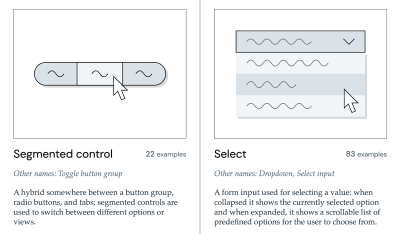
When struggling to name a complex UI component, looking at how established design systems solve the problem is often the fastest path to clarity. Iain Bean’s Component Gallery aggregates real-world examples for over 50 interface components—ranging from accordions to visually hidden utilities—listing alternate names used across different organizations. Complementary tools like Name That UI serve as visual dictionaries for everyday web interface patterns.

6. Multi-Brand Token Systems: Vodafone UK’s Taxonomy Map
Complex organizations require multi-layered design systems. The Vodafone UK Design System team released a Variables Taxonomy Map in Figma that elegantly illustrates the anatomy and categorization of design tokens. Building upon Nathan Curtis’s seminal work on design token architecture, the map breaks tokens down into four distinct collections:
- Primitive Tokens: Raw values (e.g., base color swatches, spacing increments).
- Semantic Tokens: Context-aware assignments (e.g., background color primary).
- Component Tokens: Component-specific applications (e.g., button background color).
- Page/Context Tokens: Specialized adaptations for specific views or themes.
For practitioners looking for structured blueprints, Romina Kavcic’s Design Token Naming Guide and Builder offers an interactive tool to configure naming structures by components, categories, states, and roles, backed by an inventory spreadsheet designed to track tokens across multiple themes and modes.
7. Product and Service Nomenclature: Onym
Naming the product or service itself is another hurdle entirely. Onym provides an open-source repository of methodologies, brainstorming prompts, vetting guides, sprint frameworks, and etymological resources to help teams navigate brand naming, avoid legal pitfalls, and select names with high market resonance.

Official Responses and Industry Best Practices
Industry leaders and design system maintainers universally emphasize that naming is not an isolated task left to the final stages of a project; it is an architectural decision.
Erin Gannon, in her foundational UX guide "What Do We Call This Thing?", stresses that feature discovery and adoption are directly tied to nomenclature. Features often suffer from low engagement not because they lack utility, but because their names suffer from poor discoverability. Gannon’s research highlights three core rules for feature naming:
- Drive by User Problems: Names should signal the value or outcome of a feature (the "job-to-be-done").
- Tap into User Language: Avoid internal company acronyms or overly clever marketing puns. Ask target users to explain the feature in their own vernacular, and adopt those terms.
- Bridge Mental Models: Ensure the name aligns with existing workflows so users can intuitively trial, understand, and integrate the feature into their daily habits.
Implications for Teams and Workflows
The consequences of neglecting nomenclature manifest in predictable ways across engineering and product organizations:
- Cognitive Overhead: When developers must constantly inspect code or design files to understand what a nebulous variable or component does, velocity drops.
- Technical Debt: Poorly named classes, tokens, and functions lead to redundant code, style sheet bloat, and defensive CSS/JS writing.
- Communication Breakdowns: Disjointed vocabularies cause friction during handoffs between product, design, and engineering, leading to bugs and visual regressions.
Conversely, investing time in a unified naming taxonomy yields compounding dividends. It shortens onboarding times for junior staff, automates token synchronization between design files and code repositories, and drastically improves accessibility and maintainability.
Wrapping Up
Ultimately, the correct name is simply the one that is universally understood and actively utilized by both the cross-functional team and the end-user. Countless hours are lost daily to linguistic fragmentation—where designers, developers, product managers, and users speak entirely different dialects while attempting to build the exact same thing.
If your product suffers from low feature adoption, sluggish iteration speeds, or chronic design system drift, inspect your nomenclature. Keep a shared backlog of naming conflicts to address collaboratively over time. By treating naming as an essential design discipline rather than an afterthought, teams can eliminate confusion, foster smoother collaboration, and build more coherent digital experiences.

Editor’s Note
We hope you find these wonderful community projects and guides useful, and a friendly shout-out is due to all the creators who share their work openly for others to learn from. This collaborative spirit is precisely why we love the web and the people who build it.
At Smashing, our mission is anchored in supporting the web community through articles, books, workshops, and events dedicated to making digital spaces more accessible, robust, and usable. Whether you are participating independently or joining our online events with colleagues, we remain committed to championing great web craftsmanship.
 Nila Kartika Wati
  Evan Lee Salim
  Reynand Wu